To halt it, press the button • VOL. —/ALARM SET 1 h or
VOL. +/ALARM SET 2 j.
The Reminder function
The device will remind you of the date that you have set with
the remind function. In these cases, from 8:00 – 23:00 on
that day, and at every full hour, the acoustic alarm sounds
for 10 minutes. In addition, the SDA-panel in the display r
blinks. To stop the reminder alarm, press any button.
Radio operation
For radio reception, completely unwind the wire aerial e
and, with the radio switched on, determine the most favour-
able positioning for it.
Switching the radio on and off
1. Press the button ON/OFF t. In the display r the cur-
rently selected frequency is shown.
2. Press the button ON/OFF t once again to switch the ra-
dio o and return the appliance to the automatic modus.
Manual station selection
1. Press the button UP u to raise the frequency.
2. Press the button DOWN y to lower the frequency.
Automatic station search
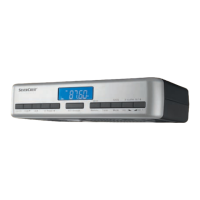
You can have the kitchen radio search for stations.
The kitchen radio searches the frequency range until it nds
a station.
1. Press and hold the button UP u for two seconds: the
kitchen radio searches for the station with the next highest
frequency.
2. Press and hold the button DOWN y for two seconds:
the kitchen radio searches for the station with the next
lowest frequency.
Repeat these steps until you have found a radio station to
your liking.
Programming stations
You can save 30 radio stations in the appliance.
1. Tune in to the desired station.
2. Press the button MEMORY/ d. In the display r
"MEM" blinks.
3. Press repeatedly the PRESET +/— buttons o/i, to se-
lect one of the memory slots 1-30. In the display r the
number of the selected memory save location appears.





 To Next Page