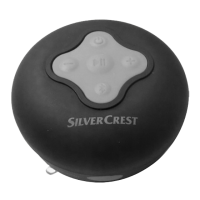
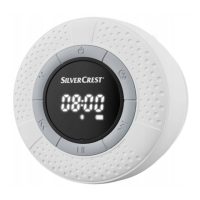
This document describes the SilverCrest SBL 3 D1 Bluetooth® bathroom speaker.
Function Description:
The SilverCrest SBL 3 D1 is a consumer electronics device designed for playing music. It can receive audio data via Bluetooth® and also functions as a radio. The speaker is intended for private use only, not for industrial or commercial purposes. It features an alarm function and a display to show time, frequency, and volume.
Important Technical Specifications:
- Operating voltage/current: 5V / 500 mA
- Battery: 3.7 V / 1200 mAh / 4.44 Wh
- Output power: 3 W RMS
- Bluetooth® version: V4.2
- Supported Bluetooth® profiles: A2DP / AVRCP
- Bluetooth® transmission power: max. 10 dBm
- Bluetooth® frequency band: 2.402 - 2.480 GHz
- FM frequency band: 87.5 – 108 MHz
- Bluetooth® range: max. 10 m
- Charging time: approx. 3 hours
- Music playback time: approx. 6.5 hours (at medium volume setting)
- Dimensions (Ø x H): approx. 84 x 52 mm
- Weight: approx. 130 g
- Degree of protection: IPX6 (protection against powerful water jets)
- Operating environment: 5°C to 35°C, max 85 % rel. humidity
- Storage temperature: 0°C to 40°C
Usage Features:
Controls and Display:
The speaker has several buttons for control:
- Power button (1): Press and hold for approx. 2 seconds to switch on/off.
- Display (2): Shows time, frequency, volume, and mode indicators (Bluetooth®, Radio, Alarm). The display switches off after approx. 2 minutes if no button is pressed.
- Bluetooth® button (3): Press and hold for approx. 2 seconds to unpair Bluetooth® and enter pairing mode.
- Next/Volume Up button (4): Press briefly to increase volume. Press and hold for approx. 2 seconds for the next track (Bluetooth®) or next station preset (radio). Press briefly twice for manual scan for the next station (radio).
- Play/Pause/Mute button (5): Press briefly to start/pause playback (Bluetooth®) or mute/unmute (radio). Press and hold for approx. 2 seconds to start automatic tuning (radio).
- Micro USB charging socket (6): Used for charging, includes a cover.
- Suction pad (7): For affixing the speaker to smooth surfaces.
- Previous/Volume Down button (8): Press briefly to reduce volume. Press and hold for approx. 2 seconds to go to the beginning of the track (Bluetooth®) or the previous station preset (radio). Press and hold again for approx. 2 seconds to skip to the previous track (Bluetooth®). Press briefly twice for manual scan for the previous station (radio).
- Mode button (9): Press briefly to select mode (Bluetooth®, Radio, Alarm).
Getting Started:
- Charging the battery: Open the Micro USB charging socket cover (6), connect the supplied charging cable (B) to the socket and a USB power adapter (not supplied). The battery indicator (11) flashes during charging and lights continuously when full. A flashing indicator and beep signal a low battery.
- Switching on/off: Press and hold the power button (1) for approx. 2 seconds. A sequence of beeps will sound. "OFF" is displayed when switching off.
- Adjusting volume: Briefly press the volume up (4) or volume down (8) buttons. A beep sounds at minimum/maximum volume.
- Selecting mode: Press the mode button (9) repeatedly to cycle through Bluetooth®, FM (radio), and AL (alarm) modes.
Bluetooth® Mode:
- Pairing: Switch on the speaker. Press the mode button (9) until the Bluetooth® indicator (12) flashes (pairing mode is active for approx. 15 minutes). Pair your mobile phone or music player (e.g., smartphone, MP3 player) with the speaker by selecting "SBL 3 D1" from the device list. Use PIN "0000" if prompted. A beep confirms pairing, and the Bluetooth® indicator (12) lights continuously.
- Playback: Start playback from your Bluetooth® device.
- Reconnecting/Unpairing: The speaker automatically reconnects to the last-paired device. To pair with a different device, press and hold the Bluetooth® button (3) for approx. 2 seconds until a beep sounds; the speaker disconnects and enters pairing mode.
Radio Mode:
- Automatic tuning: Press and hold the play/pause button (5) for approx. 2 seconds. Up to 30 stations are saved automatically.
- Manual tuning: Briefly press the next (4) or previous (8) track buttons twice to scan for stations without saving them.
- Recalling saved stations: Press and hold the next (4) or previous (8) track buttons for approx. 2 seconds to cycle through saved stations.
- Mute: Briefly press the play/pause button (5) to enable/disable mute.
Setting Time and Alarm:
- Setting the time: Only possible in alarm mode. Switch on the speaker, press the mode button (9) until "AL" (14) is shown and Bluetooth® (12) or FM (13) indicators are off. Press and hold the mode button (9) for approx. 2 seconds. Use the next (4) and previous (8) track buttons to set hours and minutes, confirming each with a brief press of the play/pause button (5).
- Setting the alarm: Only possible in alarm mode. Switch on the speaker, press the mode button (9) until "AL" (14) is shown and Bluetooth® (12) or FM (13) indicators are off. Press and hold the play/pause button (5) for approx. 2 seconds. Use the next (4) and previous (8) track buttons to select "ON" or "OFF," confirming with a brief press of the play/pause button (5). If "ON" is selected, set hours, minutes, and alarm volume using the next (4) and previous (8) track buttons, confirming each with a brief press of the play/pause button (5).
- Checking alarm status: In alarm mode, briefly press the play/pause button (5) to see "A ON" (with set time) or "A OFF." The "AL" (14) indicator lights continuously when the alarm is enabled.
- Stopping the alarm: While the alarm sounds, the time (10) flashes. The alarm automatically stops after approx. one minute. Press any button to stop it manually.
Troubleshooting:
- Speaker won't turn on: Battery is empty, recharge it.
- No Bluetooth® connection: Check if the speaker and Bluetooth® mode are on. Ensure Bluetooth® is active on your mobile device. Reduce distance between devices. Unpair any previous connections to other Bluetooth® devices.
- Functionality limitations: Update the software of your Bluetooth® device.
- No sound: Increase speaker volume.
Maintenance Features:
Cleaning:
- Ensure no moisture enters the speaker.
- Keep the Micro USB charging socket cover (6) closed during cleaning.
- Clean the speaker with a soft, slightly damp cloth.
- Do not use solvents, abrasive, or astringent cleaners, as these can cause irreparable damage.
Storage:
- Store the speaker in a clean, dry place away from direct sunlight.
- Recharge the integrated battery periodically during long periods of non-use to prolong its lifespan.
Safety Instructions:
- Read all instructions and warnings carefully before use.
- Keep the operating instructions in a safe place for future reference.
- DANGER: High-risk situations leading to death or major injuries.
- WARNING: Moderate-risk situations leading to death or major injuries.
- ATTENTION: Low-risk situations leading to minor or moderate injuries.
- CAUTION: Important instructions to prevent property damage.
- Radio interface warning: Turn off the speaker in aircraft, hospitals, operating theatres, or near medical equipment. Keep at least 20 cm away from pacemakers/defibrillators. Avoid placing near flammable gases or explosive areas when wireless mode is on. TARGA GmbH is not liable for interference from unauthorised modifications.
- Risk of explosion: Never throw the speaker into fire.
- General warnings:
- No open flame sources (e.g., candles) on or near the speaker.
- Prevent foreign objects from entering.
- Avoid major temperature fluctuations to prevent condensation and short-circuiting. If exposed, wait approx. 2 hours for it to reach ambient temperature before switching on.
- Never cover the speaker during charging, as the battery can heat up.
- Lay connected cables to prevent tripping hazards.
- Keep the suction pad clean and undamaged for secure attachment.
- Affix the suction pad only to smooth surfaces (e.g., windows, smooth tiles).
- Ensure secure attachment to prevent falling and injury/damage.
- Charge the speaker only in a dry environment.
- High volume warning: Listening to music too loudly can cause hearing damage.
- Personal safety: Can be used by children aged 8+ or persons with reduced physical/sensory/mental capabilities or lack of experience, if supervised and instructed. Children must not play with the speaker or clean/maintain it unsupervised. Keep packaging materials out of reach of children; packaging is not a toy (risk of suffocation).
- Maintenance/cleaning warning: Repairs are required if the speaker is damaged (e.g., housing damage, liquid/object penetration, exposure to rain/moisture, malfunction, or dropping). Ensure the Micro USB charging socket cover (6) is properly closed when cleaning. If smoke, unusual noises, or smells occur, power off immediately and unplug cables. All repairs must be carried out by qualified service personnel. Do not open the housing, as this voids the warranty.
Copyright:
All contents of the user manual are protected by copyright and provided for information only. Copying or commercial use of data and information without explicit written consent is strictly forbidden. Texts and diagrams are up-to-date as of printing but are subject to change without notice.
- The crossed-out rubbish bin symbol indicates compliance with European Directive 2012/19/EU. Electrical and electronic devices must be disposed of separately from household waste at official disposal centres.
- Battery disposal: Do not dispose of batteries with domestic waste. They contain toxic heavy metals (Cd = Cadmium, Hg = Mercury, Pb = Lead) and must be handled as specialist waste. Take spent batteries to a local collection point. The built-in rechargeable battery cannot be removed for disposal; the complete product must be disposed of.
- Packaging disposal: Dispose of packaging in an environmentally friendly manner. Cardboard can be recycled at paper recycling centres. Film and plastic should be taken to public collection points. Packaging materials are labelled with abbreviations (a) and numbers (b): 1–7: plastic / 20–22: paper and cardboard / 80-98: composite materials.
- The product is recyclable and collected separately under extended producer responsibility.
- This product complies with RE Directive 2014/53/EU and RoHS Directive 2011/65/EU.
- It also complies with applicable national directives of the Republic of Serbia.
- The complete EU Declaration of Conformity can be downloaded from:
https://www.targa.gmbh/downloads/conformity/344984_2004.pdf
- Warranty: 3-year warranty from the date of purchase. Keep the original receipt as proof. Contact the hotline for problems not solvable by the documentation. Provide the article number or serial number. The product will be repaired or replaced free of charge for material or manufacturing defects. Repairs/replacements do not start a new warranty period. Consumables (batteries, rechargeable batteries, lamps) are excluded.
- Statutory rights are not affected.
- Service contact (Germany): Phone: 0800 5435111, E-Mail: targa@lidl.de
- Service contact (Austria): Phone: 0820 201222, E-Mail: targa@lidl.at
- Service contact (Switzerland): Phone: 0842 665 566, E-Mail: targa@lidl.ch
- Service contact (UK): Phone: 0800 404 7657, E-Mail: targa@lidl.co.uk
- Service contact (Ireland): Phone: 1890 930 034, E-Mail: targa@lidl.ie
- Service contact (Malta): Phone: 800 62230, E-Mail: targa@lidl.com.mt
- Service contact (Cyprus): Phone: 8009 4409, E-Mail: targa@lidl.com.cy
- Service contact (Belgium): Phone: 070 270 171, E-Mail: targa@lidl.be
- Service contact (Luxembourg): Phone: +32 70 270 171, E-Mail: targa@lidl.be
- Service contact (Netherlands): Phone: 0900 0400 223, E-Mail: targa@lidl.nl
- Service contact (Poland): Phone: 22 397 4996, E-Mail: targa@lidl.pl
- Service contact (Czech Republic): Phone: 800 143 873, E-mail: targa@lidl.cz
- Service contact (Slovakia): Phone: 0850 232001, E-mail: targa@lidl.sk
- IAN: 344984_2004
- Manufacturer: TARGA GmbH, Coesterweg 45, 59494 Soest, DEUTSCHLAND (GERMANY)

 Need help?
 General


 To Next Page