19 GB/IE/NI
Inserting / Replacing batteries
Before replacing the battery, ensure that the device
has been switched off.
When the batteries become weak, the battery warning
symbol will appear on the display
. Temperature
measurements will still be possible but the batteries
will have to be replaced as soon as possible.
If the battery warning symbol
and
“Lo“ flash on the display, the batteries must
be replaced immediately. If the batteries
are too weak, the thermometer will switch
off automatically.
Replace the batteries as follows:
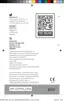
Remove the battery
cover
3
.
Remove the empty batteries
from the battery compartment.
Insert the new batteries into
the battery compartment un-
til they audibly and noticeably
click in. Ensure the correct polarity (+/-) of
the batteries.
Reattach the battery cover
3
to the battery
compartment.
338571_2001_silv_Multifunktionsthermometer_Content_IE_NI_DK_BE_NL.indd 19338571_2001_silv_Multifunktionsthermometer_Content_IE_NI_DK_BE_NL.indd 19 26.05.20 10:5526.05.20 10:55


 To Next Page