www.simmonsdrums.net
11
The first name in electronic drums.
drum module operation
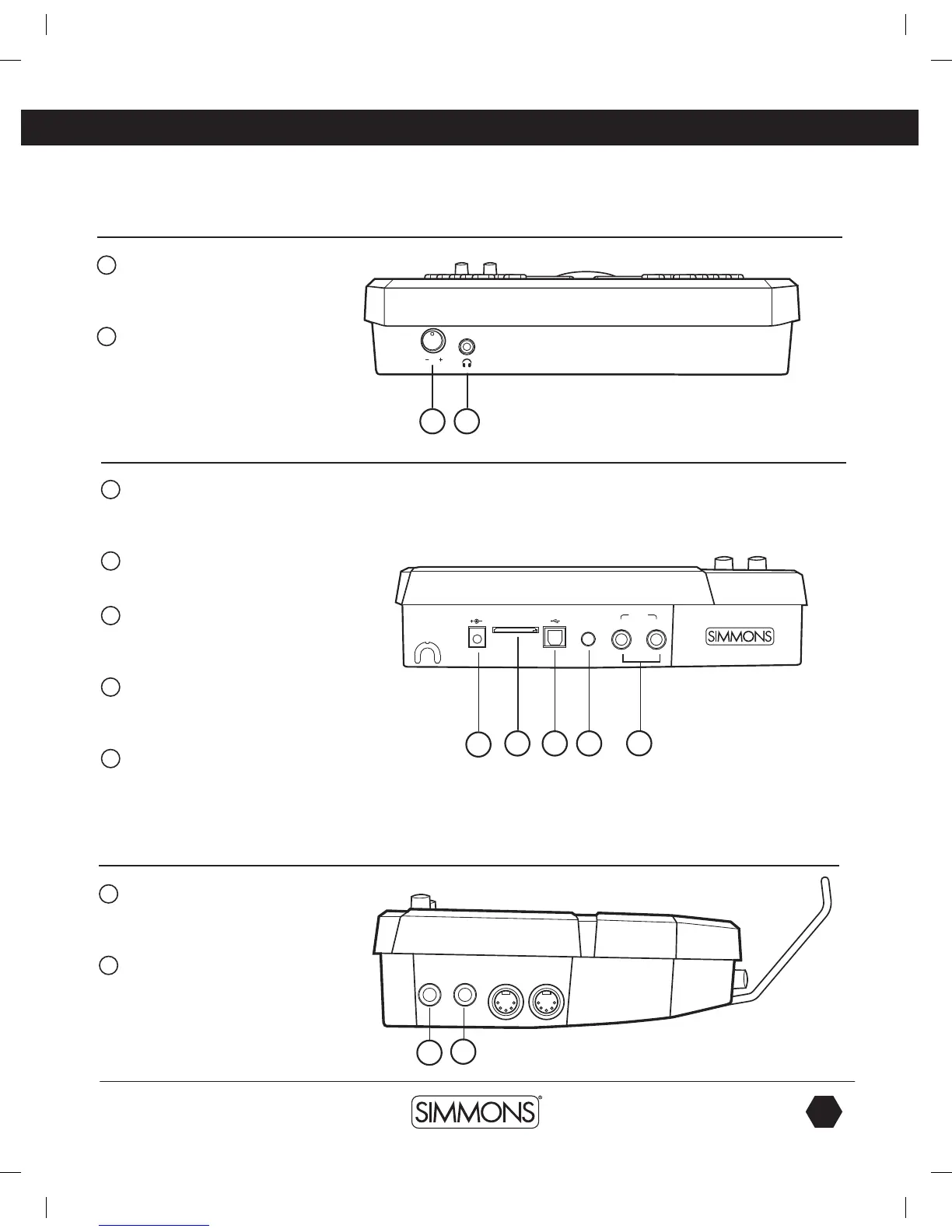
Front Panel
1
Headphone Volume Knob
Controls the audio level for the
headphone output.
2
Headphone Input Jack
Output for 1/8” stereo headphone plug.
Back Panel
1
AC Adapter Input
Connection for the 9V DC power
adapter.
2
SmartMedia Card
(SD) Card slot.
3
USB Port
Used for connecting the SD1500
module to a computer.
4
Aux Input Stereo 1/8” Jack
To connect output from CD or MP3
players to the module.
5
Outputs
Stereo audio outputs to connect to
external audio sources.
(Unbalanced
1/4
”)
Side Panel
1
Tom Pad Trigger Input
Used to add an additional tom pad to
the drum set.
2
Crash Pad Trigger Input
Used to add an additional cymbal pad
to the drum set.
USB SD CARD9V-500mA AUX IN
L/MONO
R
OUTPUT
TOM 4 CRASH 2
MIDI OUT MIDI IN
1 2
1
2 3 4
5
1
2
9993 Simmons SD1500 Drum Set Manual.indd 11 4/25/14 10:56 AM



 To Next Page