SD
OWNER’S MANUAL
8
The first name in electronic drums.
9993 Simmons SD1500 Drum Set Manual.indd 11_22_13 0913AM
Connections
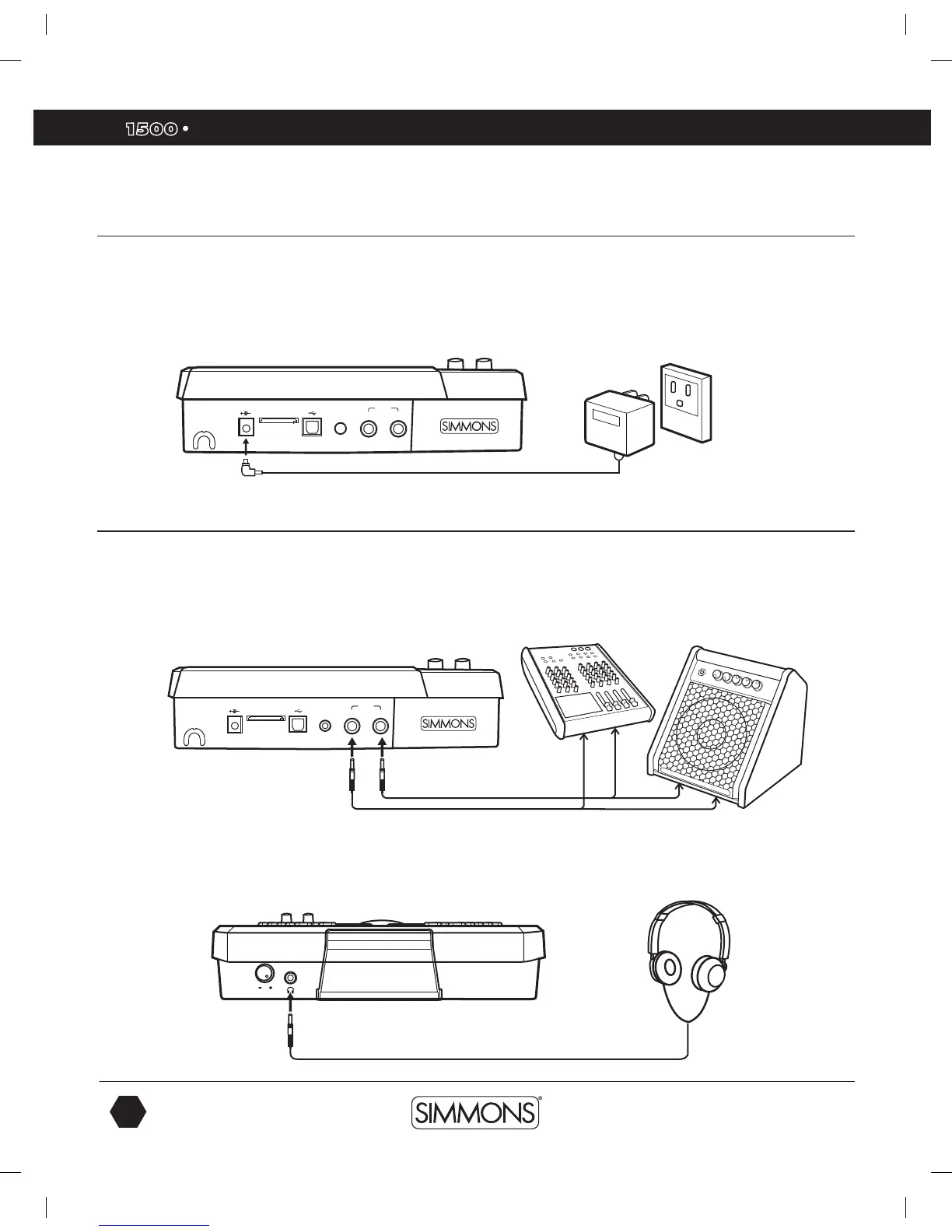
AC Adapter
The SD1500 sound module uses an external power supply called an AC Adapter. Make
sure the power is switched OFF on the module and connect the power adapter with the DC
IN jack on the rear panel.
NOTE: To protect the speakers, amplifier and the drum module from damage, lower the
volume to the minimum level before switching power ON.
Connecting Audio Equipment
Mixers and Amplifiers
1. When you want to send the audio output to a mixer or amplifier, connect using the
Output L/MONO and R jacks on the rear panel (for monaural playback, use the
L/MONO jack; for stereo playback, connect both L/MONO and R jacks.)
2. The volume from the module is adjusted with the MASTER knob.
Headphones
You can connect a standard pair of headphones the SD1500 sound module to listen to your
electronic drum set without disturbing others. Connect the headphones to the headphone jack
located on the front panel of the drum module. Adjust the volume to a comfortable level to
avoid damaging your hearing. The Headphone output is separate from the Master Volume
output control knob.
USB SD CARD9V-500mA AUX IN
L/MONO
R
OUTPUT
USB SD CARD9V-500mA AUX IN
L/MONO
R
OUTPUT
Make sure the power is switched
OFF when connecting the drum
module with external devices.
or or
9993 Simmons SD1500 Drum Set Manual.indd 8 4/25/14 10:56 AM



 To Next Page