SD
OWNER’S MANUAL
12
The first name in electronic drums.
9993 Simmons SD1500 Drum Set Manual.indd 11_22_13 0913AM
drum module operation
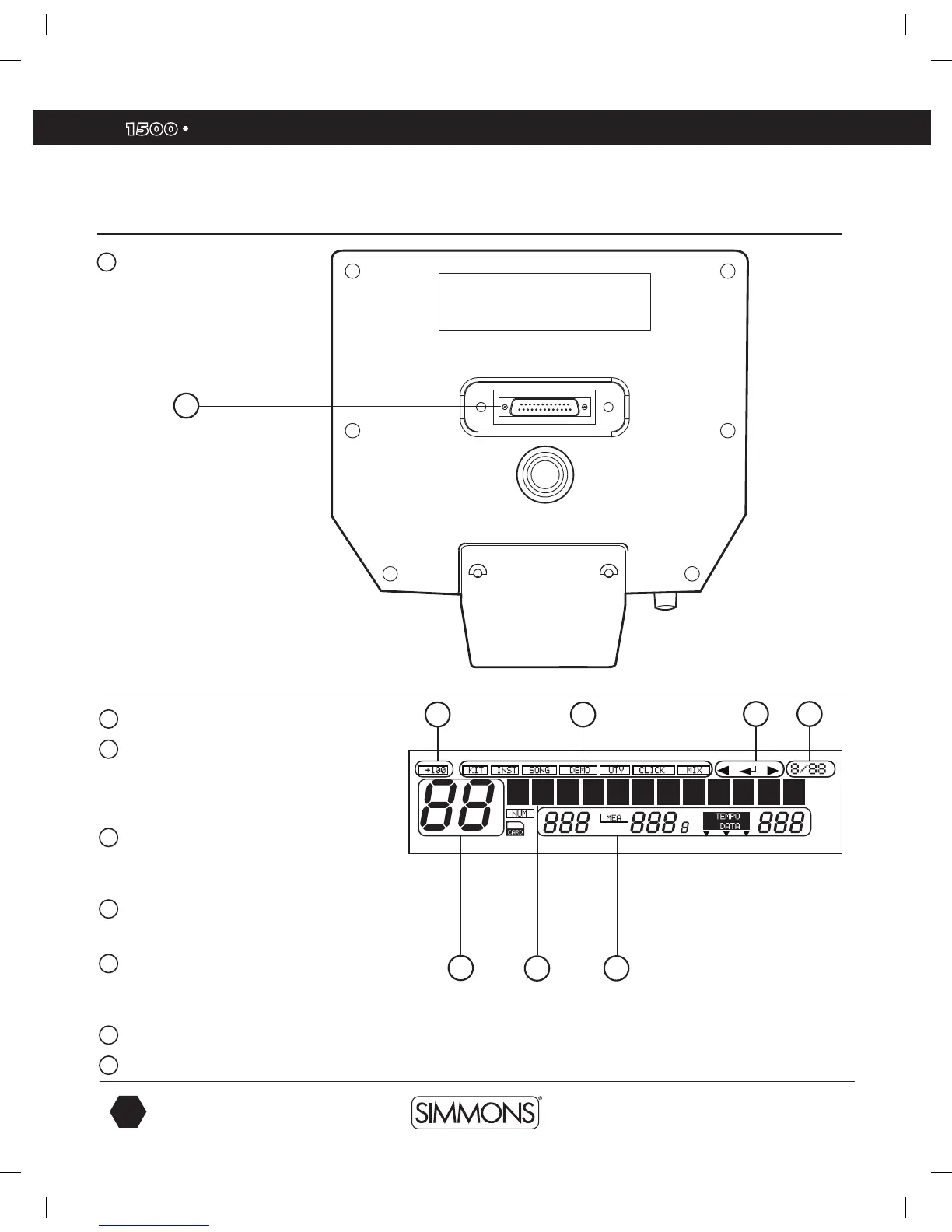
LCD Layout
1
Current Kit Index
2
Main Display
Used to display the current kit or Song name
as well as various menus. In all menus, the
current selected field are highlighted.
3
Mode Icon
Displays the current mode that the module is in, ie.,
Kit, Song, Demo, Utility, Click, Mix and Card.
4
Current Kit Index
Shows 100-increment values.
5
Song Number, Measure, Beat and Tempo
Also indicates the current voice or song index in the
menu pages.
6
Indicates the Page -/+, Save/Enter is Valid
7
Current Time Signature
Bottom Panel
1
Multi-Pin Connection Jack
For Pad Trigger cables
1
1
2
3
6 7
4
5
9993 Simmons SD1500 Drum Set Manual.indd 12 4/25/14 10:56 AM



 To Next Page