SD
OWNER’S MANUAL
12
The first name in electronic drums.
10156 Simmons SD500 Drum Set Manual.indd 07_17_14 0308PM
Connections
Connecting the Module and Pads
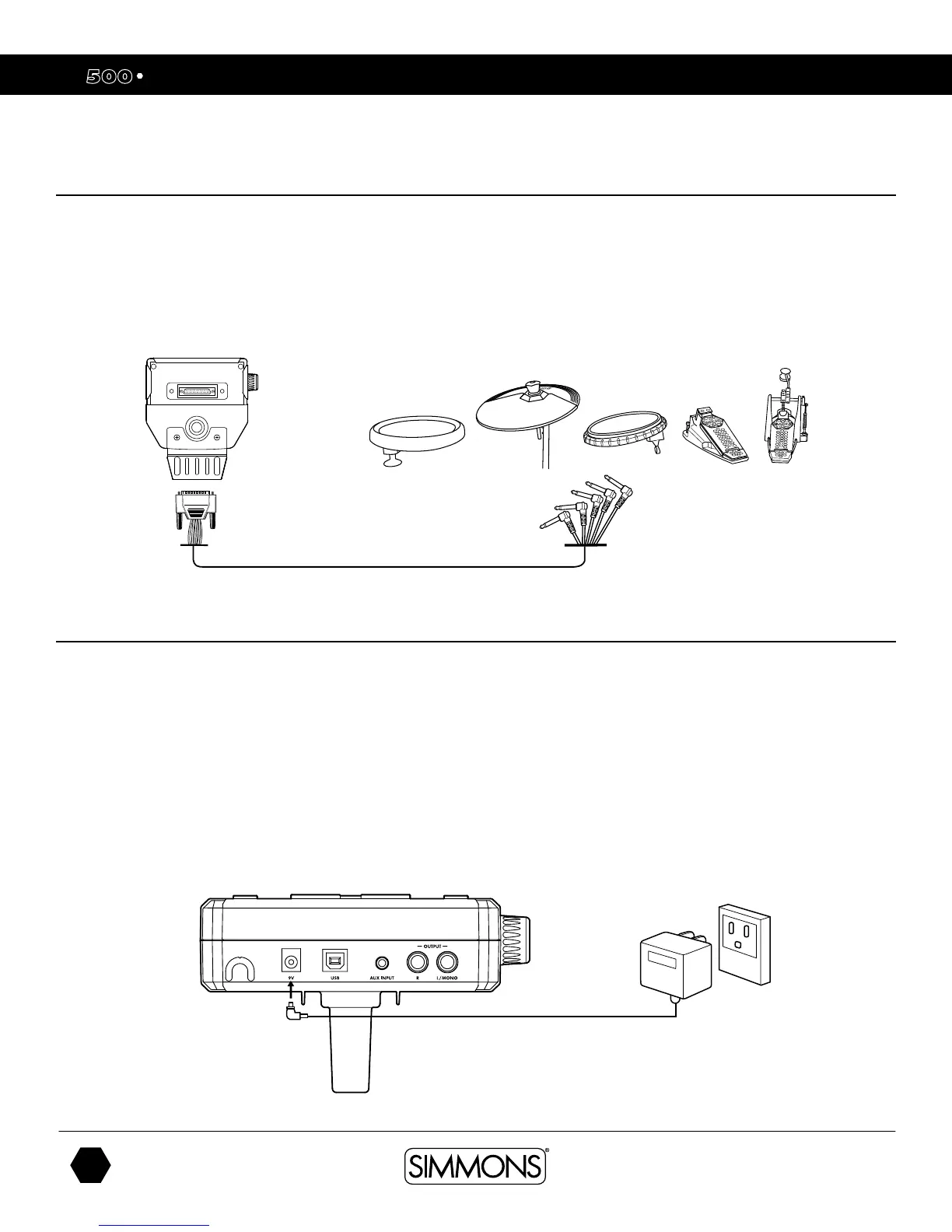
Using the provided cables, connect the 1/4” jacks to the corresponding drum pads, cymbal pads
and kick pad. The pin connection will attach to the serial port of the sound module. (See illustration.)
NOTE: The voice of the hi-hat pad is controlled by the hi-hat pedal. Similar to a real drum kit, the
hi-hat pad functions as an ‘open hi-hat’ when the pedal is released. When the pedal is pressed
down, it functions as a ‘closed hi-hat’. Use cable strips to retain cable to rack.
AC Adapter
The SD500 module uses an external power supply called an AC Adapter. This plugs into the
back of the module.
Make sure the power is switched OFF on the module and connect the power adaptor with the
DC IN jack on the rear panel.
NOTE: To protect the speakers, amplifier and the drum module from damage, lower the volume
to the minimum level before switching the power ON.
Make sure the power is switched OFF when connecting the drum module with external devices.



 To Next Page