The Expansion Power Supply (XPS)
XPS features
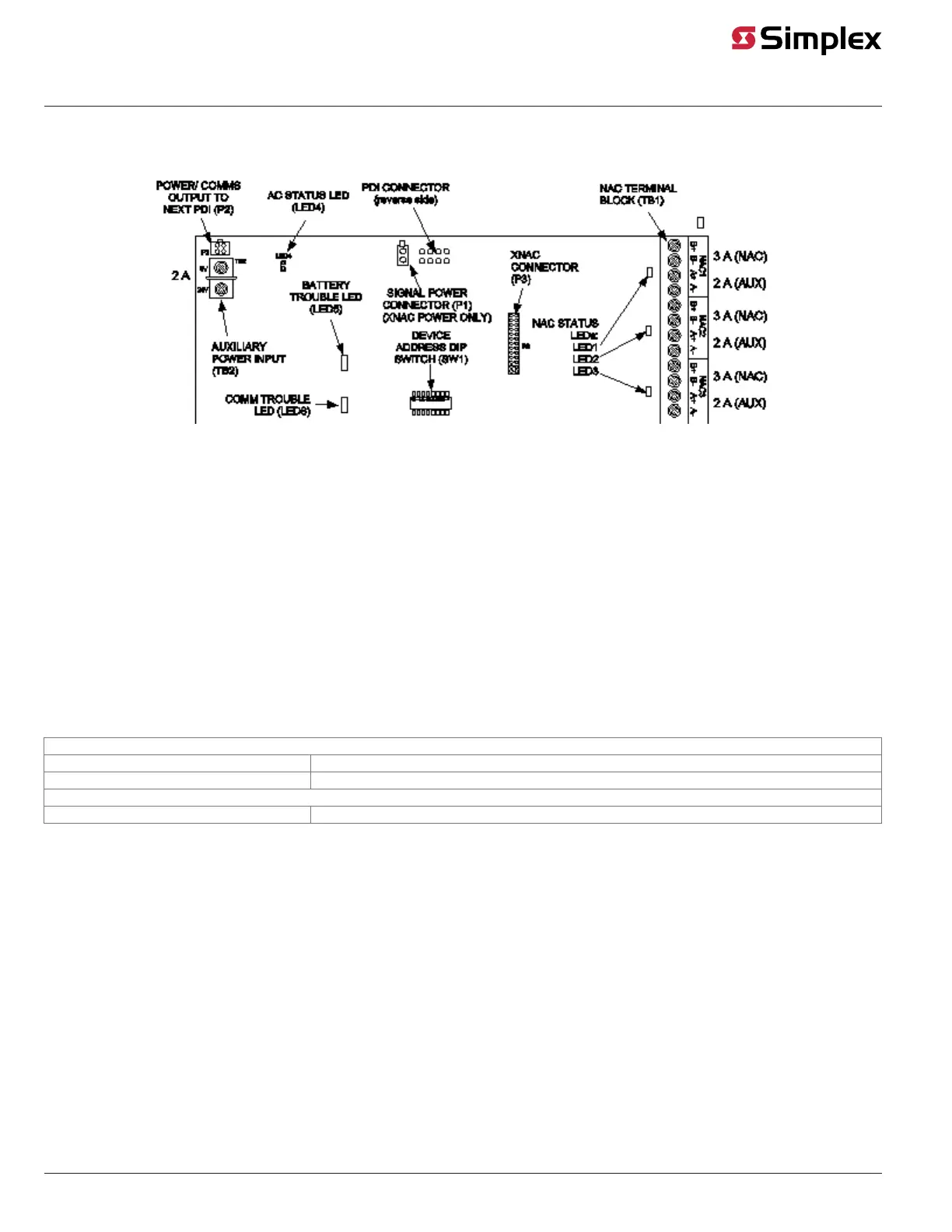
Figure 1 is an illustration of the XPS.
Figure 1: The Expansion Power Supply
LEDs
The XPS has the following LEDs:
• LED1 (yellow)*. Illuminates when NAC 1 is active or in a trouble state; otherwise, it is off.
• LED2 (yellow)*. Illuminates when NAC 2 is active or in a trouble state; otherwise, it is off.
• LED3 (yellow)*. Illuminates when NAC 3 is active or in a trouble state; otherwise, it is off.
• LED4 (green). Illuminates when the XPS is running off of AC power; otherwise, it is off.
• LED5 (yellow). General status LED.
- On steady: overcurrent tripped.
- Single repeating flash: battery not connected.
• LED6 (yellow). Illuminates when communication loss with the CPU occurs. Normally off.
*During initialization of the XPS, LEDs 1, 2, and 3 illuminate because the NACs are held in the isolate stage and create an open circuit trouble.
Input and output specifications
Table 1 summarizes the input and output specifications for the XPS.
Table 1: Input and output specifications
AC input specifications
4100-5102 220 VAC/230 VAC/240 VAC @ 50 Hz or 60 Hz 2 A Max
4100-5103 120 VAC @ 60 Hz, nominal, 4 A Max
DC output specifications
All XPSs Minimum: 19.5 VDC Maximum: 32 VDC Ripple: 2 VDC p-p @ full load (9 A)
Environmental operating range
The 4100U/4100ES modules are rated to operate at ambient temperatures from 32°F - 120°F (0°C-49°C).
The 4100U/4100ES modules are rated for operation at 90°F (32°C), 93% RH (non-condensing).
page 2 574-772 Rev. Q
XPS and XNAC Installation Instructions



 To Next Page