4100-2301 expansion bay wiring
If the XPS is being installed in a 4100-2301 expansion bay (for non-4100U/4100ES 2975-91xx Back Boxes):
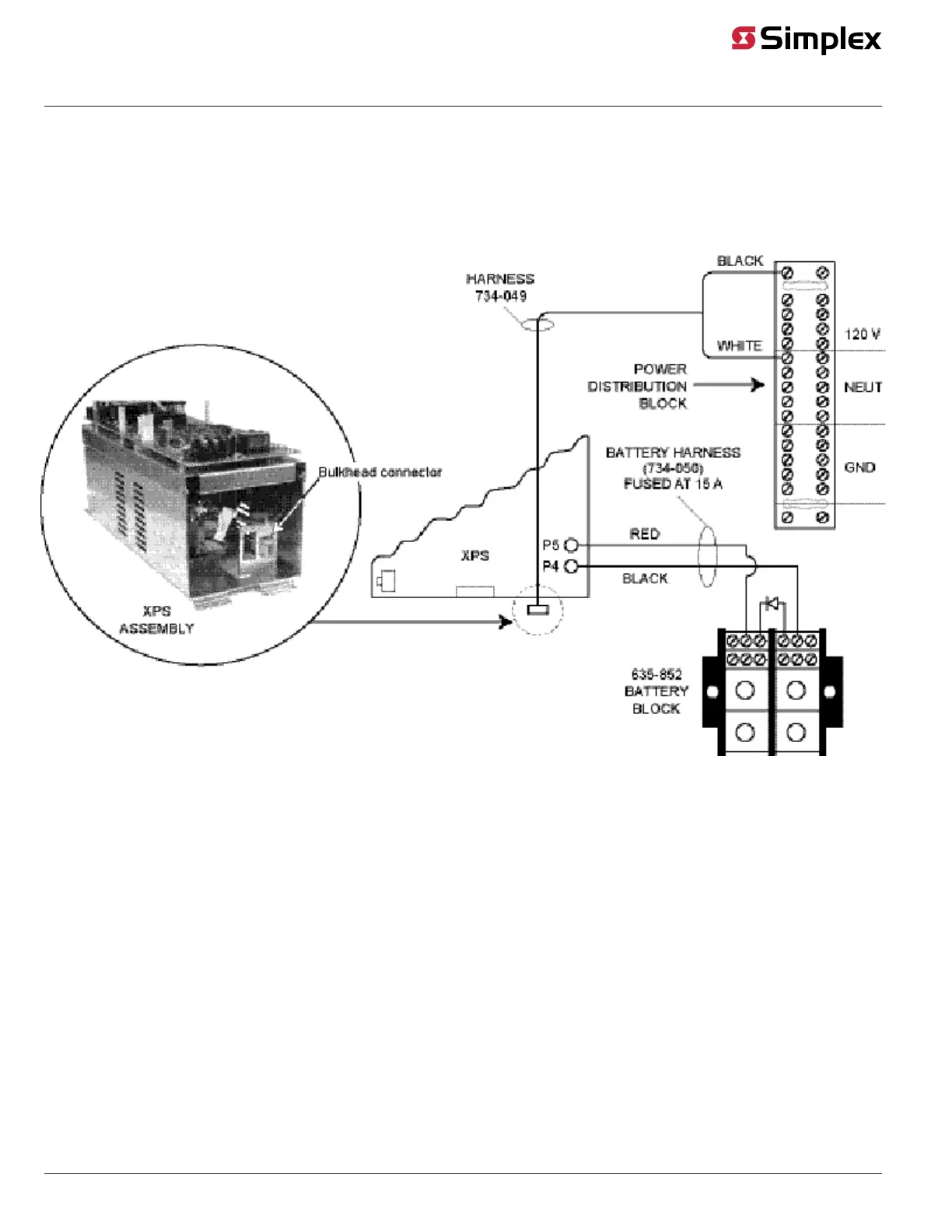
1. For DC wiring, connect the battery block (635-852) to the XPS using harness 734-050. Feed red and black wires through the side rail to the front
of the XPS to prevent wire damage when the front panel is lowered. Connect the separate red and black wires (with yellow female terminations) to
plugs P4 (black) and P5 (red) on the XPS.
2. For AC wiring, connect the white and black wires (harness 734-049) from the 120 V and NEUT terminal blocks to the connector at the bottom of
the XPS assembly, keeping AC wires at least 1 in. away from all other wires. AC power must be kept to the right side of the cabinet, in the non-
power-limited area. The black wire must be closer to the wall at the XPS connection point.
Figure 8: XPS connection when mounted in a 4100 style box
page 8 574-772 Rev. Q
XPS and XNAC Installation Instructions



 To Next Page