1110
KEYPAD INSTRUCTIONS KEYPAD INSTRUCTIONS
Command Command
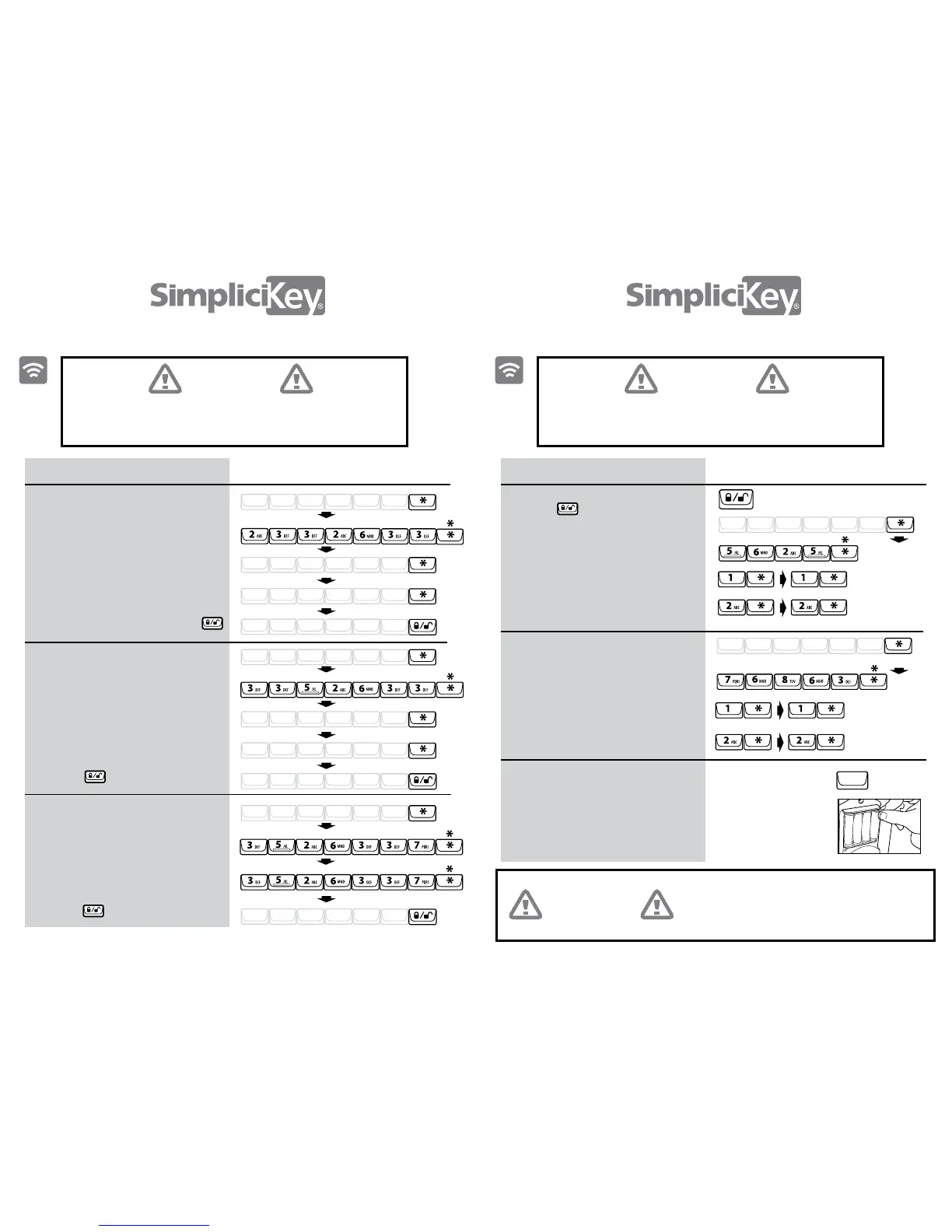
Add Key Code
Delete a Key Code
Delete all Key Codes
1. Enter your Admin Code, press *
1. Enter your Admin Code, press *
1. Enter your Admin Code, press *
2. Enter “ADD CODE”, press *
2. Enter “DEL CODE”, press *
2. Enter “DL CODES”, press *
3. Repeat “DL CODES”, press *
4. Test the deleted Key Codes,
press
3. Enter the Key Code to be deleted,
press *
4. Repeat the Key Code to be deleted,
press *
5. Test the deleted Key Code,
press
3. Enter the new Key Code, press *
NOTE: Code can be 4-7 digits
*If error tone, start over
4. Repeat the new Key Code, press *
5. Test the new Key Code, press
Press Press
Your administration code (Admin Code) can be found on the
back of this booklet. The Admin Code can be changed by
following instructions on page 12.
Your administration code (Admin Code) can be found on the
back of this booklet. The Admin Code can be changed by
following instructions on page 12.
A - D - D - C - O - D - E -
Enter Admin Code
Enter Admin Code
Enter Admin Code
Enter
Enter
Repeat
Repeat
Test
Test
Test
New Key Code
Key Code to Delete
New Key Code
Key Code to Delete
New Key Code
Delete Key Code
Delete Key Code
D - E - L - C - O - D - E -
- C - O - D - E -
- C - O - D - E -
Command
Simple Lock Feature
Quiet Lock Feature
Master Reset Feature
Enables to lock
without entering a Key Code
Turn on / off keypad sounds
Clears all stored codes, settings,
and remote control keyfobs.
All codes and keyfobs will need to
be reprogrammed after performing
this feature.
Remove one battery
Press and hold any
button and re-insert the
4th battery. Continue
holding button for about
5 seconds after battery
has been inserted
If the keypad ashes and a multi-tone alert
goes o at any point while in admin mode, you
have taken too long and will have to start over
from the rst step.
1. Enter your Admin Code, press *
1. Enter your Admin Code, press *
2. Enter “SOUND” and press *
To turn sound ON, press 1, *
and repeat
To turn sound OFF, press 2, *
2. Enter “LOCK” and press *
To turn simple lock ON, press 1, *
and repeat
To turn simple lock OFF, press 2, *
and repeat
Enter Admin Code
L/ UL Button (used for locking only)
To turn on simple lock
To turn o simple lock
To turn on sound
To turn o sound
L - O - C - K -
Enter Admin Code
S - O - U - N - D -
Critical Point
Critical Point Critical Point
S -
-
D - L
SD - L


 To Next Page