11
CHILD LOCK
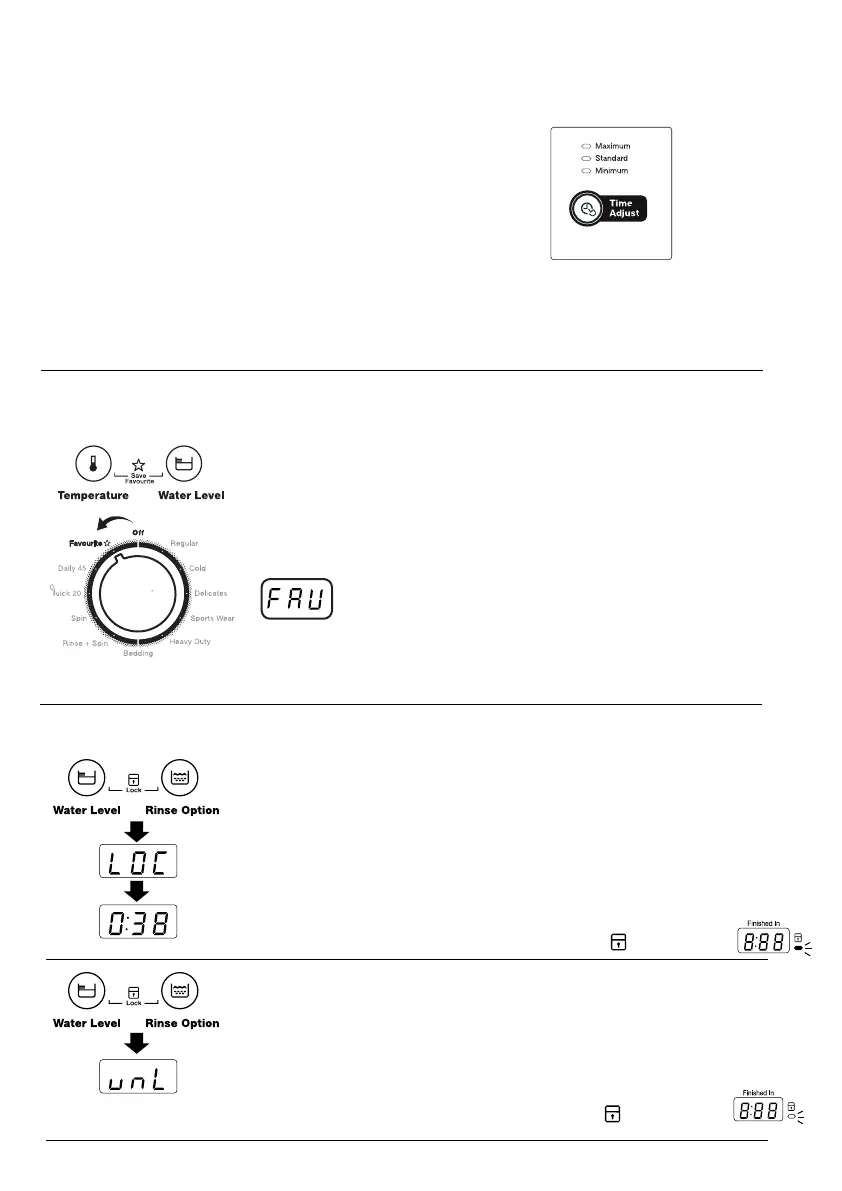
FAVOURITE
TIME ADJUST
3.5 TIME ADJUST, FAVOURITE , CHILD LOCK
To Activate the child lock :
: Hold down the “Water Level” and “Rinse Option” buttons at the
same time for 2 seconds.
The favourite function is the ability to tailor individual wash features
and save them as a custom programme until the next time.
To save Favourite, select a wash program, Spin,Temperature,
Rinse then press and hold Temperature and Water Level buttons
simultaneously for > 2 seconds. Buzzer will sound then display will
show "FAV". The program is now stored for later use
by selecting Favourite via selector knob.
Your appliance is provided with CHILD SAFETY LOCK which
permits you to leave the appliance unsupervised with the door
closed without having to worry that children might be injured by
or cause damage to the appliance.
This option allows you to increase/decrease washing time from
3 available options.
: Standard > Minimum > Maximum
(Default is “Standard”)
Time adjust is only applicate to
: Regular, Cold, Delicates, Hand Wash, Heavy Duty, Bedding
To Deactivate the child lock :
: Hold down the “Water Level” and “Rinse Option” buttons at the
same time for 2 seconds.
(SWT7055TMWA / SWT7055LMWA / SWT6055TMWA)
(SWT7055TMWA / SWT7055LMWA / SWT6055TMWA)
Selector Knob
when activated buzzer will sound then display
will show "LOC" for 2 seconds before going back
to standby mode showing wash time.
When deactivated buzzer will sound then display will
show "unL" for 2 seconds then going back to
show washing time.
(Model SWT6555TMWA display shows “LOC” and icon will turn on)
(Model SWT6555TMWA display shows “unL” and icon will turn off)
child lock
operate
Washing
time
2sec
2sec
2sec


 To Next Page