EasyManua.ls Logo

SimPure Q3-600 - Filter Cartridge Replacement Procedure; Step 1: Open Side Plate and Access Filters; Step 2: Remove Old Filter Cartridges

SimPure Q3-600
23 pages
Print Icon
To Next Page IconTo Next Page
To Previous Page IconTo Previous Page
Loading...
Filter
cartridge
replacement
steps
Note: Before
replacing
the
filter
cartridge,
please
be
sure
to
follow
the
following
step.
Firstly,
turn
off
the
feedwater
valve,
then
turn
on
the
faucet
to
release
the
water
pressure
inside
the
machine.
Finally,
turn
off
the
power
supply.
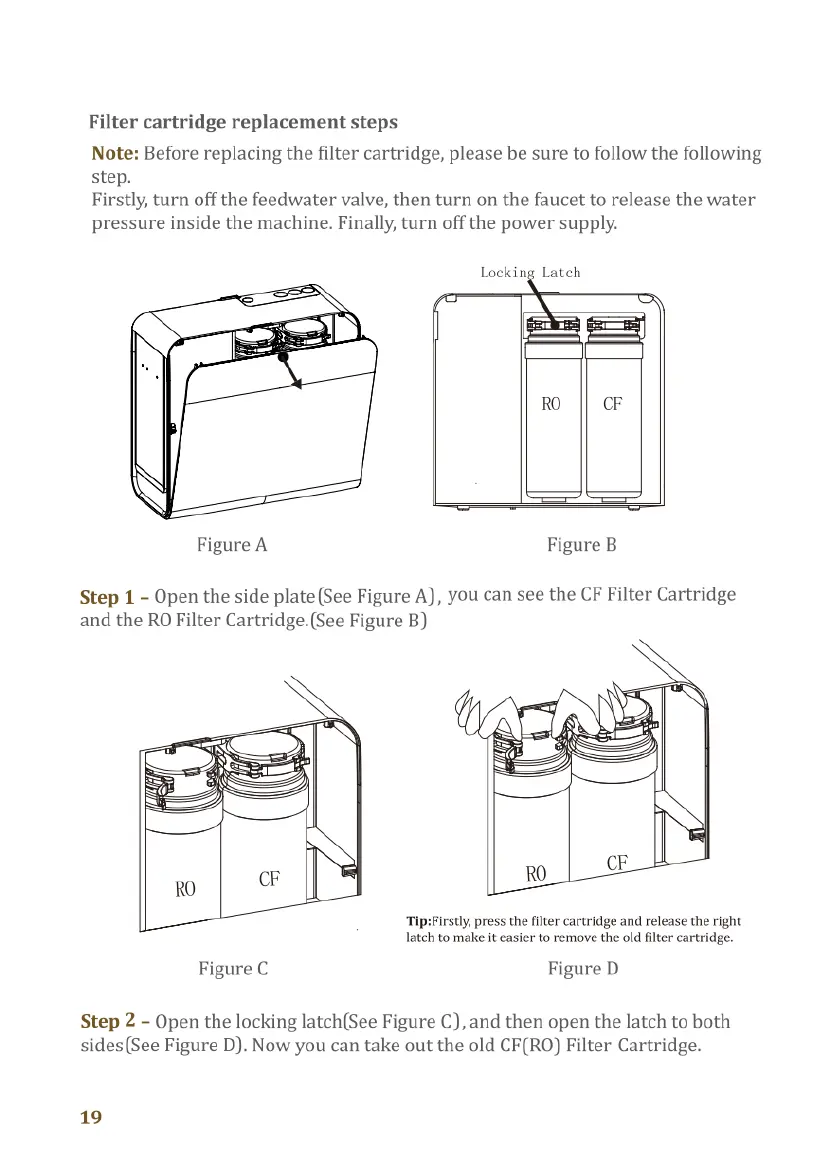
Locking
Latch
RO CF
Figure
A
Figure
B
Step
1
-
Open
the
side
plate
(See
Figure
A),
you
can
see
the
CF
Filter
Cartridge
and
the
RO
Filter
Cartridge.(See
Figure
B)
Tip:Firstly,
press
the
filter
cartridge
and
release
the
right
latch
to
make
it
easier
to
remove
the old
flter
cartridge.
Figure
C
Figure
D
Step
2
-
Open
the
locking
latch(See
Figure
C),
and
then
open
the
latch
to
both
sides(See
Figure
D).
Now
you
can
take
out
the old
CF(RO)
Filter
Cartridge.
19
Figure
E
Figure
F
Step
3
-
Match
the
corresponding
labels('RO
to
RO’
or
‘CF
to
CF)
and
install
the
new
CF(RO)
Filter
Cartridge
(See
Figure
E).
Finally,
lock
the
Locking
Latch.
(See
Figure
F)
Note:
Refer
to
the
markings
to
ensure
that
each
filter
cartridge
is
installed
in
the
correct
location.
Figure
G
Step
4
-
Align
the
hole
position
and
close
the
side
plate.(See
Figure
G)
*Tips:
1.Before
installing
the
filter,
ensure
that
the
markings
on
the
filter
and
the
markings
on
the
locking
latch
are
consistent.
2.After
installing
the
filter,
ensure
the
locking
latch
is
securely
fastened.
Customer
Service:
service@simpurelife.com
Toll-Free
:1-866-528-4572
Website:
www.simpurelife.com
20

Related product manuals