EasyManua.ls Logo

SimPure Y7P-W - Page 10

SimPure Y7P-W
21 pages
Print Icon
To Next Page IconTo Next Page
To Previous Page IconTo Previous Page
Loading...
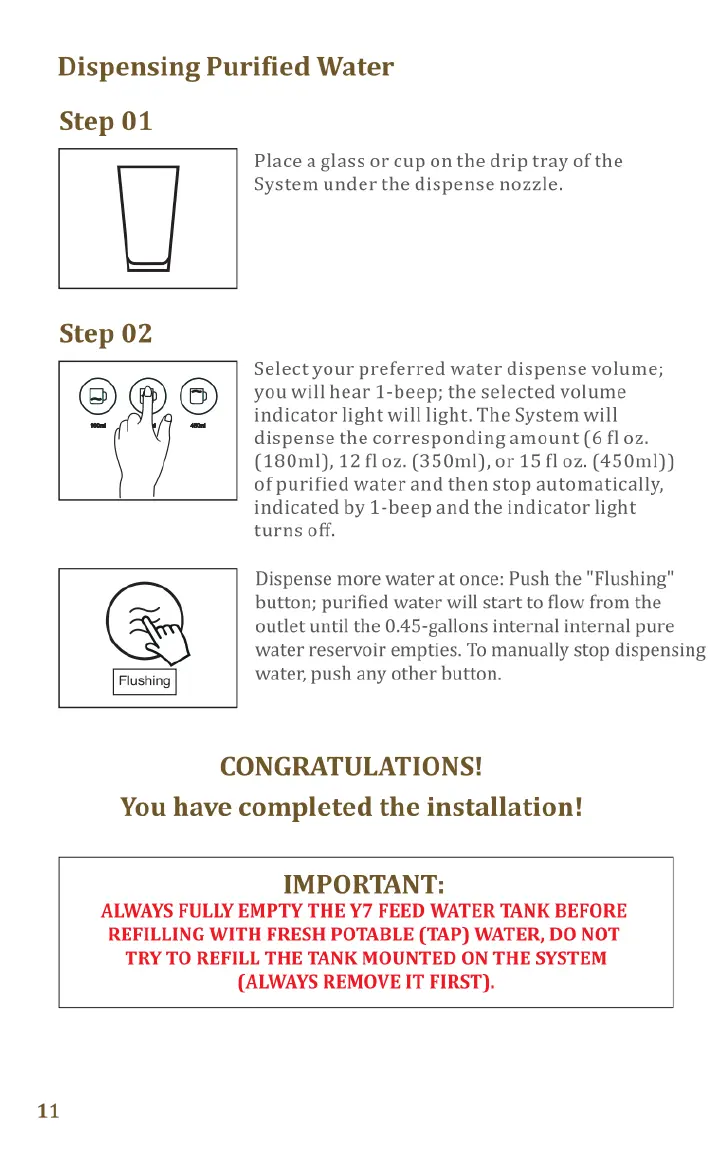
Dispensing
Purified
Water
Step
01
Place
a
glass
or
cup
on
the
drip
tray
of
the
D
System
under
the
dispense
nozzle.
Step
02
Selectyour
preferred water
dispense
volume;
@
you
will
hear
1-beep;
the
selected
volume
=
=
indicator
light
will
light.
The
System
will
dispense
the
corresponding
amount
(6
fl
oz.
(180ml),
12
fl
0z.
(350ml),
or
15
fl
0z.
(450ml))
of
purified
water
and
then
stop
automatically,
indicated
by
1-beep
and
the
indicator
light
turns
off.
Dispense
more
water
at
once:
Push
the
"Flushing"
button;
purified
water
will
start
to
flow
from
the
outlet
until
the
0.45-gallons
internal
internal
pure
water
reservoir
empties.
To
manually
stop
dispensing
water,
push
any
other
button.
CONGRATULATIONS!
You
have
completed
the
installation!
IMPORTANT:
ALWAYS
FULLY
EMPTY
THE
Y7
FEED
WATER
TANK
BEFORE
REFILLING
WITH
FRESH
POTABLE
(TAP)
WATER,
DO
NOT
TRY
TO
REFILL
THE
TANK
MOUNTED
ON
THE
SYSTEM
(ALWAYS
REMOVE
IT
FIRST).
11
Operational
Guide
Display
Indicators
Your
SimPure®
Y7P-W
uses
advanced
features
to
monitor
and
operate
your
System.
Sleep
Mode
If
there’s
no
operation
within
5
minutes,
the
system
will
enter
standby
(sleep)
mode,
the
brightness
of
the
button
ring
in
the
display
will
decrease,
and other indicators
will
go
out.
Push
any
button
to
exit
the
standby
mode,
the
indicator
light
will
display
normally,
and
push
the
button
again
to
activate
the
corresponding
function.
CF
/
RO
Indicator
Light
The two
indicators
lights
remind
the
user
when
to
replace
the
filters;
Steady
-
>90%
exhausted
-
order
new
filter
Flashing
-
2100%
exhausted,
you
will
also
hear
10-beeps. Replace
filter(s)
CF
=
Composite
Filter
RO
=
Reverse
Osmosis
Membrane
Lo
R
]
Filtering
Indicator
Light
Steady
-
This
signifies
that
the
System
is
filtering
water
Safety
Protection
-
If
the
internal
purified
water
tank
has
not
refilled
after
30
minutes,
@
the
System
will
enter
into
protection
mode,
L)
with
allindicator
lights
on, and
you
will
hear
@
10-beeps.
The
System
will
stop
filtering
water
(purified
water
can
still
dispense).
Reset
the
System
by
reconnecting
the
power.
12