EasyManua.ls Logo

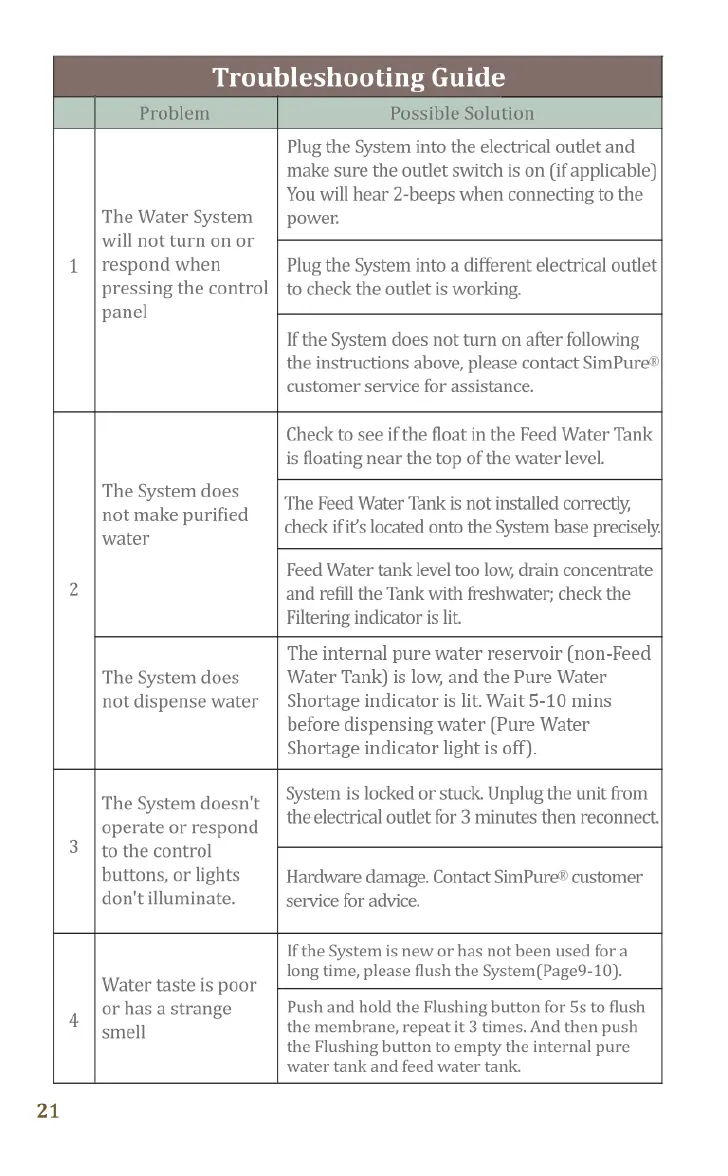
SimPure Y7P-W - Troubleshooting Guide; System Not Turning On or Responding; No Purified Water Production; No Water Dispensing

SimPure Y7P-W
21 pages
Print Icon
To Next Page IconTo Next Page
To Previous Page IconTo Previous Page
Loading...
Troubleshooting
Guide
Troubleshooting
Guide
The
Water
System
will
not
turn
on
or
respond
when
pressing
the
control
panel
Plug
the
System
into
the
electrical
outlet
and
make
sure
the
outlet
switch
is
on
(if
applicable)
You
will
hear
2-beeps
when
connecting
to
the
power.
Plug
the
System
into
a
different
electrical
outlet
to
check
the
outlet
is
working.
If
the
System
does
not
turn
on
after
following
the
instructions
above,
please
contact
SimPure®|
customer
service
for
assistance.
The
System
makes
excessive
noise
during
operation
Note:
The
System
does
make
noise
when
processing
water;
this
is
normal.
The
Feed
Tank water
level
is
very
low.
Empty
the
Feed
Water
Tank
and
refill
with
fresh
potable
(tap)
water.
There's
an
air
blockage
in
the
water
production
system.
Unplug
the
unit
from
the
electrical
outlet
for
3
minutes
then
reconnect.
Flush
the
System
1-3
times
before
using (Page
9).
Water
quality
is
poor;
filters
have
been
blocked
early
(before
replacement
schedule).
Replace
both
filters.
The
System
does
not
make
purified
water
Check
to
see
if
the
float
in
the
Feed
Water
Tank
is
floating
near
the
top
of
the
water
level.
The
Feed
Water
Tank
is
not
installed
correctly,
check
ifit’s
located
onto
the
System
base
precisely,
All
the
lights
flashing
twice
Plug
it
in.
All
indicator
lights
will
be
on
and
flashing
twice,
this
is
a
self-check
program.
No
action
required
Feed
Water
tank
level
too
low,
drain
concentrate
and
refill
the
Tank
with
freshwater;
check
the
Filtering
indicator
is
lit.
The
System
does
not
dispense
water
The
internal
pure
water
reservoir
(non-Feed
‘Water
Tank)
is
low,
and
the
Pure
Water
Shortage
indicator
is lit.
Wait
5-10
mins
before
dispensing
water
(Pure
Water
Shortage
indicator
light
is
off).
The
System
doesn't
operate
or
respond
to
the
control
buttons,
or
lights
don'tilluminate.
System
is
locked
or
stuck.
Unplug
the
unit
from
the
electrical
outlet
for
3
minutes
then
reconnect.
Hardware
damage.
Contact
SimPure®
customer
service
for
advice.
All
the
lights
keep
flashing
If
the
system
continues
filtering
water
for
more
than
30
mins
"Safety
Protection"
is
activated,
will
beep
10x
and
all
lights
will
flash.
Reset
the
System
by
reconnecting
the
electrical
power.(Page
12]
The
stainless
steel
filter
of
the
feed
water
tank
inle]
is
clogged.
Please
follow
the
page
18
to
clean
it.
The
filter
elements
are
clogged
by
impurities.
Push
and
hold
the
Flushing
button
for
5s,
observe
whether
there
is
flushed
water
in
the
feed
water
tank
drain
out
from
the
water
outlet,
if
no
or
the
water
flow
is
low,
please
replace
both
filter
elements.
The
filter
elements
are
clogged
by
limescale.
Please
follow
the
page
19
to
maintain
it.
If
still
not
solve
it
after
following
the
instructions
above,please
contact
SimPure
customer
service
for
assistance.
Water
taste
is
poor
or
has
a
strange
smell
If
the
System
is
new
or
has not
been used
for
a
long
time,
please
flush
the
System(Page9-10).
Push
and
hold
the
Flushing
button
for
55
to
flush
the
membrane,
repeat
it
3
times.
And
then
push
the
Flushing
button
to
empty
the
internal
pure
water
tank
and
feed
water
tank.
21
Pure
Water
Shortage
light
keeps
flashing
when
the
feed
water
tank
is
full
SimPure
Y7P
Series
is
not
an
instant
filtration
system.
It
takes
time
to
allow
the
filter
system
inside
to
process
the
water.
Waiting
for
about
10
mins
until
the
"Pure
Water
Shortage"
light
is
off,
and
then
when
the
"filtering"
light
is
off,
means
the
filtering
operation
is
finished.
22