EasyManua.ls Logo

Simrad V3100 - User Manual

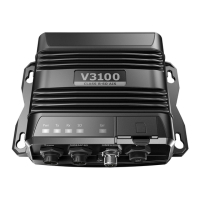
Simrad V3100
38 pages
Print Icon
To Next Page IconTo Next Page
Loading...
ENGLISH
V3100 Class B
AIS Transponder
User manual
bandg.com
simrad-yachting.com

Questions and Answers

  • L
    Luis BruceAug 3, 2025
    Why is my MMSI received but not my vessel name on other chartplotters using Simrad V3100?
    • C
      Charles HoustonAug 3, 2025
      If your MMSI is being received by other vessels but your vessel name is not shown on their chartplotter or PC, older software and AIS displays may not be fully compatible with Class B transponders. Please contact the chartplotter maker and ask for software upgrades (for these older chartplotters) to resolve this issue.
  • C
    Christina LaneAug 9, 2025
    Why is the red error LED illuminated on my Simrad V3100?
    • C
      Cesar StephensAug 9, 2025
      The red error LED on your Simrad Marine Radio might be illuminated because the unit does not have a valid MMSI. Please check if the AIS transponder is correctly entered with a valid MMSI. Also, ensure that both VHF and GPS antennas and their cables are working properly and are not damaged. If the issue persists, return the unit to your dealer/service partner for a technical check.
  • J
    Jason WalkerAug 15, 2025
    What to do if my Simrad V3100 Marine Radio receives AIS signals but nobody sees me?
    • A
      angela63Aug 15, 2025
      If your Simrad Marine Radio receives AIS signals normally, but no one in the surrounding area can see you, the VHF antenna's location is directly related to AIS transmitting range. Ensure that the VHF antenna is installed at the mast as high as possible. Also, if your GPS antenna is not connected or set up correctly, your transponder will see other vessels fine, but you will not be sending out your vessel position. Be sure that the VHF antenna is placed following the instructions in section “VHF antenna installation” on page 14.
  • A
    Amanda RichardsonAug 20, 2025
    What to do if no data is being received by the chartplotter from my Simrad Marine Radio?
    • K
      Kelly SingletonAug 21, 2025
      If no data is being received by the chartplotter, check that the power supply is connected correctly at V3100, and that the power supply is 12V or 24V with sufficient current capacity (no less than 2A). Ensure that the connections between V3100 and the chartplotter are correct.
  • I
    iholtAug 27, 2025
    How to fix a Simrad V3100 when the transmitting LED is not illuminated?
    • B
      Belinda MartinezAug 27, 2025
      If the transmitting LED (Green color) is not illuminated, check if your GPS antenna is connected correctly. The Tx LED will flash orange every 5 seconds, meaning that the device is still acquiring a GPS fix and therefore not ready yet to make a transmission. Note: The Tx LED indicator will flash once quickly and the green light from the Tx LED could be missed if not observed carefully.

Summary

Notices and Compliance Statements

Safety and General Warnings

Provides crucial safety warnings and general notices for product usage.

About Your AIS Class B Transponder

V3100 Product Description

Details the features and technology of the V3100 AIS Class B transponder.

Installation Guide

Installation Procedures Overview

Outlines the general steps and diagram for installing the AIS transponder.

VHF Antenna Installation

Recommends optimal placement and distances for VHF antenna installation.

GPS Antenna Installation

Details GPS antenna mounting and location requirements for clear sky view.

Configuring Your AIS Transponder

Installing the Configuration Software

Step-by-step guide to install the Navico AIS System Configurator tool.

Connecting Transponder to PC;Mac

Explains the process of connecting the AIS transponder via USB.

Programming Vessel Data

Instructions for entering essential vessel details into the transponder.

Getting Started with the V3100

NMEA Communication Protocols

Troubleshooting Common Issues

LED Status and Visibility Problems

Addresses issues with LED indicators and why the vessel may not be seen.

Data Reception and Error LED Issues

Troubleshoots problems with data not received by chartplotter and Red Error LED.

Simrad V3100 Specifications

General IconGeneral
BrandSimrad
ModelV3100
CategoryMarine Radio
LanguageEnglish

Related product manuals