10
7. OPERATION PROCEDURE
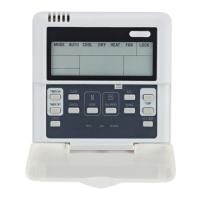
OF WIRE CONTROLLER
● Operation procudeure of mode
setting
1. Press MODE at shutdown status, you
could select appropriate mode as you
want. The function is invalid at startup
status.
2.The modes which you can select
depend on outdoor unit .
● Operation procudeure of water
temperature setting
1.Press [TEMP SET] button of wire
controller when background light is on.
2. Press [ADDRESS/+] or [ADDRESS/- ]
button,you can select the water tempera-
ture. Temperature range is not same in
different operation mode .
3.Temperature range depend on outdoor
unit .
●
Operation procudeure of system
ON/OFF
Press [ON/OFF] button, running indicator
of wire controller is light, unit is start to
run, and display running status at wire
controller. Press this button once again,
unit will stop running.
●Operation procudeure of system
information querying
1.Press [QUERY] ,enter Check status.
2.Press [ADDRESS/+] or [ADDRESS/-]
button, select the unit you want to query.
3.Press [PAGEUP] or [PAGEDOWN]
button to query the unit information, which
includes E-, P-, Tou, Tin, T4,T3A, T3b ,IA,
Ib, T6, FA, Fb or T3A, P-, E-,Tout, Ib, IA,
Ts, T4, T3B.
●Operation of remote on/off
If the main unit’s is under the remote
on/off control, Net-ON



 To Next Page