unit’s power will be limited according to the
lower power setting of both indoor units.
This function is only available on some models.
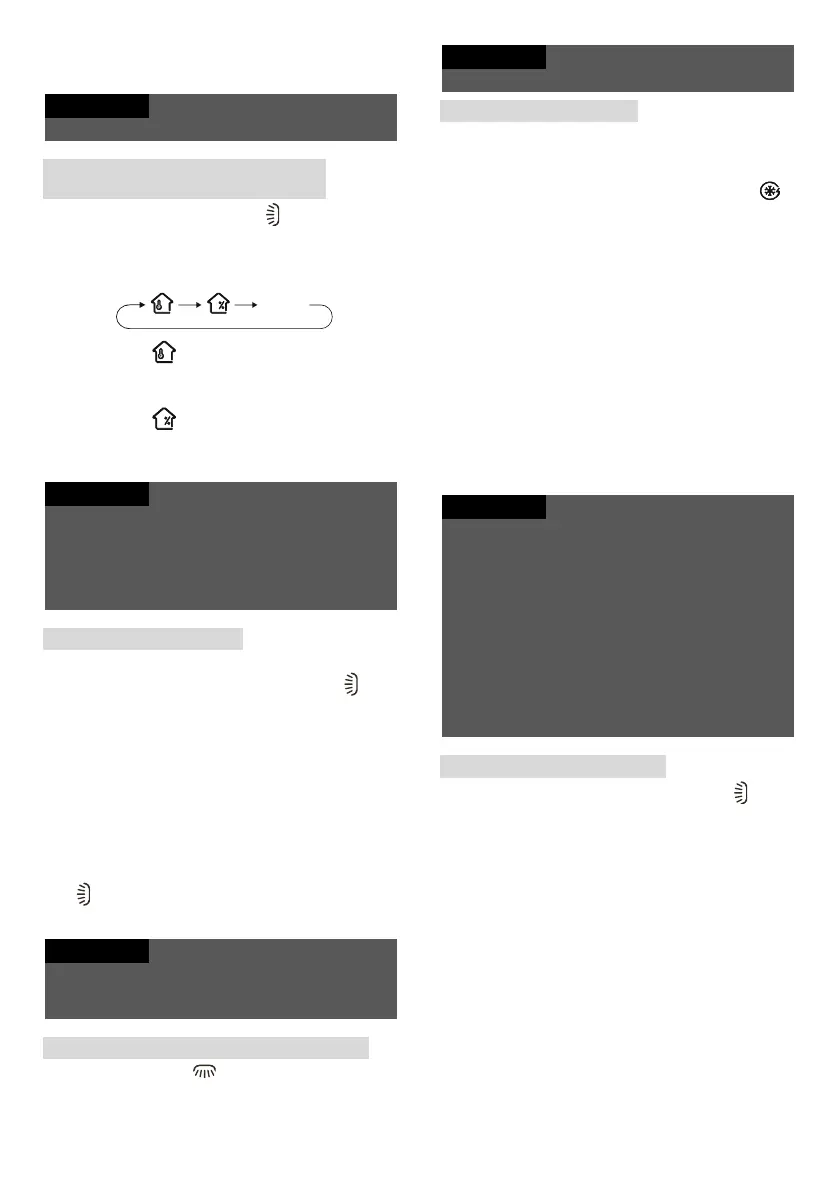
Indoor ambient
temperature/humidity display
Press and hold the On/Off and buttons
simultaneously to display the indoor temperature
or humidity on the indoor unit display. The cycle
selection on the remote control is as follows:
If you select using the remote control, the
indoor unit numeric display will show the
temperature in the room.
If you select using the remote control, the
indoor unit numeric display will show the
humidity in the room.
The humidity value is only indicative. Example: If
the humidity value is “0%”, it may indicate a
malfunction of the humidity detection board. Contact
your local service.
There may be some measurement deviation with
regard to the humidity and light intensity detection.
Filter cleaning reminder
The filter cleaning reminder function is disabled
by default. Press and hold the On/Off and
buttons simultaneously for 5 seconds to turn it
on. An audible signal will sound for 0.5 seconds
and the numeric display will light up for 3
seconds. When the cleaning reminder function is
switched on and the air conditioner run time
reaches the set value, the numeric display will
flash for about 30 seconds each time the unit is
switched on to remind the user to clean the filter.
This cleaning cycle reminder can be switched off
by simultaneous pressing and holding the On/Off
and buttons for 5 s; then the unit will start
counting the run time again.
Once the cleaning reminder function is switched on,
only this cleaning cycle reminder can be cancelled.
This function is only available on some models.
Volume control of indoor unit buzzer
Press the Mode and buttons simultaneously
to lower the volume of the indoor unit buzzer.
This function is only available on some models.
Fast Cool function
Press the On/Off and + buttons simultaneously in
the Cool mode to switch between the following
modes: fast cooling 25 °C, fast cooling 16 °C and
normal cooling. In Fast Cool mode, indicator
on the remote control will be displayed.
When you enter the Fast Cool mode, automatic
fan speed and the temperature of 25 °C or 16 °C
will be set. The set temperature will flash on the
display for 5 seconds. During the flashing, you
can use the + or - button to set the desired
temperature. Press the Fan button to set the fan
speed. If the set temperature and fan speed are
not changed during this time, the remote control
and indoor unit will operate according to the
current set temperature and fan speed for 20
minutes. After 20 minutes, the set temperature
and fan speed for the remote control and indoor
unit will change to the state before the Fast Cool
function was activated.
If the set temperature or fan speed is changed
during operation in the Fast Cool mode, the Fast
Cool mode is terminated. The indoor unit then
continues to operate according to the set state.
The Fast Cool function can only be used on some
models. If this function is not available for this
indoor unit, the remote control will return to the state
before the Fast Cool mode after 20 minutes. The
indoor unit continues to operate according to the
current state. During this time, the state of the
indoor unit and the state displayed on the remote
control may differ.
This function is only available on some models.
Auto Clean function
When the unit is off, press the Mode and
buttons simultaneously for 5 seconds to switch
the Auto Clean function on or off. When the Auto
Clean function is on, the display of the indoor unit
will show “CL”. During the automatic evaporator
cleaning process, the unit will carry out rapid
cooling or rapid heating. Some noises may be
heard, such as those caused by flowing
refrigerant or thermal expansion/contraction of
parts. Cold or warm air may be blowing from the
air conditioner, which is normal. Ensure sufficient
ventilation of the room during the cleaning
process to avoid disturbance of comfort.



 To Next Page