Remote control button functions
This remote control is universal. It can be used for
air conditioners with many functions. If a function
button is pressed on the remote control that the
model does not have, the unit will maintain its
original operating status.
When the air conditioner is connected to the power
supply, a beep will sound. The power indicator is
on. You can then operate the air conditioner using
the remote control.
When the unit is switched on, after pressing the
button on the remote control, the signal
transmission indicator flashes once on the
remote control display and a tone sounds from the
air conditioner to confirm that it is receiving the
signal.
On/Off button
Press this button to switch the unit on. Press the
button again to switch the unit off.
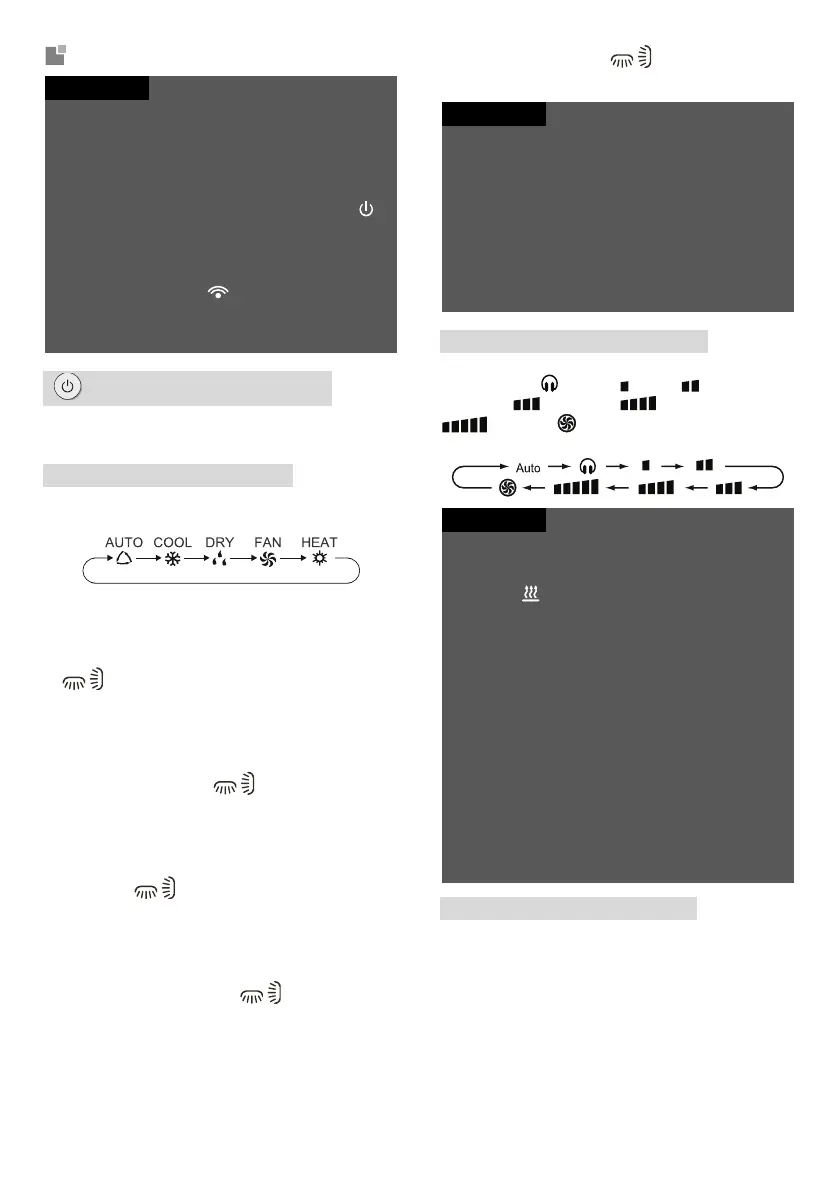
Mode button
Press this button to set the desired operation
mode for this cycle:
When you select the Auto mode, the air
conditioner will operate automatically
according to the measured temperature. Press
the Fan button to set the fan speed. Press the
/ button to set the air blowing angle.
When you select Cool mode, the air
conditioner will operate in Cool mode. Press
the + or - button to set the desired
temperature. Press the Fan button to set the
fan speed. Press the / button to set the air
blowing angle.
When you select Dry mode, the air conditioner
will operate in Dry mode with low fan speed.
Fan speed cannot be adjusted in Dry mode.
Press the / button to set the air blowing
angle.
When you select Fan mode, the air conditioner
will only blow air, it will not cool or heat. All
indicators are off. Press the Fan button to set
the fan speed. Press the / button to set
the air blowing angle.
When you select Heat mode, the air
conditioner will operate in Heat mode. Press
the + or - button to set the desired
temperature. Press the Fan button to set the
fan speed. Press the / button to set the air
blowing angle.
To prevent cold air from blowing out when Heat
mode is started, the indoor unit will start blowing out
air with a delay of 1-5 minutes (the delay time
depends on the room temperature).
Temperature setting range via remote control is 16-
30 °C.
There is no indicator for this mode on some models.
An air conditioner that has only the Cool function
cannot operate in Heat mode. If Heat mode is
selected by the remote control, the air conditioner
cannot be switched on using the On/Off button.
Fan button (Fan speed)
This button is used to set the fan speed in this
cycle: AUTO, (Quiet), (Low), (Low-
Medium), (Medium), (Medium-High),
(High) to (Turbo), and then back to
AUTO.
In Dry mode, the fan runs only at a low speed.
X-FAN function: When you press the fan speed
button for 2 seconds in Cool or Dry mode, the
indicator will be displayed and the fan will run for
a few more minutes after the unit is switched off to
dry the inside of the unit. When power is connected,
the X-FAN function is switched off by default. The
X-FAN function cannot be used for Auto, Fan or
Heat mode.
This function allows the moisture on the evaporator
of the indoor unit to dry out after the unit is switched
off to prevent mould growth.
When the X-FAN function is on: After the unit is
switched off by pressing the On/Off button, the
indoor unit fan will continue to run at a low speed
for several minutes. During this time, the indoor
unit fan can be stopped directly by pressing the
fan speed button for 2 seconds.
When the X-FAN function is off: After the unit is
switched off by pressing the On/Off button, the
entire unit stops immediately.
+ / − button (Increase/Decrease)
Press the + or - button once to increase or
decrease the set temperature by 1 °C. If you hold
the + or - button for 2 seconds, the set
temperature on the remote control will change
rapidly. If you release the button when the
desired value is reached, the change will also
appear on the display of the indoor unit.




 To Next Page