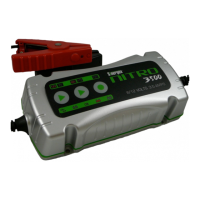
Touch Panel Indicators:
– REVERSE – Reversed Polarity
– FAULT – Battery Fault
– ON – Charger is Connected to AC Power Supply
– CHARGING – Battery Charger is Charging
– BATTERY CHARGED – Battery is fully charged and Charger
is supplying the Float or Maintenance Charge
GENERAL SAFETY PRECAUTIONS AND PRE-CHARGER
CHECK LIST
Do not install the Nitro Battery Charger in a zero-clearance
Compartment, overheating may be result.
To avoid risk of fire and electronic shock, make sure that existing
wiring and power cable are in good electrical condition. Do not
operate the Nitro charger if the wiring or power cable is damaged
in any way.
If the AC power cable is damaged, it must be replaced by the
manufacturer or its service agents or a similar qualified person to
avoid hazard and further damage
Do not charge non-rechargeable batteries.
During charging, the battery must be placed in a well-ventilated
area.
The battery charger must only be plugged in to an earthed
AC outlet.


 To Next Page