Polarity LED will indicate the reversed polarity. The battery
charger’s warning buzzer will also sound. If this occurs simply
disconnect the battery charger from the AC power connect the DC
clamps correctly to the battery terminals. Reconnect the charger to
the AC power.
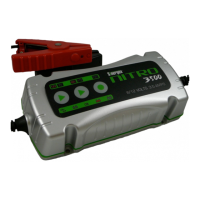
The battery charger is now in the Standby operating mode and
the “12V”, “GEL” and “ON” LEDs are illuminated. This is the
standard charging mode and as soon as the START button is
pressed, the charger switches immediately into the 12V GEL cell
battery charging mode.
If you require an alternative selection, proceed as follows:
Step 1 – Select the desired battery voltage. 6V or 12V.
Step 2 – Select the battery type. GEL or Standard. “GEL” or
“STD”.
GEL indicates a common Maintenance Free battery, e.g. Gel Cell,
VRLA, AGM & etc. STD indicates a common lead acid battery or
calcium battery.
Step 3 – Press the “START” button to begin charging the battery.
Battery Fault – A few seconds after switching on to the operating
mode, the LED indicator “FAULT” will illuminate if the following
occurs:
A. Low battery voltage - < 3 V
B. High battery voltage - > 15 V (12 V battery) / > 7.5 V (6 V
battery)
C. Battery short circuit or battery cell short circuit
D. Wrong choice of voltage for the battery
Under these conditions, the battery charger will stop charging. In
the event of A, B or C, the battery may be defective and we


 To Next Page