6) Press the key [ESC] and back to standby mode.
Special Instruction for APE8000
◆Register the remote control
1) Press the key [D] on standby mode (time display mode) and [F1] appears on the screen.
2) Press the key [A] and the screen is on standby
3) Press the key [B] and [F1] appears on the screen.
4) Press the key [B] again enter standby mode and finish the registration of the remote control.
Note: All the register steps should be finished within 2 minutes after the receiver is turned on.
The remote controller should be registered again when the receiver is turned on every time.
◆Specific methods of operation are same with other receivers’
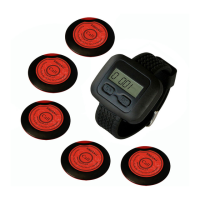
Below is the function of remote controller keys:
D: [FUN] (function) / [MOVE] (move)
A: [ENT] (enter)
B: [ESC] (escape)
C: [UP] (up) / Delete the current calling number
E: [DOWN] (down) / Delete all the calling number
Volume adjustment:
1) Standby mode, press the key [C] or [E] to adjust the volume. Numbers “01”~“15” mean 15
kinds of volume. (This is not including the voice reporting)
2) Press the key [B], back to standby mode and the volume setting is done.
Special instruction of APE8800:
Time setting of the perpetual calendar:
1) Standby mode, press key [FUN] till digit flashes.
2) Press key [MOVE] to adjust the digit position.
3) Press key [UP] or [DOWN] to set the current date and time.
4) Keep pressing key [FUN] until the digit light keeps on.
Instruction of the remote control
Function: deleting the registered number
1) Choose the No.300 position with manual operation and register the remote control to this
position. Then press any keys during the registration.
2) Instruction of keys: C key——deleting the currently display number on the screen.
A key——deleting all the numbers on the screen.
Call pager registration:
1) Standby mode, press key [FUN] 3 seconds till [F1] appears on the screen.


 To Next Page