GB
Turn the stitch selection dial so that the pointer is set to the
straight stitch position.
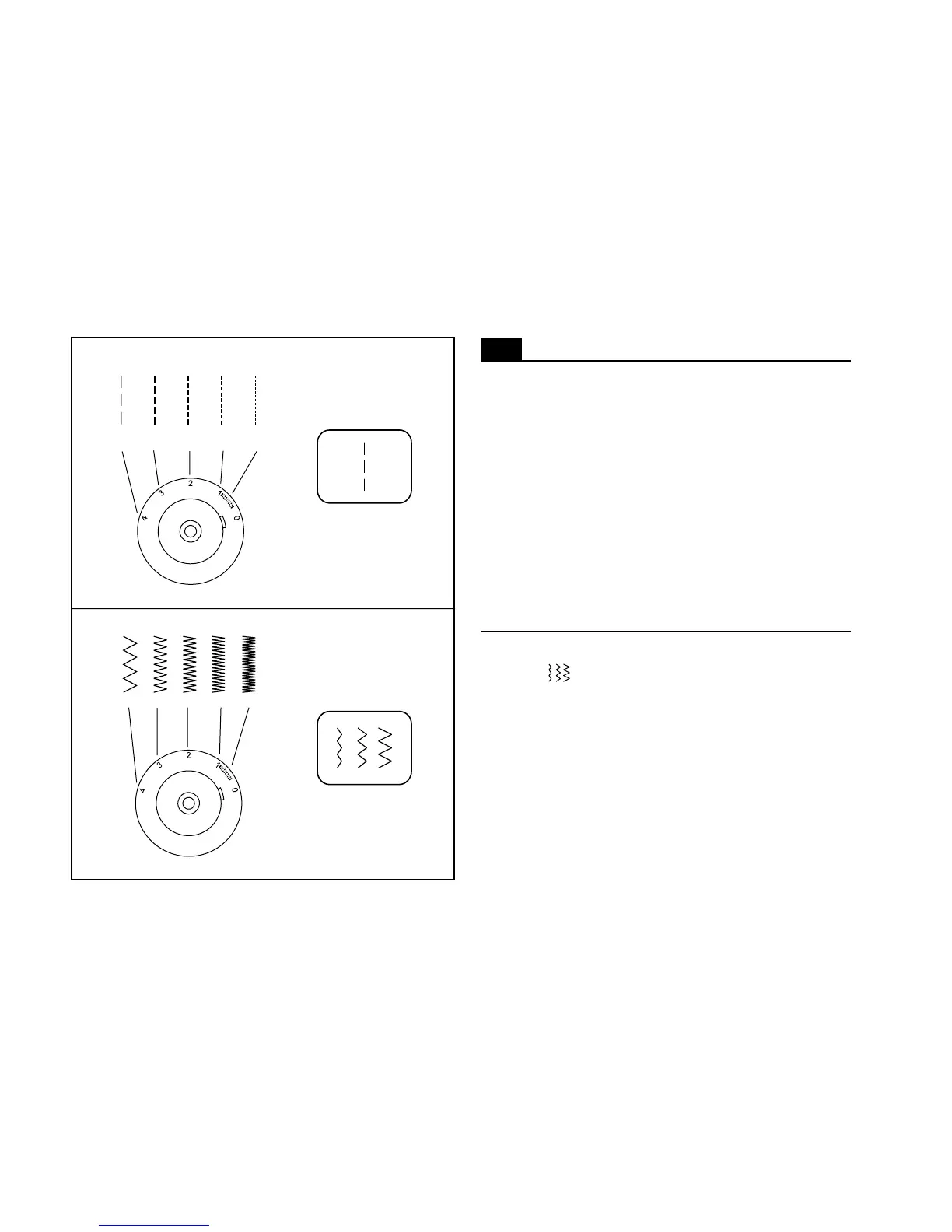
Generally speaking, the thicker the fabric, thread and needle,
the longer the stitch should be. For a fine stitch set length at "1"
or "2".
For gathering set to straight stitch, with stitch length at "4".
Do 2 rows of stitching ¼ of an inch apart. Remove from machine,
hold bobbin thread and gather fabric to desired fullness.
40
Straight stitching
4
3
2 1
0.5
4
3
2 1
0.5
Zigzag stitching
Turn the pattern selector dial so that the stitch display shows
"zig-zag" " ". Turning the pattern selector dial will increase
or decrease the zig zag width. (1)
The density of zigzag stitches increase as the setting of stitch
length dial approaches "0".
Neat zigzag stitches are usually achieved at "2.5" or below.
Closed up zigzag stitches (close together) are referred to as a
satin stitch. (2)
Function of stitch length dial while zigzag


 To Next Page