EasyManua.ls Logo

Singer 9800 - Infodisplay Functions Part 2; Stitch Width and Function Modes; Menu Navigation and Mirror Image; Sewing Recommendations

Singer 9800
35 pages
Print Icon
To Next Page IconTo Next Page
To Previous Page IconTo Previous Page
Loading...
7.
Stitch
width
WRefi
you
soect
a
stitch
or
a
mctercl,
The
machine
auto
matcay
sets
tne
best
stitch
width
which
is
displayed
with
numbers
on
the
display.
You
can
change
the
sitch
width
by
pressing
the
(+)
or
(-)
buffon.
The
width
can
be
adjusTed
bet
ween
0
and
a
mm.
.
ru
ecIed
tnctaon
When
you
turn
on
the
machine,
the
selected
function
displays
NORMAL.
Touch
the
FUNC
but
ton
to
PROG
for
programming.
If
you
touch
the
button
again.
REP
=
repeat
will
be
displayed
to
sew
your
programmed
stit
ches.
9.
MENU
Selected
group
of
stit
ches
Your
choice
is
displayed
when
you
have
pressed
the
MENU
button
to
select
one
of
the
three
groups
stitches,
block
letters
and
script
lefters.
10.
Mirror
image
You
can
mirror
a
stitch
by
using
the
button
K
.
The
symbol
is
then
displayed.
1
1.
Selected
stitch
The
number
1
—40,
correspon
ding
to
the
selected
stitch
is
dis
played.
When
selecting
letters,
the
letter
is
displayed.
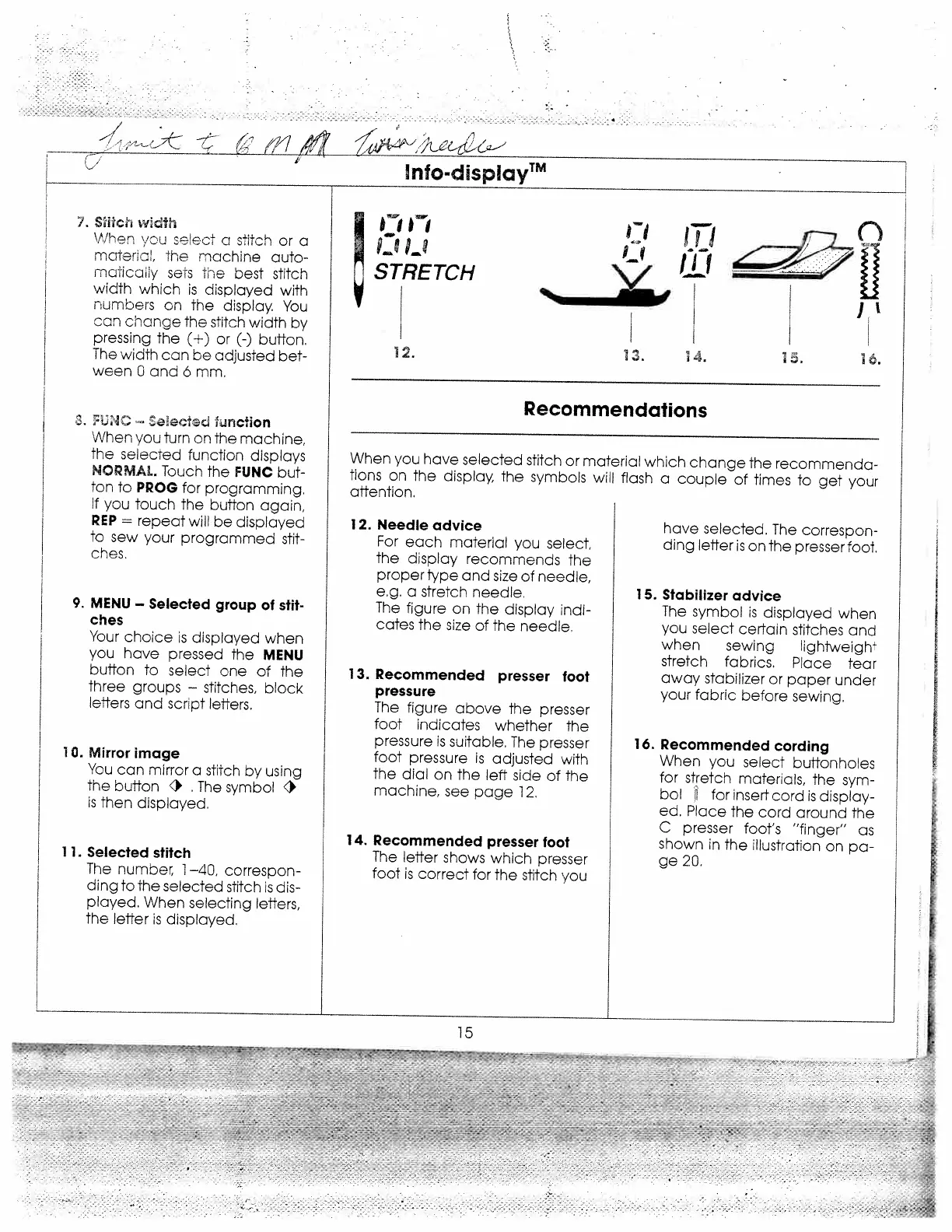
LC--
STRETCH
12.
Needle
advice
For
each
material
you
select,
the
display
recommends
the
proper
type
and
size
of
needle,
e.g.
a
stretch
needle.
The
figure
on
the
display
indi
cates
the
size
of
the
needle.
13.
Recommended
presser
foot
pressure
The
figure
above
the
presser
foot
indicates
whether
the
pressure
is
suitable.
The
presser
foot
pressure
is
adjusted
with
the
dial
on
the
left
side
of
the
machine,
see
page
12.
14.
Recommended
presser
foot
The
leffer
shows
which
presser
foot
is
correct
for
the
stitch
you
have
selected.
The
correspon
ding
letter
is
on
the
presser
foot.
15.
Stabilizer
advice
The
symbol
is
displayed
when
you
select
certain
stitches
ana
when
sewing
lighiweight
stretch
fabrics.
Place
tear
away
stabilizer
or
paper
under
your
fabric
before
sewing.
16.
Recommended
cording
When
you
select
buttonholes
for
stretch
materials,
the
sym
bol
for
insert
cord
is
display
ed.
Place
the
cord
around
the
C
presser
foot’s
“finger”
as
shown
in
the
illustration
on
pa
ge
20.
l
flfO.djSPIOYTM
fl
IT’
n
0riijJ
15.
16.
Recommendations
When
you
have
selected
stitch
or
material
which
change
the
recommenda
lions
on
the
display,
the
symbols
will
flash
a
couple
of
times
to
get
your
attention.
15
—-
---‘:
,
V
_
:
p

Related product manuals