EasyManua.ls Logo

Singer 9800 - Infodisplay Functions Part 1; Speed, Needle Stop, and Stitch Controls; Stitch Length Adjustment

Singer 9800
35 pages
Print Icon
To Next Page IconTo Next Page
To Previous Page IconTo Previous Page
Loading...
flfOdSpyTM
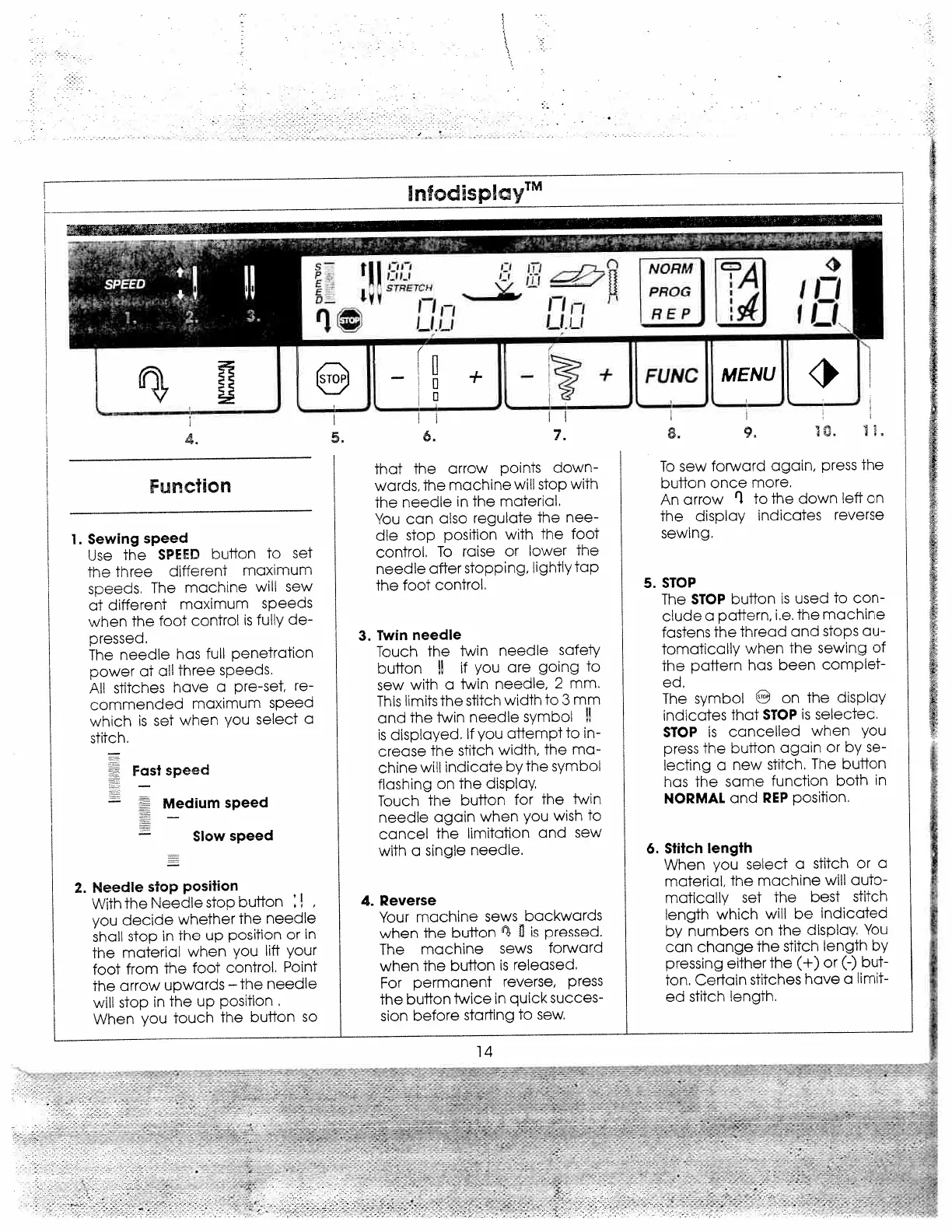
4.
Function
1.
Sewing
speed
Use
the
SPEED
button
to
set
the
three
aifferent
maximum
speeas.
The
machine
will
sew
at
different
maximum
speeds
when
the
foot
control
is
fully
de
pressed.
The
needle
has
full
penetration
power
at
all
three
speeds.
All
stitches
have
a
pre-set,
re
commended
maximum
speed
which
is
set
when
you
select
a
stitch.
2.
Needle
stop
position
With
the
Needle
stop
button
you
decide
whether
The
needle
shafl
stop
in
the
up
position
or
in
the
material
when
you
lift
your
foot
from
the
foot
control.
Point
the
arrow
upwards
the
needle
will
stop
in
the
up
position.
When
you
touch
the
button
so
that
the
arrow
points
down
wards,
the
machine
will
stop
with
the
needle
in
the
material.
You
can
also
regulate
the
nee
dle
stop
position
with
the
foot
control.
To
raise
or
lower
the
needle
after
stopping.
lightly
tap
the
foot
control.
3.
Twin
needle
Touch
the
twin
needle
safety
button
II
if
you
are
going
to
sew
with
a
twin
needle,
2
mm.
This
limits
the
stitch
width
to
3
mm
and
the
twin
needle
symbol
!!
is
displayed.
If
you
attempt
to
in
crease
the
stitch
width,
the
ma
chine
will
indicate
by
the
symbol
flashing
on
the
display.
Touch
the
button
for
the
twin
needle
again
when
you
wish
to
cancel
the
limitation
and
sew
with
a
single
needle.
4.
Reverse
Your
machine
sews
backwards
when
the
button
is
pressed.
The
machine
sews
forward
when
the
button
is
released.
For
permanent
reverse,
press
the
button
twice
in
quick
succes
sion
before
starting
to
sew.
14
LJLJ,
To
sew
forward
again,
press
the
button
once
more.
An
arrow
fl
to
the
down
left
on
the
display
indicates
reverse
sewing.
5.
STOP
The
STOP
button
is
used
to
con
clude
a
pattern,
i.e.
the
machine
fastens
the
thread
and
stops
au
tomatically
when
the
sewing
of
the
pattern
has
been
complet
ed.
The
symbol
o
on
the
display
indicates
that
STOP
is
selected.
STOP
is
cancelled
when
you
press
the
button
again
or
by
se
lecting
a
new
stitch.
The
button
has
the
same
function
both
in
NORMAL
and
REP
position.
6.
Stitch
length
When
you
select
a
stitch
or
a
material,
the
machine
will
auto
matically
set
the
best
stitch
length
which
will
be
indicated
by
numbers
on
the
display
You
can
change
the
stitch
length
by
pressing
either
the
(+)
or
(-)
but
ton.
Certain
stitches
have
a
limit
ed
stitch
length.
5.
6.
7.
Fast
speed
Medium
speed
Slow
speed
,
-.
,
,

Related product manuals