17. Powder located in Overow Bin from the printer should be poured on the Powder Chamber grid
1
.
ATTENTION!
Do not pour the powder from Overow Bin into the Fine Dusting Powder Chamber
2
! When the
machine is in operation, this chamber must always have access to air for the entire system to
function properly. It is allowed to clean the prints above it.
18. Collect all remaining powder from the Worktop with a spatula or Powder Wiper and transfer it to the Powder Chamber
grid
1
. Make sure that the powder is not on the grid of the Fine Dust Chamber
2
.
19. To remove the remaining powder from the printer’s
Print Chamber, use a Suction hose
3
.
19.a. Remove the Suction Handle from the socket
16
.
The Powder Feeding Screw
23
should be stopped
and the LED above HANDLE
16
on the Control
panel should light up.
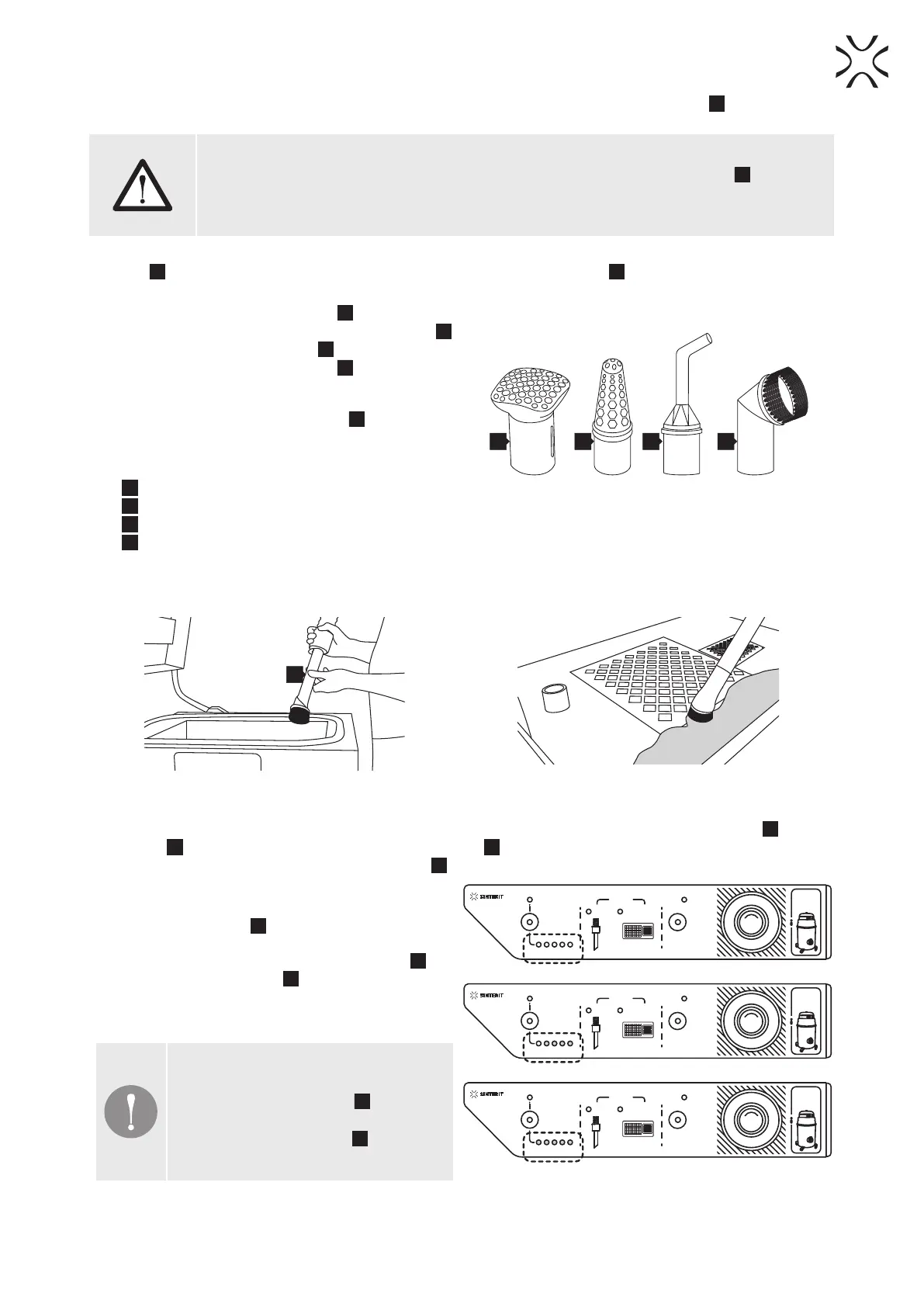
19.b. Select the nozzle for the type of task (image 30).
We recommend a PVC Brush
K
to clean the
Printing Chamber. Do not use the Suction hose
without the nozzle attached! - This may cause
damage/scratches on the cleaned surfaces
•
H
General purpose nozzle,
•
I
Powder suction nozzle,
•
J
Gap nozzle,
•
K
PVC brush.
H I J K
Image 30. Insert a suitable nozzle
into the Suction Handle according to the task.
20. Holding the Suction hose above the surface of the powder, remove it from the Print Chamber and the housing of the
printer (image 31).
21. The Suction hose can also collect all remaining powder from the PHS Worktop if any (image 32).
3
Image 31. Clean the Print Chamber of the printer
from the remaining powder.
Image 32. Clean the PHS Worktop
from any remaining powder.
22. When the cleaning is nished, disconnect and put the nozzle in Toolboard also insert the Suction handle
3
into the
socket
4
. After this operation, the Powder Feeding Screw
23
will be restarted and the powder that has been in the
chamber will be transported to the Sifting module
11
.
23. The Sifting module
11
will work when a vacuum is
detected in the system. When the vacuum cleaner is
switched off by the user, the Sifting module
11
and
the Sifting module timer
15
will continue to operate
for about 20 minutes (LEDs show the remaining time
- image 33).
IMPORTANT!
Turning off the vacuum cleaner will stop
the Powder Feeding Screw
23
. If there is
still powder in the chamber, it will not be
sent to the Sifting module
11
due to the
inactive Powder Feeding Screw.
TURN ON
VACUUM
FIRST
PHS
LIGHT
ON/OFF
POWER
SUCTION
VACUUM
SIFTING
ON/OFF
ON/OFF
TIMER
HANDLE
DEPOWDERING
ZONE
SUCTION
S
T
O
P
E
M
E
R
G
E
N
C
Y
TURN ON
VACUUM
FIRST
PHS
LIGHT
ON/OFF
POWER
SUCTION
VACUUM
SIFTING
ON/OFF
ON/OFF
TIMER
HANDLE
DEPOWDERING
ZONE
SUCTION
S
T
O
P
E
M
E
R
G
E
N
C
Y
TURN ON
VACUUM
FIRST
PHS
LIGHT
ON/OFF
POWER
SUCTION
VACUUM
SIFTING
ON/OFF
ON/OFF
TIMER
HANDLE
DEPOWDERING
ZONE
SUCTION
S
T
O
P
E
M
E
R
G
E
N
C
Y
Image 33. The LEDs on the Control panel show the remaining
time of powder sifting after switching off the vacuum cleaner.
POWDER HANDLING STATION Manual | 26


 To Next Page