EasyManua.ls Logo

Sitecom WLR-4002B - Go to the Security tab and configure the following settings: Under the Type of VPN, select the Protocol that has been set in the WLR 4002 B, Point to point tunneling protocol(PPTP) or Layer 2 Tunneling Protocol with IPsec (L2 TP-IPSec). Check unencrypted password (PAP). Check Challenge Handshake Authentication Protocol (PPTP). Check Microsoft CHAP Version 2 (MS-CHAP v2).

Sitecom WLR-4002B
130 pages
Print Icon
To Next Page IconTo Next Page
To Previous Page IconTo Previous Page
Loading...
75
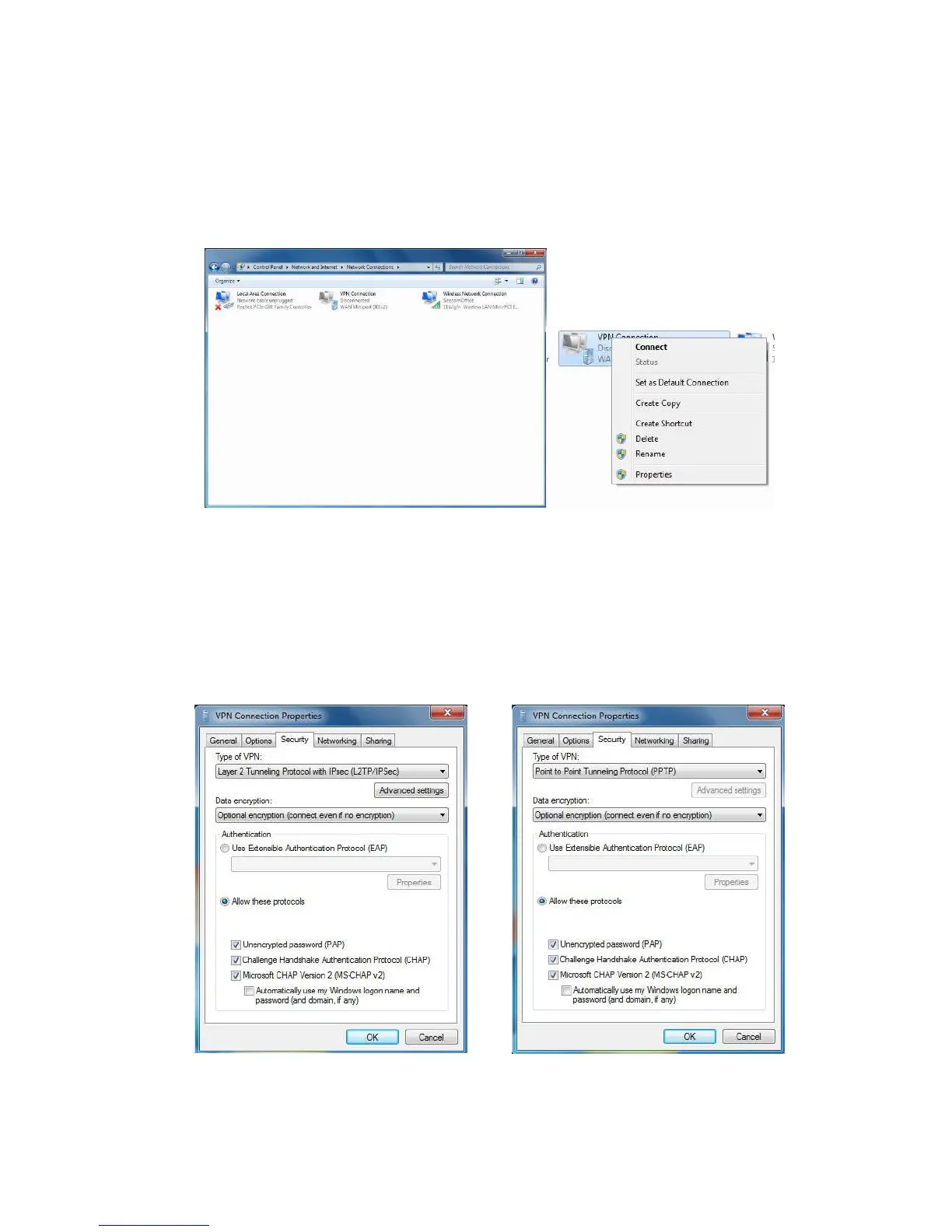
10. Select the VPN connection you just set, right-click VPN Connection, and
select Properties.
11. Go to the Security tab and configure the following settings :
Under the Type of VPN, select the Protocol that has been set in the WLR-
4002B, Point to point tunneling protocol(PPTP) or Layer 2
Tunneling Protocol with IPsec (L2TP-IPSec) .
Check unencrypted password (PAP).
Check Challenge Handshake Authentication Protocol (PPTP).
Check Microsoft CHAP Version 2 (MS-CHAP v2).


Related product manuals