47
GB
COMPUTER OPERATION MANUAL
Workout Selection
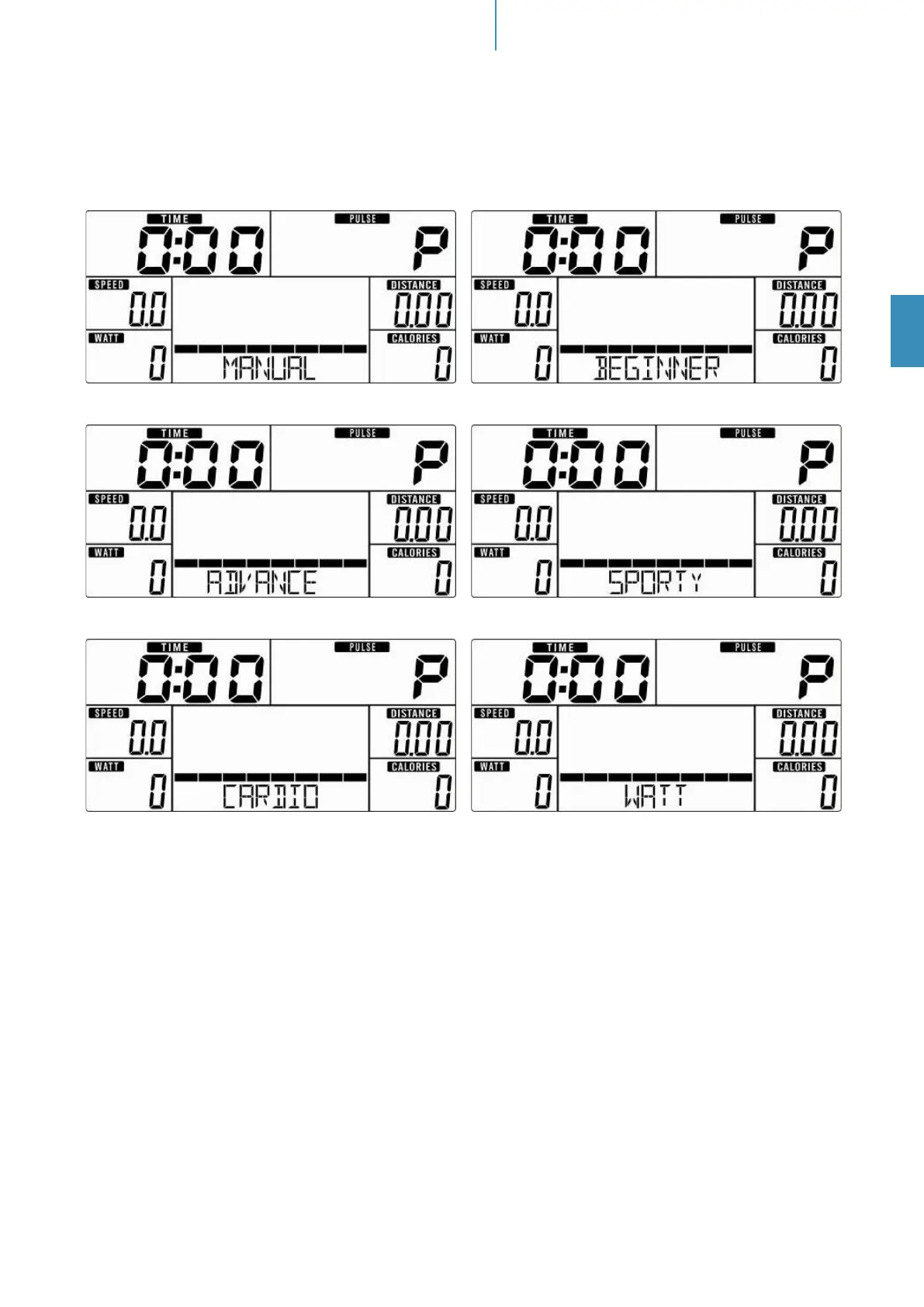
Select the workout mode with “UP”,”DOWN” and “MODE/ENTER” to conrm:
Manual (gure 2) -> Beginner (gure 3) -> Advance (gure 4) -> Sporty (gure 5) -> Cardio (gure 6) -> Watt
(gure 7).
Fig. 2 Fig. 3
Fig. 4 Fig. 5
Fig. 6 Fig. 7
Manual Mode
In manual mode you can adjust the load manually. After selecting „M“ (conrm with “MODE/ENTER”-button)
you can select the initial tension level (use “UP”, “DOWN” and “MODE/ENTER” to select). Press “START/
STOP”. You may change the tension level at any time during exercise with “UP” and “DOWN”.
You may also input target values for the following function values:
a. TIME (gure 8)
b. DISTANCE (gure 9)
c. CALORIES (gure 10)
d. PULSE (gure 11)
To input a target value, do not press “Start/Stop” after selecting the initial tension level, but instead use “UP”,
“DOWN” and “MODE/ENTER” to input the target values. After your input, press “START/STOP” to start the
workout. To pause your workout, press the „START/STOP “-button again. Press “RESET” to return to main
menu.


 To Next Page