4 SKF TKTI 21 & 31
4. Operating the camera
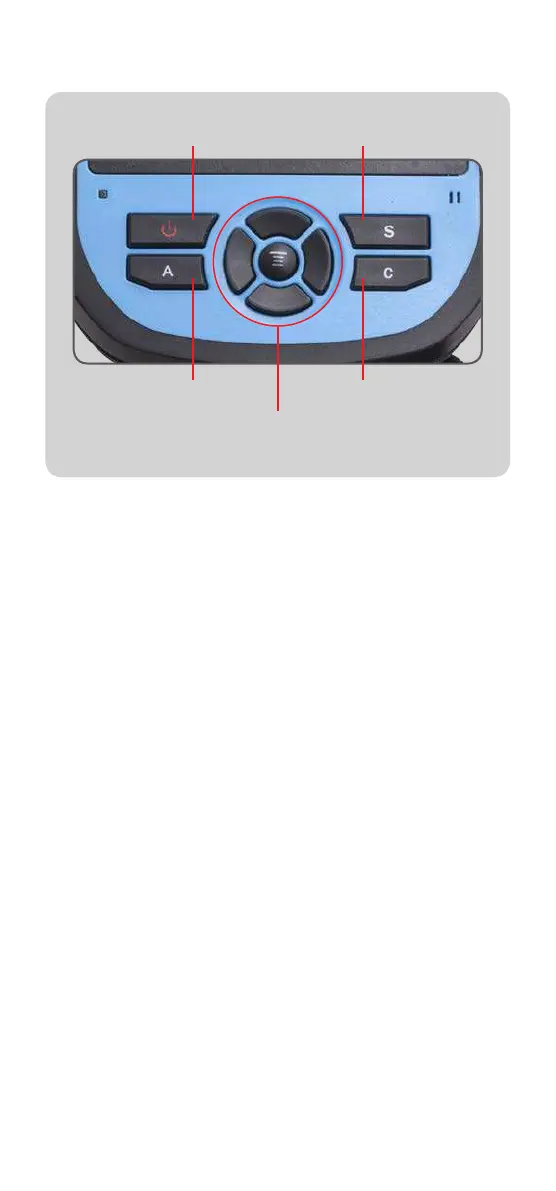
Menu/Okay button
and navigation pad
On/Off Button S button
A button C button
• Operate the laser with the trigger
• Press the A button successively to change the cursors
settings, adjust the Span and Level, change the
colour palette
• Select the Span and Level by highlighting the span/level
temperatures with the A button. Use the navigation pad to
adjust the Span or Level.
• Switch between the Infrared image and the visual image
with the C button. The C button is also used to quit a
menu
• Save an image with the S button
• Access the main menu by pressing the Menu/Okay button
• Use the navigation pad to browse through menus and
options
Infrared settings
• Set the emissivity of the object of interest and the reflected
temperature (TReflect) via Setup -> Adjustment.
An emissivity table with the most common materials is
provided. The reflected temperature is usually set to the
average room temperature.


 To Next Page