40.
Attaching the Smart Guard
System
To prevent personal injury, always dis con nect
plug from power source before attaching or
removing the Smart Guard System.
P
OSITIONING THE RIVING KNIFE
1. Remove table insert using finger hole.
2. Raise the blade as high as it will go and set it perpendicular to
table (0° on bevel scale) (Fig. 19).
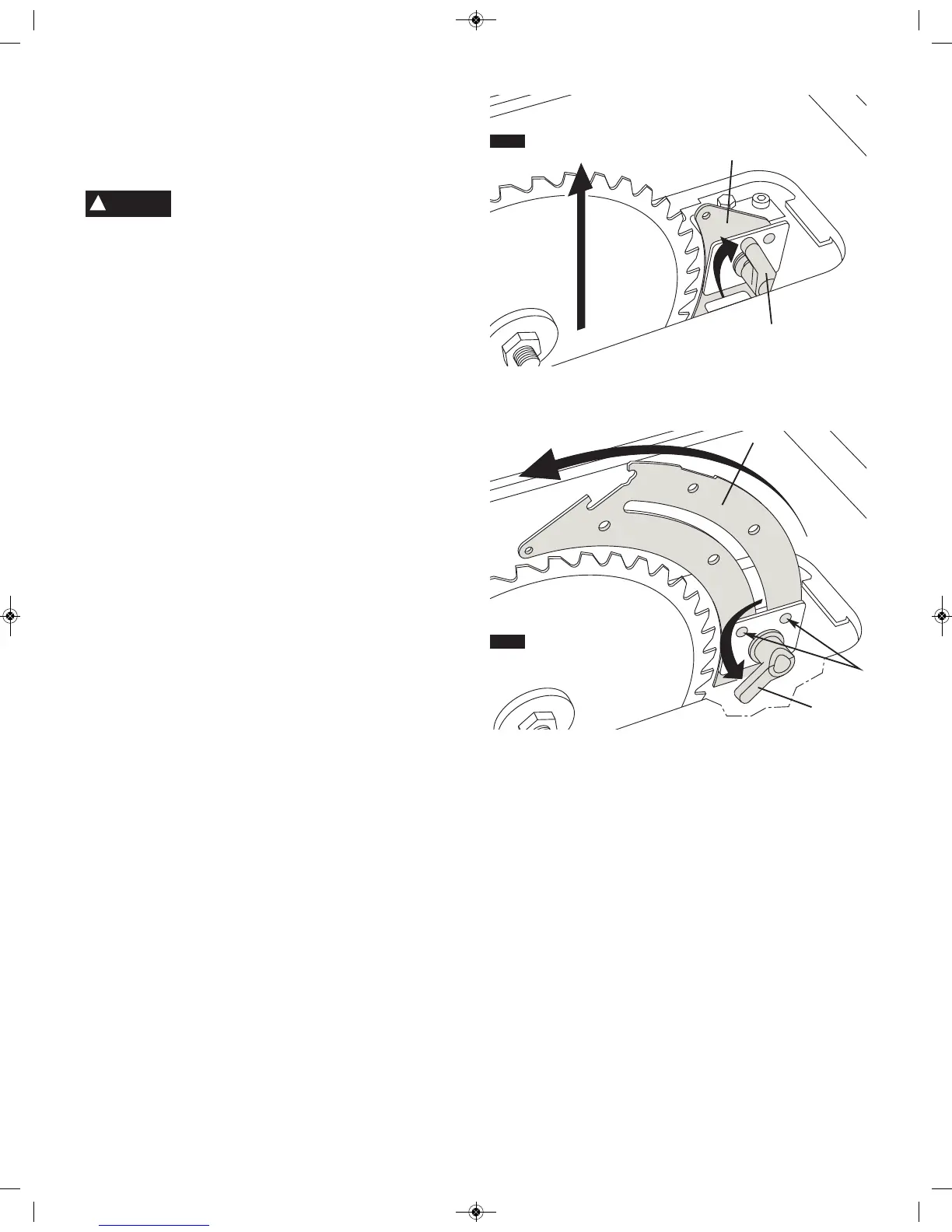
3. Rotate the riving knife release lever 1 clockwise, so that it
points upward (Fig. 19).
4. Pull riving knife 2 towards release lever to disengage it from
the pins 3.
5. Slide the riving knife 2 up to its highest position, so that it is
directly over the center of the blade (Fig. 20).
6. Align holes in riving knife with pins 3 and lock the release lever
1 by rotating it counterclockwise. Push/pull riving knife to verify
that it is locked in place (Fig. 20).
7. Replace table insert (Fig. 21).
continued on page 42
Assembly
FIG. 19
FIG. 20
1
2
1
3
2
WARNING
!


 To Next Page