EasyManua.ls Logo

Skil 9105 - Page 4

Skil 9105
24 pages
Print Icon
To Next Page IconTo Next Page
To Previous Page IconTo Previous Page
Loading...
Operating
Instructions
SLIDE
ON-OFF
SWITCH
WITH
LOCK
The
tool
is
switched
“ON”
by
the
slide
switch
located
at
the
side
of
the
motor
housing.
The
switch
can
be
locked
in
the
“ON”
position,
a
convenience
for
long
grinding
operations.
To
turn
the
tool
“ON”
without
locking
it,
slide
the
switch button
forward
by
applying
pressure
ONLY
at
the
REAR
portion
of
the
button.
When
pressure
is
released
the
switch
button
will
snap
to
“OFF”
position.
TO
LOCK
THE
SWITCH
“ON’,
slide
the
switch
button
forward
and
press
“IN”
the
FRONT
portion.
TO
UNLOCK
THE
SWITCH,
simply
press
and
release
the
REAR
portion
of
the
button.
Switch
is
spring
loaded
and
will
snap
back
automatically.
A
WARNING
tool
to
twist.
Hold
the
too!
with
both
hands
while
starting
the
tool,
since
torque
from
the
motor
can
cause
the
Start
the
too!
before
applying
to
work.
Lift
the
tool
from
the
work
be-
fore
releasing
the
switch.
DO
NOT
turn
the
switch
on and
off
while
the
tool
is
under
load:
this
will
greatly
decrease
the
switch
life.
Your
tool
is
equipped
with
a
circuit
breaker
to
protect
the
motor
from
overload.
If
the
tool
stops
during
operation
TURN
OFF
SWITCH
IMMEDIATELY,
After
allowing
the
motor
to
cool
for
about
30
seconds,
the
circuit
breaker
may
be
reset
by
depressing
the
button.
If
circuit
breaker
trips
repeatedly,
excessive
force
is
causing
the
toal
to
overload.
Don’t
press
so
hard
and
let
the
tool
do
the
work.
A
WARNING
To
prevent
accidental
start-ups,
turn
switch
Mies
“OFF”
when
circuit
breaker
trips.
If
switch
is
not
in
ihe
“OFF”
position,
tool
will
restart
when
circuit
breaker
is
de-
pressed.
Also,
tool
may
restart
without
resetting
the
circuit
breaker
in
cold
weather
when
the
temperature
falls
below
32°F
(0°C).
SIDE
HANDLE
The
side
handle
used
to
guide
and
balance
the
tool
can
be
thread-
ed
into
the
front
housing
on
either
side
of
the
tool,
depending
on
personal
preference
and
comfort.
Use
the
side
handle
for
safe
control
and
ease
of
operation.
WHEEL
GUARD
Always
attach
wheel
guard
for
grinding
operation.
Attach
with
provided
fasteners.
LOCK
NUT
AND
BACKING
FLANGE
Your
tool
is
equipped
with
a
threaded
spindle
for
mounting
acces-
sories,
Always
use
the
supplied
lock
nut
(and
backing
flange)
that
has
same
thread
size
as
spindle.
The
backing
flange
provided
with
your
tool
is
intended
for
use
with
Type
27
depressed
hub
wheels.
Grinding
Operations
WHEEL
GUARD
INSTALLATION
®
Wheel
guard
must
be
attached
when
using
disc
|
grinding
wheels.
Always
keep
wheel
guard
be-
A
WaRWiNG
tween
you
and
your
work
while
grinding.
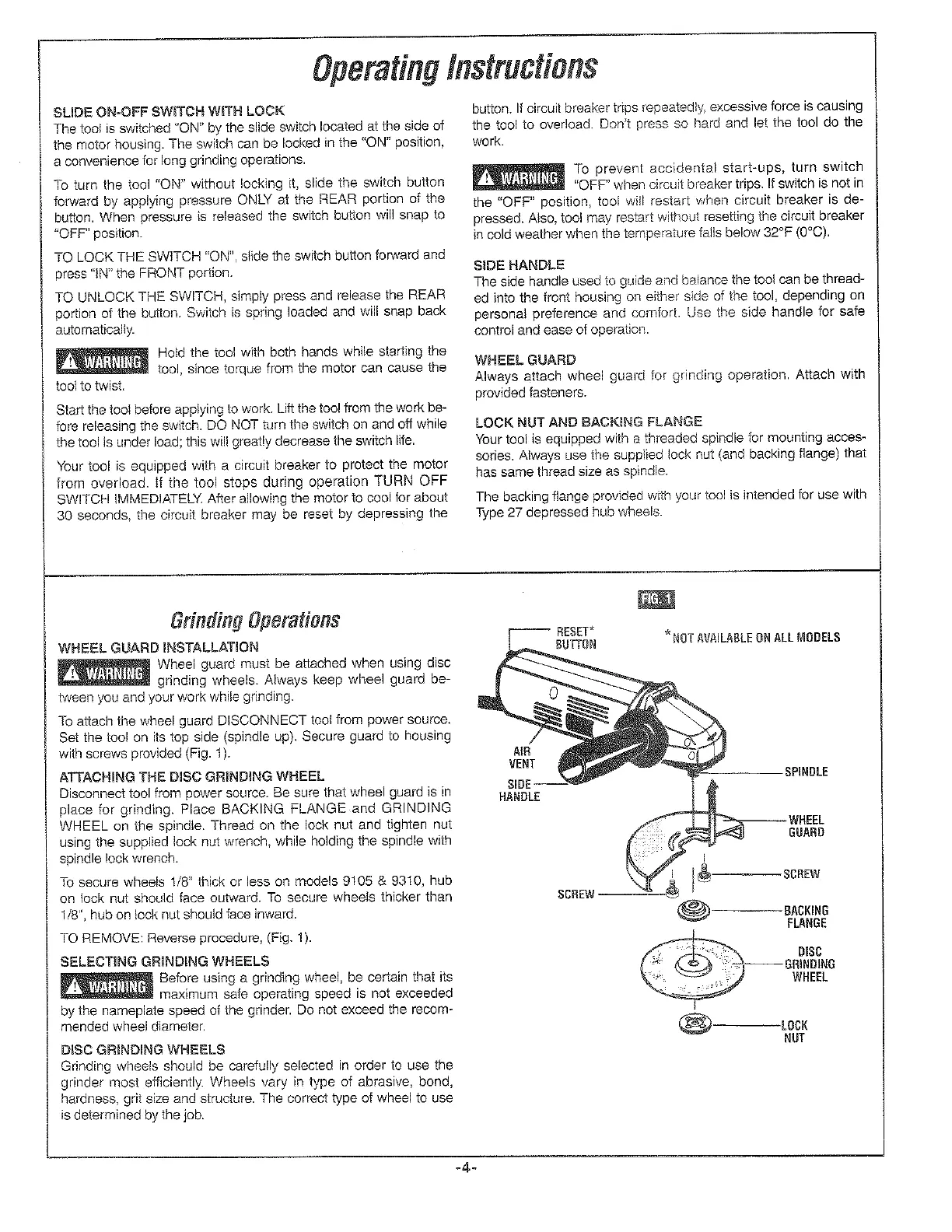
To
attach
the
wheel
guard
DISCONNECT
tool
from
power
source.
Set
the
tool
on
its
top
side
(spindle
up).
Secure
guard
to
housing
with
screws
provided
(Fig.
1).
ATTACHING
THE
DISC
GRINDING
WHEEL
Disconnect
tool
from
power
source.
Be
sure
that
wheel
guard
is in
place
for
grinding.
Place
BACKING
FLANGE.and
GRINDING
WHEEL
on
the
spindle.
Thread
on
the
lock
nut
and
tighten
nut
using
the
supplied
lock
nut
wrench,
while
holding
the
spindle
with
spindle
lock
wrench.
To
secure
wheels
1/8"
thick
or
less
on
models
9105
&
9310,
hub
on
tock
nut
should
face
outward.
To
secure
wheels
thicker
than
1/8",
hub
on
lock
nut
should
face
inward.
TO
REMOVE:
Reverse
procedure,
(Fig.
1).
SELECTING
GRINDING
WHEELS
Pee
Before
using
a
grinding
wheel,
be
certain
that
its
rN
ES
maximum
safe
operating
speed
is
not
exceeded
by
the
nameplate
speed
of
the
grinder.
Do
not
exceed
the
recom-
mended
wheel
diameter.
BISC
GRINDING
WHEELS
Grinding
wheels
should
be
carefully
setected
in
order
to
use
the
grinder
most
efficiently.
Wheels
vary
in
type
of
abrasive,
bond,
hardness,
grit
size
and
structure.
The
correct
type
of
wheel
to
use
is
determined
by
the
job.
RESET*
_
BUTTON
“NOT
AVAILABLE
ON
ALL
MODELS
SPINDLE
HANDLE
WHEEL
GUARD
SCREW
BACKING
FLANGE

Related product manuals