22
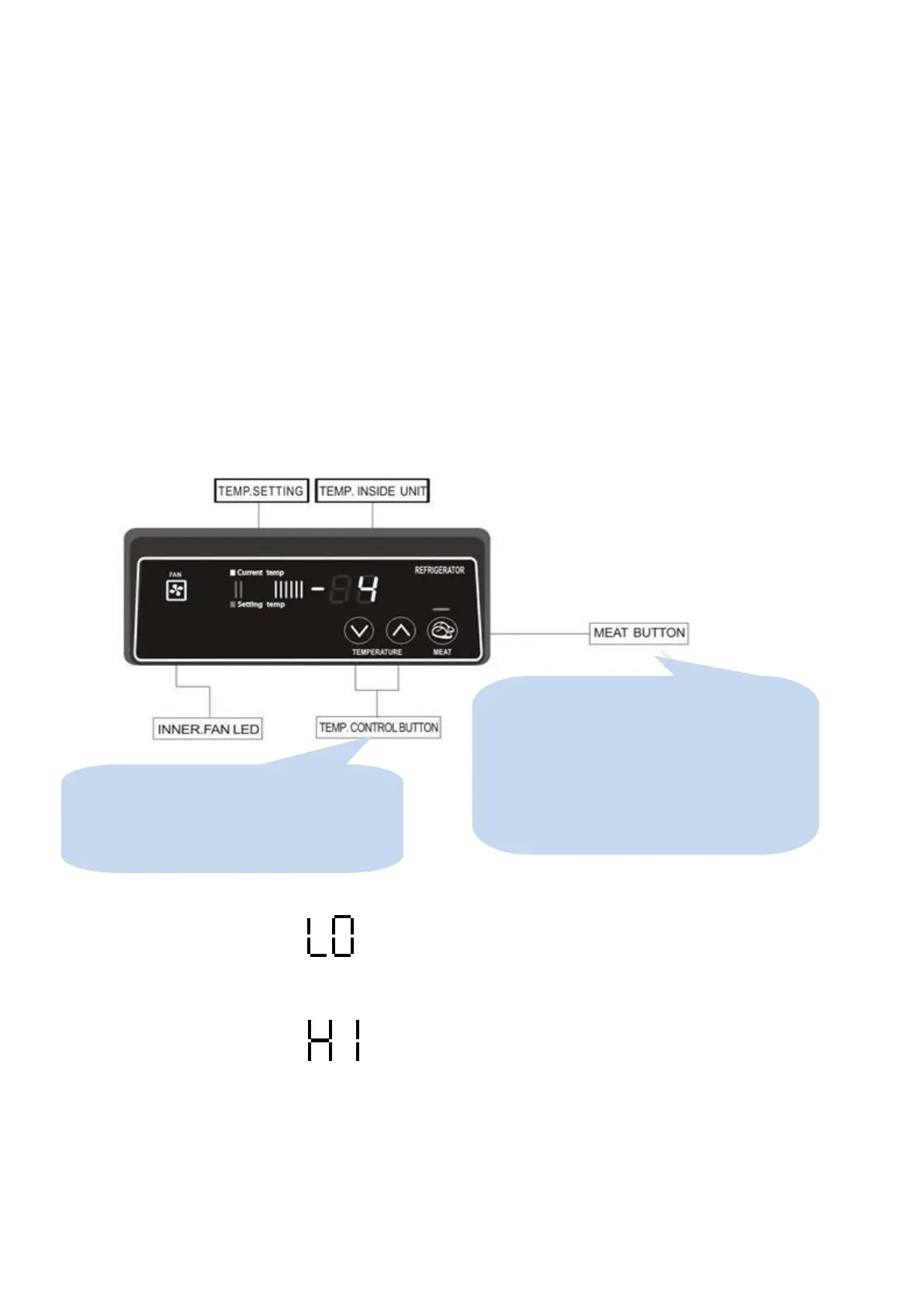
3-4. PCB Control Instruction
3-3-1. Basic Operation
1) Plug in and the Display panel will be lighted and make a beep sound.
The compressor will begin to run.
2) The compressor is automatically cycled by the electronic controller (PCB).
3) The Defrost cycle is automatically controlled by the PCB.
4) Good Air Flow in refrigerator unit is critical.
Be careful to load product so that it neither presses against the back wall, nor reaches within four inches
from the evaporator compartment.
5) When the inside temperature is lower than -45℃, the panel will display “LO”.
6)Higher than +18℃, the panel will display “HI”.
1. By pushing the up/down button, you can set the
inside temperature.
2. If you want lower temperature, push the Down
button to be lighted lower level numbers.
1. If you push the MEAT button, the unit keeps
meats and fishes freshly.
2. Push the MEAT button again, the function will
cancel.
3. There is a lack of MEAT button on KSR / KHR KUF
series



 To Next Page