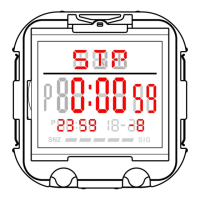
Hour Minute Second
2.Press C Key to adjust the selected item.
3.Press A key to confirm and return to the countdown display status.
Press C key to start/stop the countdown
Press A key to set and reset the countdown mode.
Remarks: When the countdown time is up, the warning tone will last for 1 minute, the symbol flashes; press any
key to interrupt ,and countdown time will restart .It will automatically exits the setting status without any key
operation within one-minute.
G.Alarm setting :
Alarm mode, press C key to turn on/off the hourly chime(
)
Press D key to select AL1-AL5
Press C key to turn the alarm on/off (A)(
)
Press the A key button for 2 seconds to set the alarm time
Press B key to switch settings.
Press C key to adjust the selected item
Press A key to exit time setting
Remarks: 1: Enters the alarm setting state, the alarm is automatically turned on.
2 : When the alarm time is up, and the alarm warning tone will last for 1 minute.
H.Dual time setting :
Dual time mode, press A key for 2 seconds to enter time setting
Press B key to switch settings.
Press C key to adjust the selected item
Press A key to exit time setting
Remarks: Setting the dual time ,set in 30-minute /units, does not affect the hour.


 To Previous Page
 Loading...