Trafficinformationend
TP
TP
Recordingtraficinformation
After the traffic information ends, the sound of
the original station, or of a CD, will be Restored.
You can press button at any time to
cancel the playback of traffic information. The
symbolwill disappear.
Your radio has a special memory which allows
the recording of traffic information for
subsequent replay. Recording is only possible
in the FM band. Recording works even when
youarelistening to aCD.
16
Discloadingslot
ActivationofCD playbackmode
CD
NOCD
Your radio is fitted with a built- in CD player. To
Listen to a CD, insert the disc into the slot
with printed side up. Disc contents will be read
andplayback begins.
While listening to the radio, press button .
If a CD has been inserted, playback starts from
the point where it has been interrupted the last
time. If no CD is inserted, you will be notified of
thefactby message.
14
2
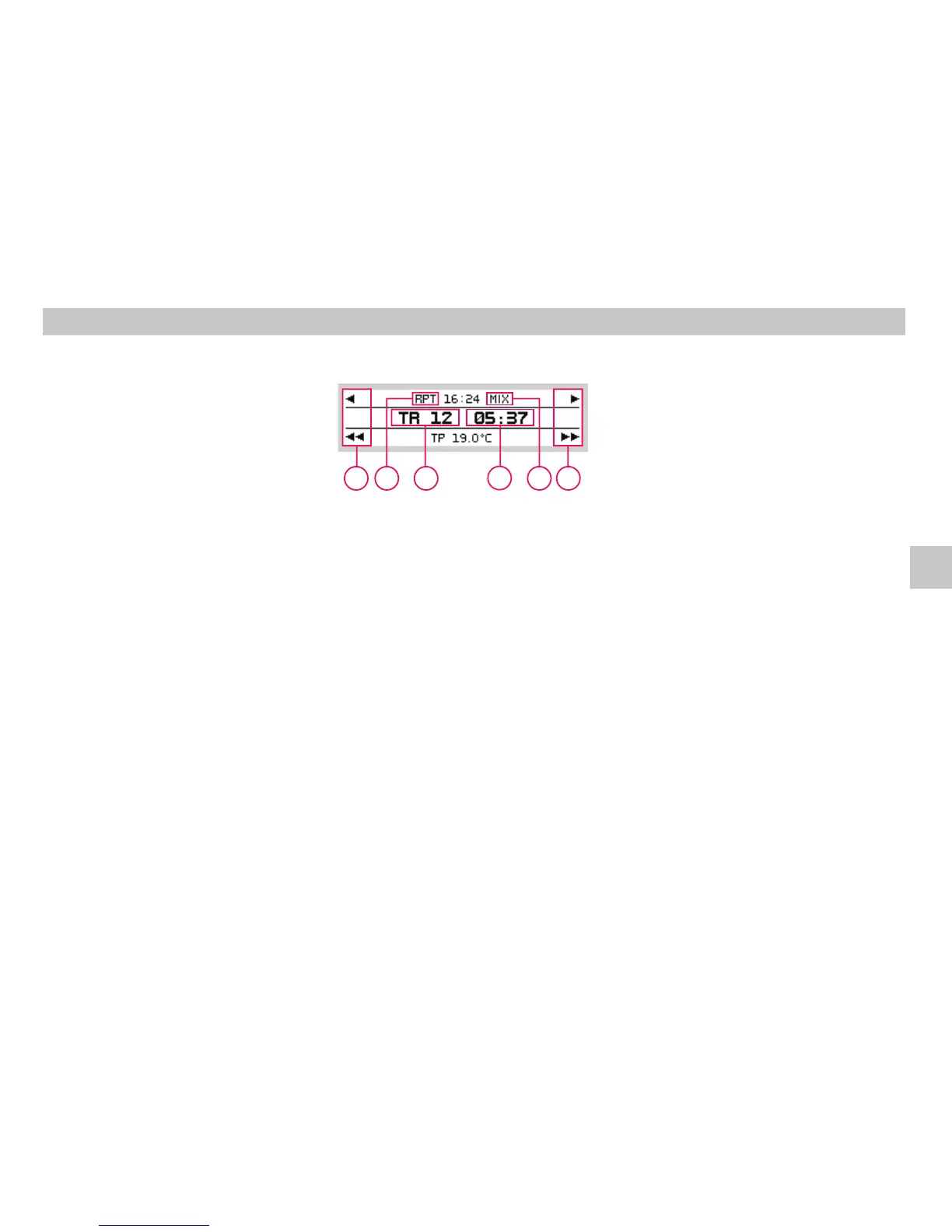
Displayindicationsin theCDmode
REPEAT
MIX
A Currenttrack number
B Play timeindication
C Areareservedforpresetbuttons .
Previous/nexttrack.
Fast forward /rewindwithin atrack.
D Icon - mode active See chapter
Optionalfunctions in theCD mode
E Icon - mode active See chapter
Optionalfunctions in theCD mode
34
78
12
9
Operating of CD player
Replaying CD
A
D
B
E
C
C
GB













 To Next Page