GERMANY
Charging the Smartphone via the +COM/UNIT
33
Charging the Smartphone via the +COM/UNIT
Cableless charging of the smartphone
Should you have a smartphone with a Qi charging function, you can charge it on the road via the
+COM/UNIT without the need for a cable. You can do this as follows:
➤ Ensure that the +COM/UNIT has been adequately charged (min. 50%).
➤ Mount the +COM/UNIT on the COMPIT analogue with the smartphone, (please refer to page 30).
➤ Press the in order to switch the +COM/UNIT on.
The bottom LED is illuminated blue and the LEDs for the battery indicator are illuminated orange. The
+COM/UNIT is now switched on.
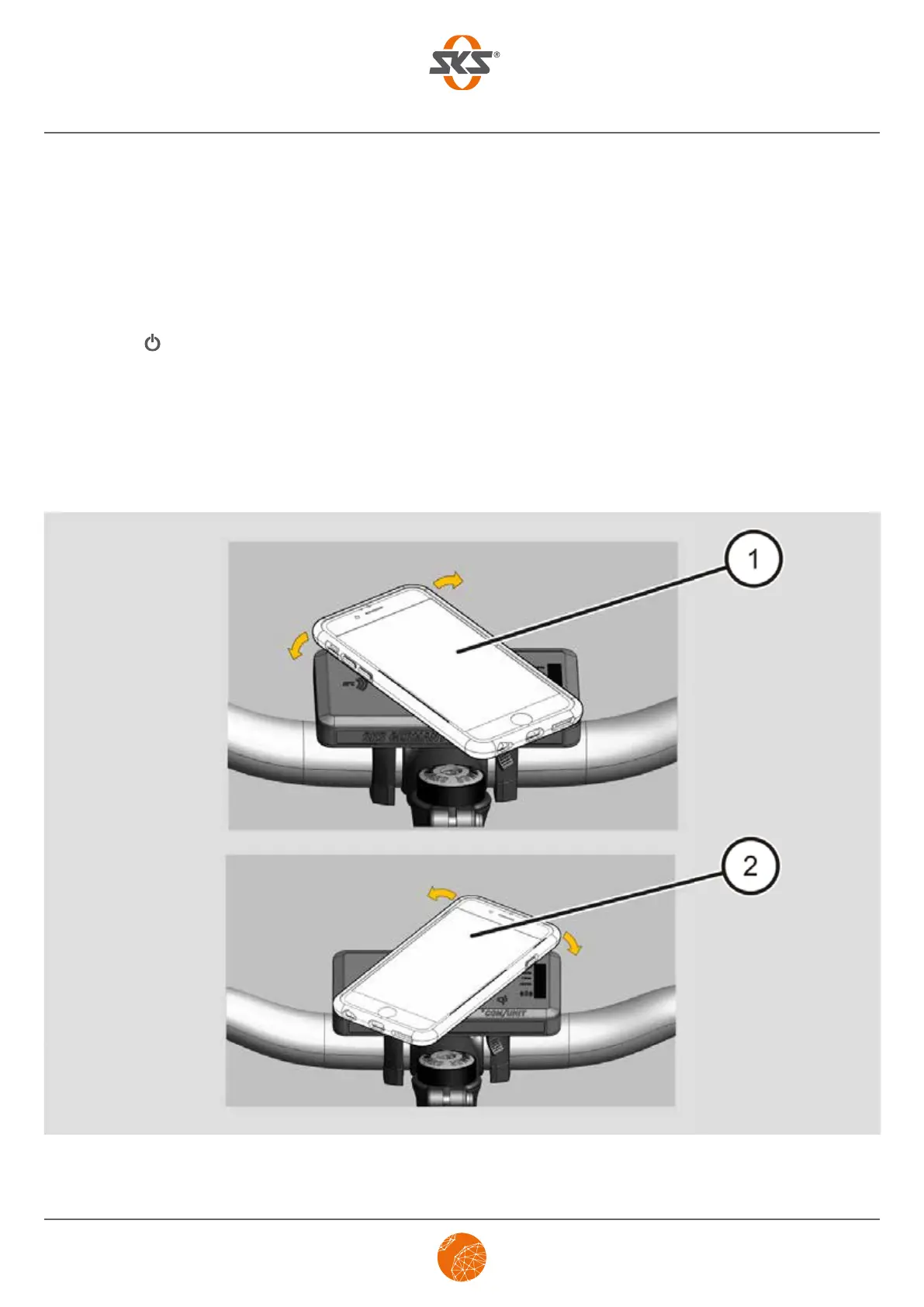
➤ Place your smartphone on the Qi docking station (as shown in 1 or 2) of the +COM/UNIT and turn it
to the right or left (by approx. 45 degrees) above the Qi docking station until it audibly locks into place.
The smartphone starts to charge automatically.


 To Next Page