GERMANY
Charging the Smartphone via the +COM/UNIT
35
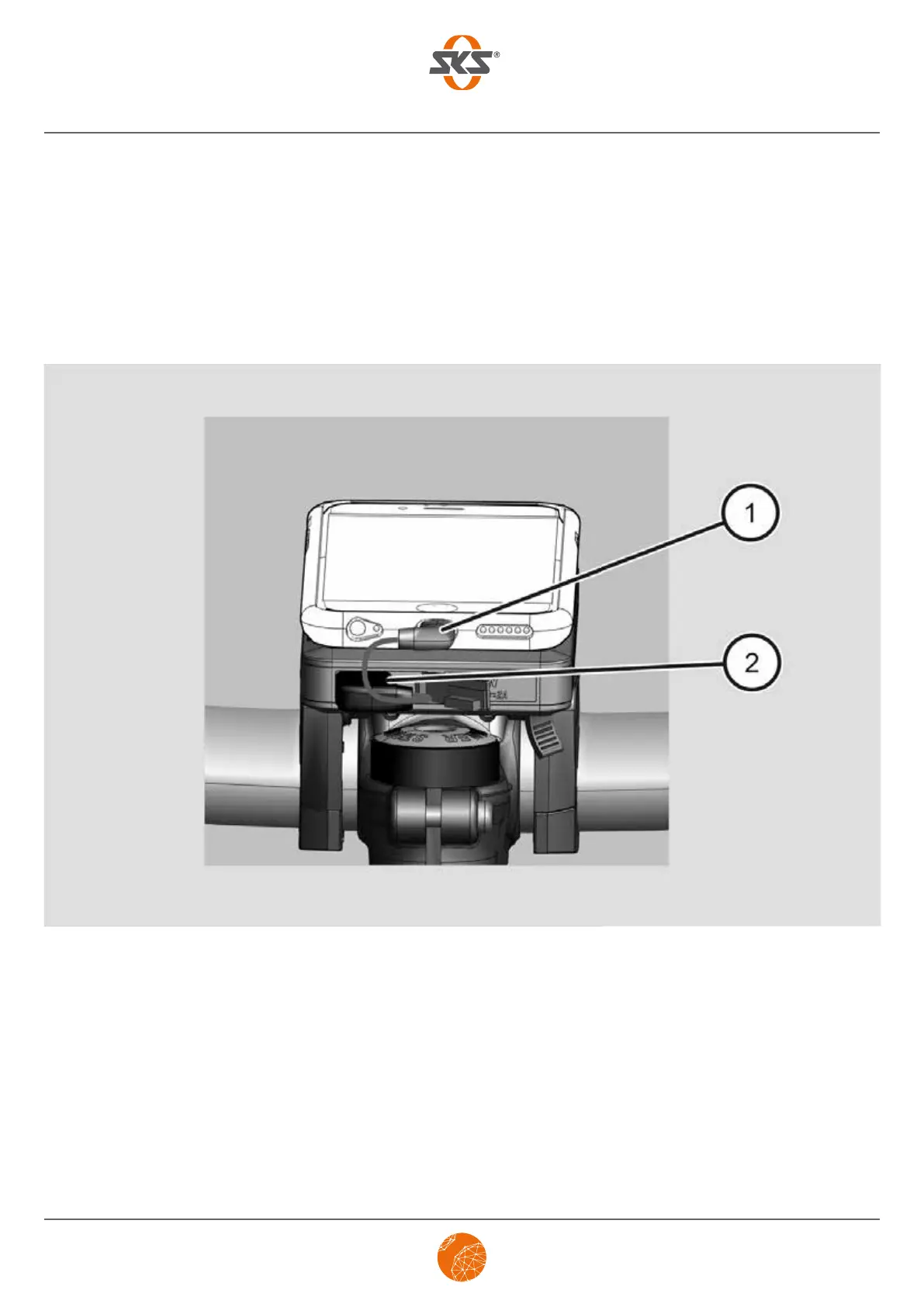
Charging the smartphone with a cable
Should you have a smartphone that does not have a Qi charging function, you can charge it via the +COM/
UNIT using an optional USB cable as follows when you are on the road:
➤ Ensure that the +COM/UNIT has been adequately charged (min. 50 %).
➤ Connect the optional USB cable (2) to the output port of the +COM/UNIT (2).
➤ Now connect it to your smartphone (1).
➤ To charge your smartphone, refer to the instructions in the section headed Charging the smartphone
without a cable, please refer to page 33.
Carry out the following after you have charged your smartphone:
➤ Disconnect the USB cable from your smartphone and from the +COM/UNIT.
➤ Remove your smartphone from the +COM/UNIT by turning it over the Qi docking station
(approx. 45 degrees).
➤ Press the safety lever and remove the +COM/UNIT analogue to the smartphone.
➤ Recharge the +COM/UNIT if necessary, please refer to page 37.


 To Next Page