The quadcopter’s Lithium-Polymer battery must be charged before the unit can be
flown. Before charging, be sure the quadcopter and remote control are powered off.
Failure to do so may result in injury.
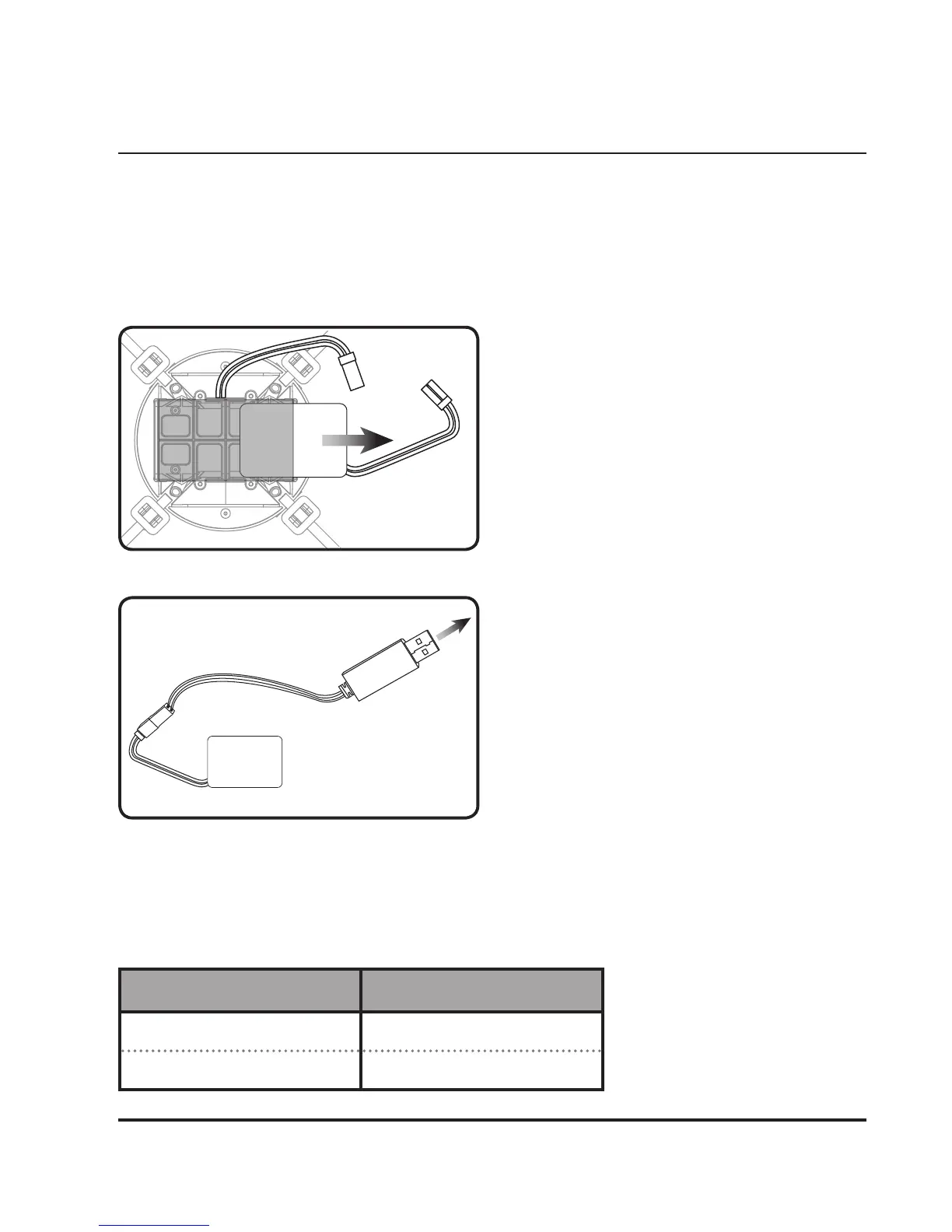
Step 1
To charge the battery, disconnect the
plugs between the battery and the
receiver board on the underside of the
quadcopter, then gently slide the battery
out of its tray.
Be sure to pull on the connector plugs
only, pulling on the wires may result in
damage to the plugs or wires.
Step 2
Connect the battery plug to the matching
plug on the included USB charger, then
connect the USB charger to a USB power
source, such as a powered on computer
or USB power adapter (recommended,
not included).
The red light in the plug of the USB
charging cable will indicate battery
charge status (see table below).
When the battery is fully charged, re-
install the battery in its tray and connect
the plug to the receiver board.
Charging Procedure
LIGHT STATUS
Red Light ON Battery charging
Red Light OFF Battery fully charged
Charging Status


 To Next Page