- 5 -- 4 -
Battery Instructions
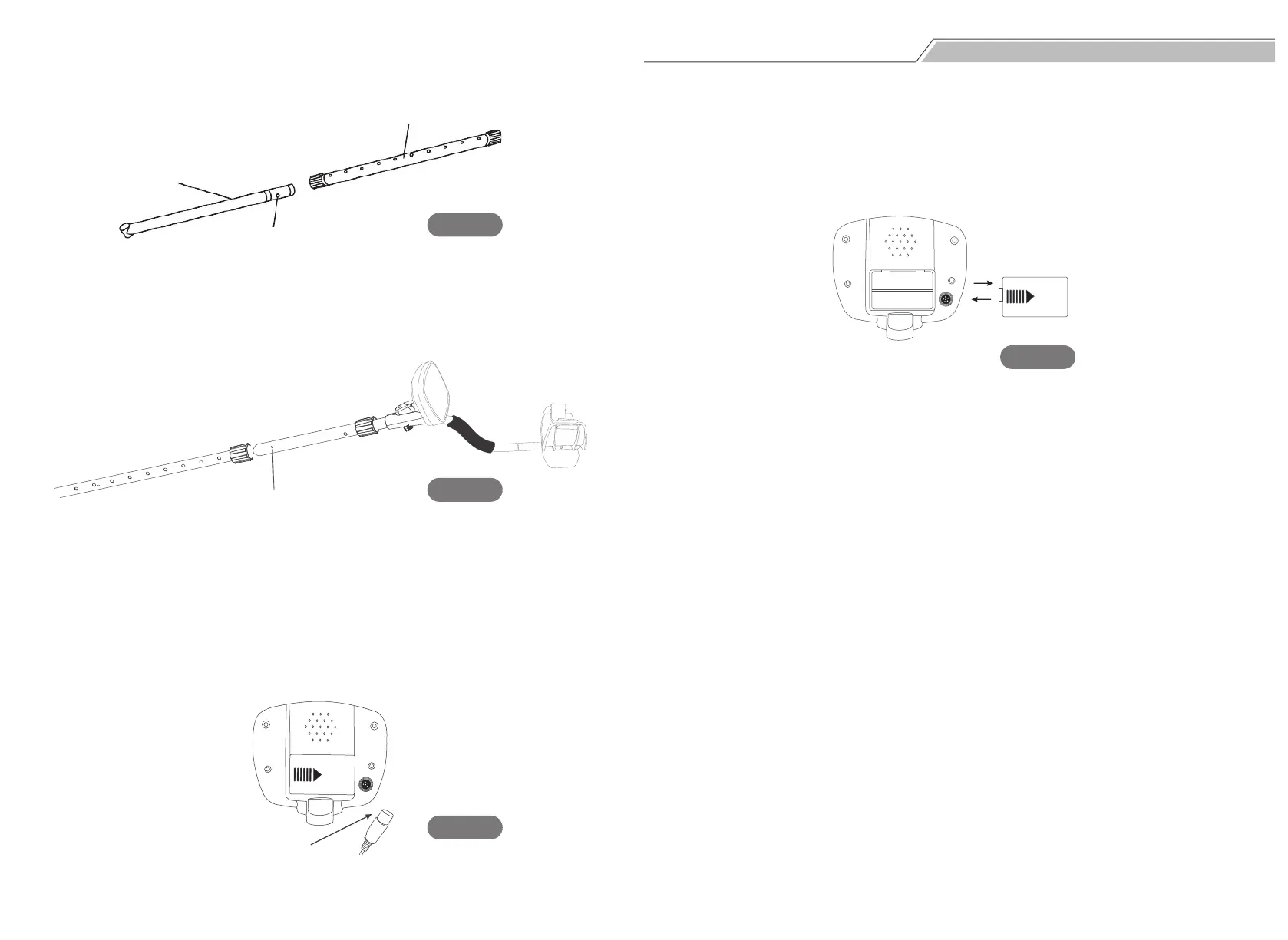
Step 2. Loosen the lock nut on the middle stem, and press the silver button on
the lower stem. Then insert the lower stem into the middle stem (see Fig. 3).
Step 3. Loosen the lock nut on the other end of the middle stem. Press the
silver button on the upper stem, and insert the upper stem into the other end
of the middle stem (see Fig. 4).
Step 4. Adjust the length that the lower stem inserts into the middle stem. Also,
you can adjust the total length of the stem, making you feel comfortable with
your arm straight.
Step 5. Wind the cable of the search coil around the stem with moderate
tightness, rather than make it sway. Plug the cable into the lower left part of
the control panel (see Fig. 5). Please note that do not pull the cable or plug.
Please use two 9V alkaline batteries.
Uncover the battery case and install the batteries according to the polarity sign
in the battery case. If you are not going to use the detector for a long time,
please remove the batteries from the battery case.(see Fig.6)
Plug
Fig. 3
Fig. 4
Fig. 5
Fig. 6
Middle Stem
Lower Stem
Silver Button
Silver Button


 To Next Page