EasyManua.ls Logo

Skyrc NC2500 Pro - User Manual

Skyrc NC2500 Pro
24 pages
Print Icon
To Next Page IconTo Next Page
Loading...
AA/AAA NiMH/NiCD Charger & Analyzer
Instruction Manual
Question and Answer IconNeed help?

Do you have a question about the Skyrc NC2500 Pro and is the answer not in the manual?

Summary

Product Introduction

Meet SkyRC NC2500 Pro

Introduces the charger, its design, and key external components.

Safety and Features

Important Safety Precautions

Essential warnings and guidelines for safe operation to prevent hazards.

Key Product Features

Highlights the main functionalities, including modes, independent slots, and adjustable current.

Technical Specifications

Charge and Motor Run-In Specs

Details input, battery types, rates, cut-off voltages, and motor run-in parameters.

Advanced Charging Features

Automatic Current Adjustment

Explains how the charger adjusts current based on battery internal resistance for optimal charging.

Battery Knowledge

Capacity, C Rating, and Matching

Information on mAh, 'C' rating, and best practices for battery matching.

Operating Modes

Four Working Modes Overview

Introduces Charge, Discharge, Refresh, and Break-In modes for battery management.

Charge Mode Operation

Step-by-step guide for charging batteries with parameter settings.

Discharge Mode Operation

Procedures for discharging batteries, including setting current and cut-off voltage.

Refresh Mode Operation

Using the refresh mode to test and improve battery performance.

Break-In Mode Procedure

Steps for breaking in new or deactivated batteries using a specific charge-discharge sequence.

Power and Connectivity

Power On and Battery Insertion

Guides on powering up the charger and correctly inserting batteries.

USB Power Output

Details on the QC3.0 USB port for charging external devices.

Additional Functions

Battery Meter and Motor Run-In

How to use the battery meter and the motor run-in output port.

LED Indicators and Error Messages

Explains LED status lights and common error codes for troubleshooting.

System Settings

Configurable Settings

Configuration for backlight, key sound, units, firmware updates, and language.

Support and Legal

Battery Rescue Procedures

Procedures for rescuing batteries using specific modes.

Liability Exclusion Clause

Disclaimer regarding product use and limitations of liability.

Warranty and Service

Information on product warranty coverage and how to obtain service.

Summary

Product Introduction

Meet SkyRC NC2500 Pro

Introduces the charger, its design, and key external components.

Safety and Features

Important Safety Precautions

Essential warnings and guidelines for safe operation to prevent hazards.

Key Product Features

Highlights the main functionalities, including modes, independent slots, and adjustable current.

Technical Specifications

Charge and Motor Run-In Specs

Details input, battery types, rates, cut-off voltages, and motor run-in parameters.

Advanced Charging Features

Automatic Current Adjustment

Explains how the charger adjusts current based on battery internal resistance for optimal charging.

Battery Knowledge

Capacity, C Rating, and Matching

Information on mAh, 'C' rating, and best practices for battery matching.

Operating Modes

Four Working Modes Overview

Introduces Charge, Discharge, Refresh, and Break-In modes for battery management.

Charge Mode Operation

Step-by-step guide for charging batteries with parameter settings.

Discharge Mode Operation

Procedures for discharging batteries, including setting current and cut-off voltage.

Refresh Mode Operation

Using the refresh mode to test and improve battery performance.

Break-In Mode Procedure

Steps for breaking in new or deactivated batteries using a specific charge-discharge sequence.

Power and Connectivity

Power On and Battery Insertion

Guides on powering up the charger and correctly inserting batteries.

USB Power Output

Details on the QC3.0 USB port for charging external devices.

Additional Functions

Battery Meter and Motor Run-In

How to use the battery meter and the motor run-in output port.

LED Indicators and Error Messages

Explains LED status lights and common error codes for troubleshooting.

System Settings

Configurable Settings

Configuration for backlight, key sound, units, firmware updates, and language.

Support and Legal

Battery Rescue Procedures

Procedures for rescuing batteries using specific modes.

Liability Exclusion Clause

Disclaimer regarding product use and limitations of liability.

Warranty and Service

Information on product warranty coverage and how to obtain service.

Overview

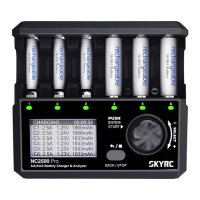
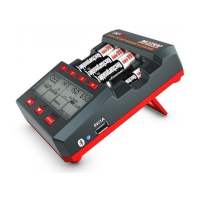
The SkyRC NC2500 Pro is a sophisticated six-channel charger and analyzer designed for AA/AAA NiMH/NiCD batteries. This device offers a comprehensive solution for battery management, allowing users to not only charge their batteries but also to analyze, refresh, and break them in, ensuring optimal performance and extended lifespan. Its intuitive design, featuring a wide-viewing LCD screen and a rotary dial, makes operation straightforward, providing essential battery information at a glance.

Function Description

The primary function of the NC2500 Pro is to charge AA/AAA NiMH/NiCD batteries across six independent slots simultaneously. Beyond simple charging, it acts as a battery analyzer, offering four distinct working modes: Charge, Discharge, Refresh, and Break-In. Each mode serves a specific purpose in maintaining and optimizing battery health.

The Charge mode is for regular recharging of batteries that are in good condition and continuous use. Users can set programmable charge rates, delta peak values, and timers to prevent overcharging. An innovative "Step Charge" mode, when enabled, allows for multi-stage charging, which can further prolong battery life by tailoring the charging process to the battery's capacity. The charger also incorporates an automatic current adjustment feature based on detected internal resistance, which helps reduce heat generation and protect the battery during charging.

The Discharge mode is used to fully discharge batteries at a programmable rate. This is useful for conditioning batteries and preparing them for subsequent charging or storage. Users can set a specific cut-off voltage to ensure safe and effective discharge.

The Refresh mode is designed to determine the actual capacity of a battery by performing a charge-discharge-charge cycle. This mode is particularly useful for batteries that have been stored for two weeks to three months or for those that are not performing optimally. By cycling the battery, the NC2500 Pro can help restore its performance and accurately assess its true capacity.

The Break-In mode is a specialized function for new batteries or batteries that have been stored for more than three months and have become chemically deactivated. This mode involves a specific charge-discharge-charge sequence at small rates over an extended period (typically 39-45 hours). This process helps activate the battery and can rescue batteries that the Refresh mode cannot improve.

In addition to battery management, the NC2500 Pro features a Motor Run-In mode. This allows users to connect a motor to the dedicated output port and set parameters such as voltage, current limiting, direction (auto/forward/reverse), and time for motor break-in. This function can be run simultaneously with the main battery charging/discharging processes.

The device also includes a Battery Meter function, which allows users to check the battery voltage and internal resistance of inserted batteries, providing quick insights into their condition.

Usage Features

The NC2500 Pro is designed for ease of use with several features that enhance the user experience:

  • Six Independent Slots: The charger can handle up to six AA or AAA batteries simultaneously, with each slot operating independently. This means different batteries can be in different stages of charging or analysis without affecting each other.
  • Wide-Viewing LCD Screen: The LCD screen provides clear and comprehensive information, displaying current, capacity, voltage, elapsed time, and the active working mode for each slot. This allows users to monitor the status of their batteries at a glance.
  • Rotary Dial and Push Buttons: Navigation and parameter setting are made easy with a rotary dial and "ENTER/START" and "BACK/STOP" buttons. This intuitive interface simplifies the selection of modes and adjustment of settings.
  • LED Indicators: Each slot has an LED indicator that provides visual feedback on the battery's status. A solid orange light indicates a battery is inserted and in good contact, pulsing green signifies charging, pulsing red indicates discharging, solid green means the process is complete, and blinking red signals an error.
  • USB QC3.0 Output: The NC2500 Pro includes a USB QC3.0 port, allowing it to function as a fast charger for other compatible devices. Users can view the output voltage, current, power, charging capacity, and time through the USB POWER interface. This feature is available during battery discharging or when the main charging process is not active.
  • Reverse Polarity Prevention: The charger is equipped with a safety mechanism to prevent damage from incorrect battery insertion, ensuring user safety and device longevity.
  • System Settings: Users can customize various settings such as backlight time, key sound (on/off), temperature unit (°C/°F), and language (English/Japanese). There's also an option to load factory settings and view system information (hardware/firmware version).
  • Automatic Current Adjustment: The charger intelligently adjusts the charging current based on the battery's internal resistance. If high internal resistance is detected, the current is automatically reduced to prevent overheating and protect the battery.

Maintenance Features

While the manual primarily focuses on operational features, several aspects contribute to the device's maintenance and longevity:

  • Firmware Upgradable: The NC2500 Pro's firmware can be upgraded, allowing for future enhancements, bug fixes, and compatibility updates, ensuring the device remains current and functional over time.
  • Over Temperature Protection: The charger incorporates an over-temperature protection mechanism. If the internal temperature exceeds a set value (adjustable between 55-65°C / 131-149°F), the working current will automatically decrease to reduce heat generation. If the temperature continues to rise, the process will terminate, protecting both the charger and the batteries.
  • Battery Rescue Steps: The manual provides a clear guide for rescuing batteries that are not performing well, suggesting the use of Refresh mode one to three times, followed by Break-In mode if capacity remains low. This systematic approach helps users attempt to restore battery performance before deeming them irreparable.
  • Regular Cleaning: Although not explicitly detailed as a maintenance feature, the design with anti-skid pads suggests a stable operation environment, and general good practice would involve keeping the slots and contacts clean to ensure optimal connection and performance.
  • Use of Standard AC Adaptor: The instruction emphasizes using the standard AC adaptor included in the package, which is crucial for maintaining the device's electrical integrity and preventing damage from incompatible power sources.
  • Proper Storage: The manual advises removing all batteries when the charger is not in use, which is a good practice for preventing potential battery leakage or discharge and prolonging the life of both the batteries and the charger.

In summary, the SkyRC NC2500 Pro is a versatile and intelligent battery management system that goes beyond basic charging. Its array of working modes, user-friendly interface, and built-in safety and protective features make it an invaluable tool for anyone looking to optimize the performance and extend the lifespan of their AA/AAA NiMH/NiCD batteries.

Skyrc NC2500 Pro Specifications

General IconGeneral
Number of Channels4
DisplayLCD
Operating Temperature0-40°C
ConnectivityUSB
Battery Types SupportedNiMH, NiCd, Li-ion, LiFePO4
Battery Capacity Range0.1-50000mAh
Channels4
Charging ModesStorage
Battery SizeAA, AAA, 18650, 26650
Battery ChemistryNiMH, NiCd, Li-ion, LiFePO4
Current Range0.1-10A
Capacity Range0.1-50000mAh
Internal Resistance Range0 to 999mΩ
Temperature Range0-80°C
Storage Temperature-20°C to 60°C

Related product manuals