EasyManua.ls Logo

Skytech TM-R-AF1TX - User Manual

Skytech TM-R-AF1TX
4 pages
Print Icon
To Next Page IconTo Next Page
Loading...
___________________________________________________________________________________________________________
Rev. 7/10/15 Page 1 of 4
Skytech TM/R-AF1-1
Model: TM/R-AF1-1
INSTALLATION AND OPERATING INSTRUCTIONS
SINGLE-FUNCTION WIRELESS REMOTE CONTROL SYSTEM
FOR OPERATING VALVES WITH ON/OFF LATCHING SOLENOIDS
INTRODUCTION
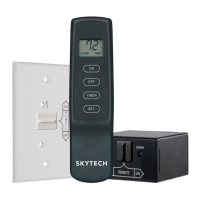
This SKYTECH remote Wireless Wall Timer system was developed to provide safe, reliable, and user-friendly remote control system
for gas heating appliances. The system can be operated manually from the transmitter. The system operates on one of 65,536 security
codes that are programmed into the transmitter at the factory.
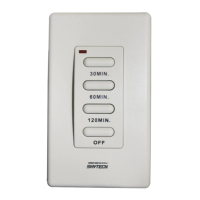
WALL TIMER
The wall timer operates on a (2) 3V button cell batteries (included) made
specifically for remote controls and electronic lighters. Before using the wall
transmitter, install the two (2) 3V button cell batteries. Follow instructions below.
The wall timer has a 30 min, 60 min, 120 min, and OFF buttons. When any of the
buttons on the wall timer is pressed, a signal light on the wall timer illuminates
briefly to verify that a signal has been sent. If the signal light does not illuminate,
check the batteries. Upon initial use, there may be a delay of 5-seconds before
the remote receiver will respond to the wall timer.
TO INSTALL BATTERIES
1. Remove face from backing plate by insetting a small screwdriver into
the small slot at the top or bottom of the faceplate as shown below then
snap OFF.
2. Locate the (2) holders for the 3V button cell batteries.
3. Place the button cell batteries into the battery holders and snap into
place. (Make sure that the batteries are installed with the (+) plus side
as shown to the right.
4. After the batteries are installed replace the faceplate on the base.
TO REMOVE THE BATTERIES
1. Remove face from backing plate by insetting a small screwdriver into
the small slot on the side at the top or bottom of the faceplate as shown
to the right then snap OFF.
2. Locate the (2) holders for the 3V button cell batteries.
3. Insert a small screwdriver into the slot at the button cell battery and pop
the battery out (Slots shown in picture above).
4. After the batteries are installed replace the faceplate.
IF YOU CANNOT READ OR UNDERSTAND THESE INSTALLATION INSTRUCTIONS DO NOT
ATTEMPT TO INSTALL OR OPERATE
www.FireplaceRemoteControls.com
1.888.977.6849
Question and Answer IconNeed help?

Do you have a question about the Skytech TM-R-AF1TX and is the answer not in the manual?

Summary

SKYTECH Wall Timer Operation and Battery Management

Wall Timer Overview and Functionality

Explains the wall timer's buttons, indicator light, and basic operation.

Installing Wall Timer Batteries

Step-by-step instructions for inserting batteries into the wall timer.

Removing Wall Timer Batteries

Instructions on how to safely remove batteries from the wall timer.

SKYTECH Remote Receiver Installation and Safety

Mounting the Wall Timer

Instructions for physically mounting the wall timer on a wall or electrical box.

Remote Receiver Power and Operation Modes

Details receiver power requirements, slide switch positions, and operational modes.

Critical Installation Warning: AC Power

Severe warning against connecting the receiver directly to AC power.

Remote Receiver Placement and Wiring Guidance

Advice on receiver placement, temperature limits, and wire usage.

SKYTECH System Wiring, Learning, and Usage

Connecting Receiver to Gas Valve Solenoid

Detailed steps for wiring the receiver to the gas valve solenoid.

Pairing Transmitter and Receiver (Learning Mode)

Procedure for establishing communication between the transmitter and receiver.

Remote Control System Operation

How the ON/OFF buttons control the gas flow via the solenoid.

Transmitter and Receiver Battery Life

Information on battery longevity and replacement for both components.

SKYTECH Troubleshooting, Specifications, and Support

Troubleshooting Remote System Issues

Steps to diagnose and resolve common problems with the remote control system.

Technical Specifications Overview

Key technical details including battery types, frequency, and FCC IDs.

FCC Compliance and Modification Notice

Disclaimer regarding radio interference and unauthorized modifications.

Technical Service and Sales Contact Information

Contact details for technical support and sales inquiries.

Summary

SKYTECH Wall Timer Operation and Battery Management

Wall Timer Overview and Functionality

Explains the wall timer's buttons, indicator light, and basic operation.

Installing Wall Timer Batteries

Step-by-step instructions for inserting batteries into the wall timer.

Removing Wall Timer Batteries

Instructions on how to safely remove batteries from the wall timer.

SKYTECH Remote Receiver Installation and Safety

Mounting the Wall Timer

Instructions for physically mounting the wall timer on a wall or electrical box.

Remote Receiver Power and Operation Modes

Details receiver power requirements, slide switch positions, and operational modes.

Critical Installation Warning: AC Power

Severe warning against connecting the receiver directly to AC power.

Remote Receiver Placement and Wiring Guidance

Advice on receiver placement, temperature limits, and wire usage.

SKYTECH System Wiring, Learning, and Usage

Connecting Receiver to Gas Valve Solenoid

Detailed steps for wiring the receiver to the gas valve solenoid.

Pairing Transmitter and Receiver (Learning Mode)

Procedure for establishing communication between the transmitter and receiver.

Remote Control System Operation

How the ON/OFF buttons control the gas flow via the solenoid.

Transmitter and Receiver Battery Life

Information on battery longevity and replacement for both components.

SKYTECH Troubleshooting, Specifications, and Support

Troubleshooting Remote System Issues

Steps to diagnose and resolve common problems with the remote control system.

Technical Specifications Overview

Key technical details including battery types, frequency, and FCC IDs.

FCC Compliance and Modification Notice

Disclaimer regarding radio interference and unauthorized modifications.

Technical Service and Sales Contact Information

Contact details for technical support and sales inquiries.

Skytech TM-R-AF1TX Specifications

General IconGeneral
BrandSkytech
ModelTM-R-AF1TX
CategoryRemote Control
LanguageEnglish

Related product manuals