9
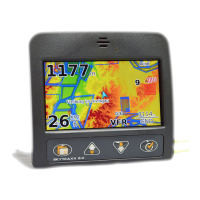
The far-left button ( >menu ) offers the following functions:
> Turn on/off (press and hold for a few seconds each time)
> Menu (press to access the main menu)
> Back (press to move back one menu level)
In some sub-menus, a small rectangle will appear above the >Menu button,
which shows that an additional function is available. To access, press >Menu
until the rectangle becomes shaded in. Additional options will then be available.
Functions offered by the two central buttons ( >up / >down )
> Browse through menu sections/adjust settings
> Change scale in map mode
If small points appear in the top right-hand corner of the screen on menu pages,
the current menu consists of several sub-pages (number of points = number of
pages)
The right-hand button ( >OK ) offers the following functions:
> Confirm selection
> Switch between display pages


 To Next Page
 Loading...