USB CONTROL
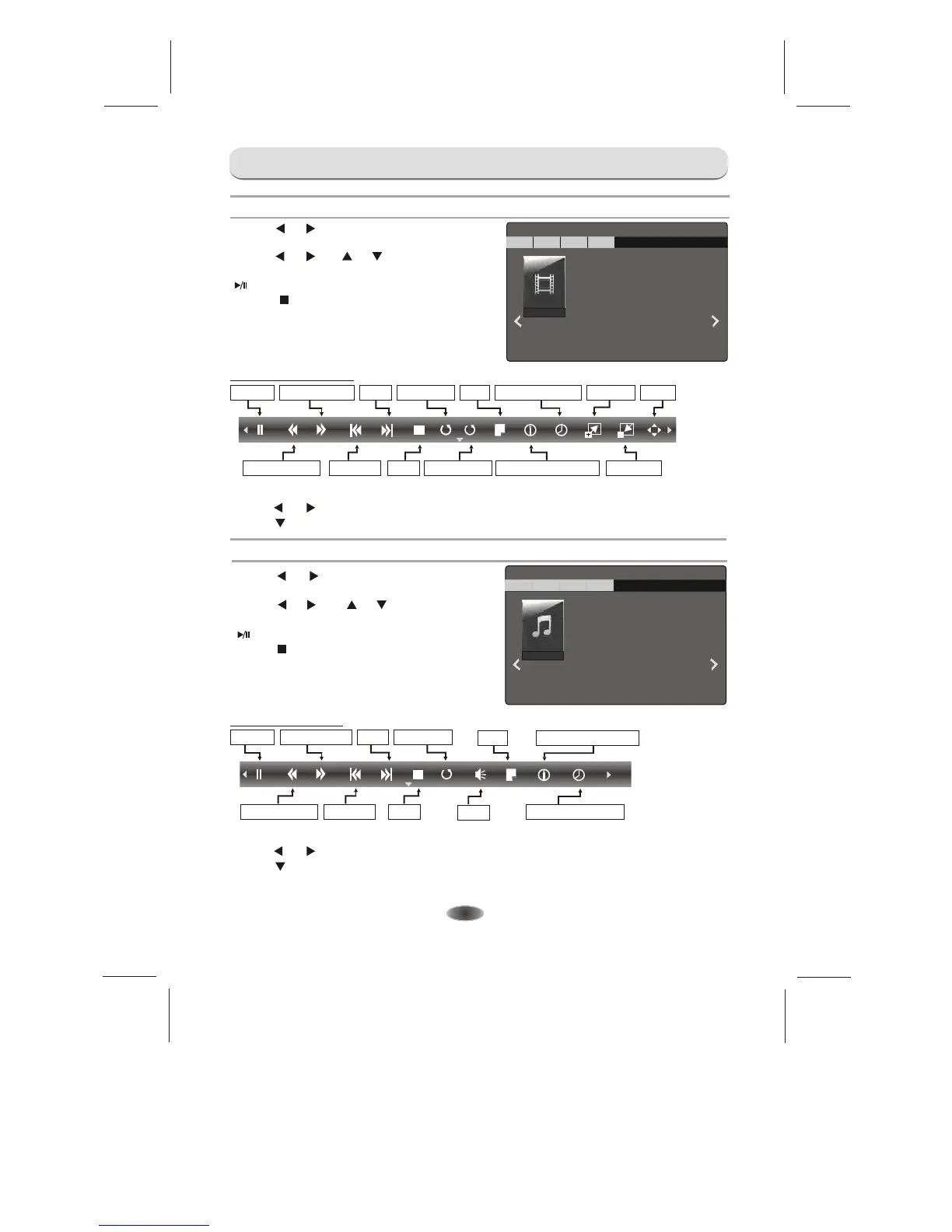
Video Menu
-16-
C: \Video
1/1
VIDEO
MUSIC
PHOTO TEXT
[RETURN] Return
[0] Delete
.flv
1.Press [ ] / [ ] to select VIDEO. Press
[ OK ] to enter.
2.Press [ ] / [ ] or [ ] / [ ] to select the desired
folder and press [ OK ] to open the folder, press
[ ] to start playing.
3.Press [ ] to stop movie playing and return
to video list.
4.Press "RETURN" to the previous menu screens.
Music Menu
C: \Music
1/1
VIDEO
MUSIC
PHOTO
TEXT
[RETURN] Return
[0] Delete
.mp3
1.Press [ ] / [ ] to select MUSIC. Press
[ OK ] to enter.
2.Press [ ] / [ ] or [ ] / [ ] to select the desired
folder and press [ OK ] to open the folder, press
[ ] to start playing.
3.Press [ ] to stop music playing and return
to music list.
4.Press "RETURN" to the previous menu screens.
Video Control Bar
Fast Reverse
Previous
Stop
Zoom In
Zoom Out
- Press [ INFO ] to display Video Control Bar while playing the video.
- Press [ ] / [ ] to select the desired settings.
- Press [ ] to exit from Video Control Bar.
AAAA
A/BA/B
Pause Fast Forward
Next
Play Mode
Repeat Play
LIST
Current Information
Selection Play
--
Move
Music Control Bar
AA
Pause
Fast Forward Next
Play Mode
Fast Reverse
Previous
Stop
LIST
Current Information
Search Time Set
- Press [ INFO ] to display Music Control Bar while playing the music.
- Press [ ] / [ ] to select the desired settings.
- Press [ ] to exit from music Control Bar.
Note:For lyric function to work, the music and lyric files must be named in the same.
Mute


 To Next Page