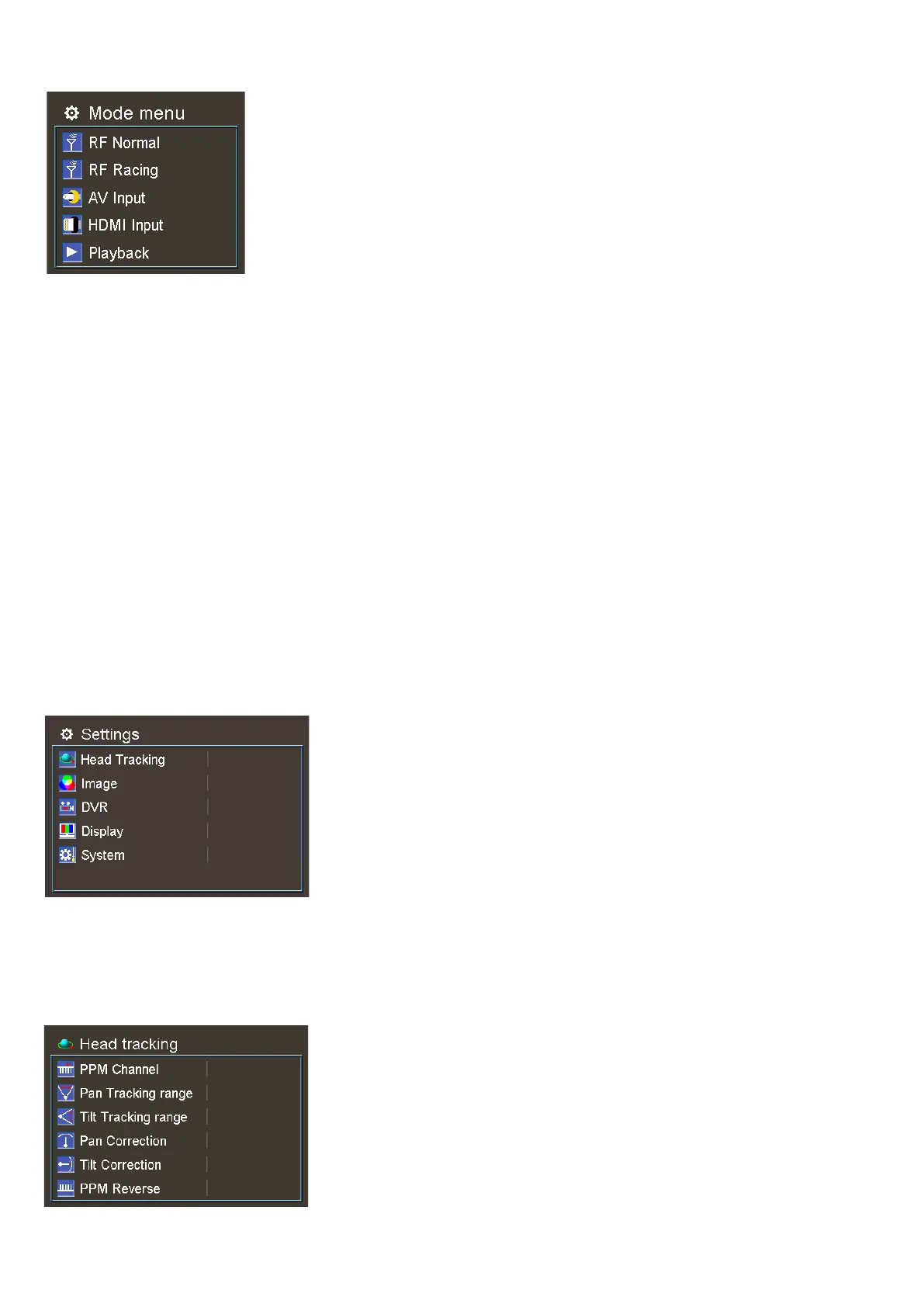
MODE MENU
·Press the Mode to pop up mode menu. press again to quit menu.
·Use CH and BAND button to navigate, Rec button to select.
·RF normal: this mode is normal 48 CH receiver mode.
·RF Racing: this mode will make receiver only work on RaceBand.
·AV Input: When enable the AV IN mode . The NTSC and PAL system format can be supported to be
automatically switched. The receiver module will be automatically turned off to save the power.
·HDMI Input: the receiver module and the video recording module will be automatically turned off to save
the power.
·Playback: in this mode, customer can review the DVR files.
PLAYBACK
· In playback mode, use Band and Channel button to choose files, press Rec button to play and pause .
· When playing the DVR, press Band and Channel button to fast forward or fast backward.
Press the Mode button to quit play mode · .
· Press the Menu button to delete DVR, use Rec button to confirm. .
Settings
Short press Menu button to pop up system menu. press Mode button quit menu.·
Use CH an B to navigate, press the rec to confirm, mode to quit.· d AND
Head Tracking
·The head tracking reset button is menu button, hold menu button to reset the gyro.
·The gyro required for an initialization time. When it is powered on, goggles must be kept horizontal
5


 To Next Page