English – Version 1.2 – January 2021
In order to enable communication with the EVBox car charging station, a communication cable must
be connected between the Smappee Connect or Genius gateway and the charging station. The
required connectors are supplied in the preconfigured Smart Charging kit, or they can be purchased
separately. The cable itself is not supplied by Smappee. It is recommended to use a RS-485 or CAT 5/6
cable.
Install the communication cable along the route from the Connect or Genius unit to
the charging station. Leave enough cable at each end to make the connections.
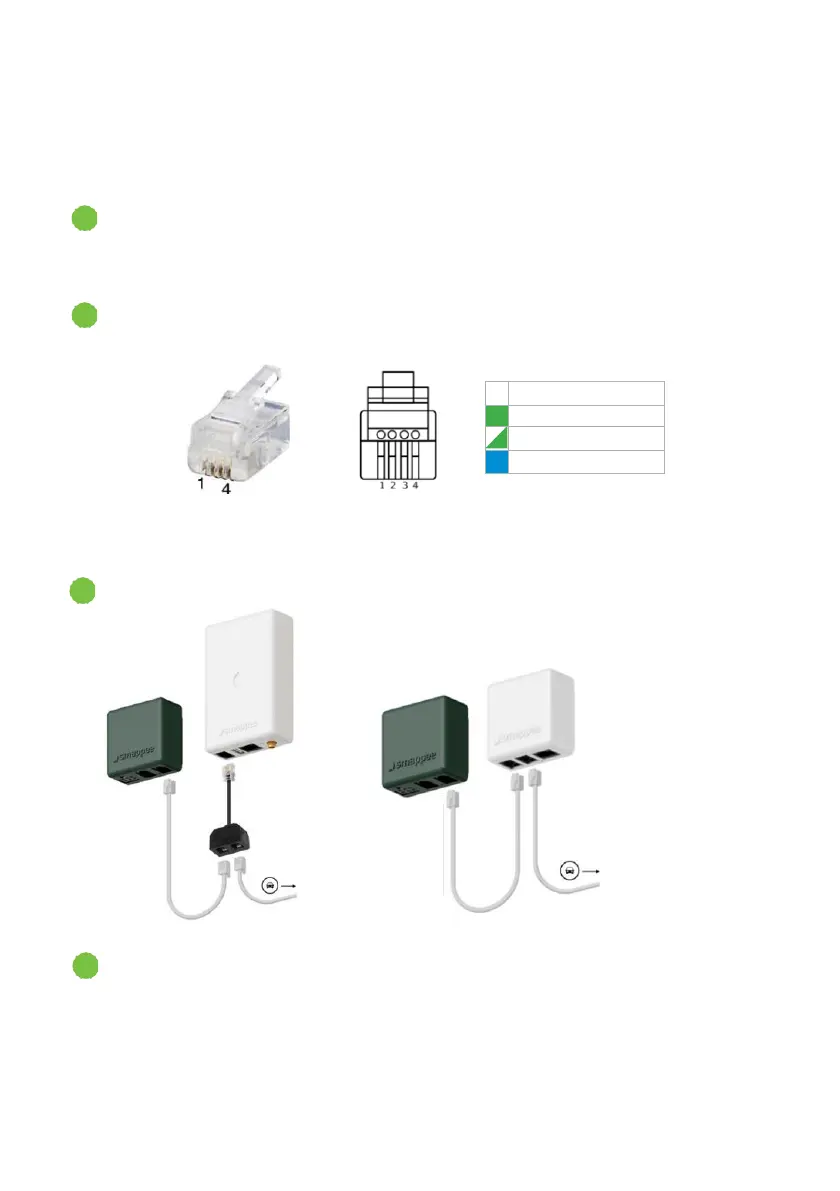
Install the RJ10 connector (supplied) on the Connect or Genius unit end of the network
cable:
Note: The unused wires of the network cable remain unconnected. When a Genius
unit is used, connect the RJ10 Splitter (supplied) to the unit.
Connect the RJ10 connector to the RJ10 Splitter or to the Smappee Connect.
Continue with connecting the network cable to the charging station in the next
section.


 To Next Page