English – Version 1.2 – January 2021
5. Configuration
EVBox Smart Charging is configured using the Smappee Energy Monitor app. This app can be used
from the installer’s or user’s smartphone or tablet.
When the Smart Charging has been configured, the user uses the Smappee Energy Monitor app to
monitor their energy usage.
IMPORTANT: The configuration procedure is different for preconfigured Smart
Charging kits than for Smappee Infinity products which were purchased
separately. If you do not have a preconfigured kit, please skip to ‘Non-
preconfigured Smappee Genius’.
Preconfigured Smart Charging Kits
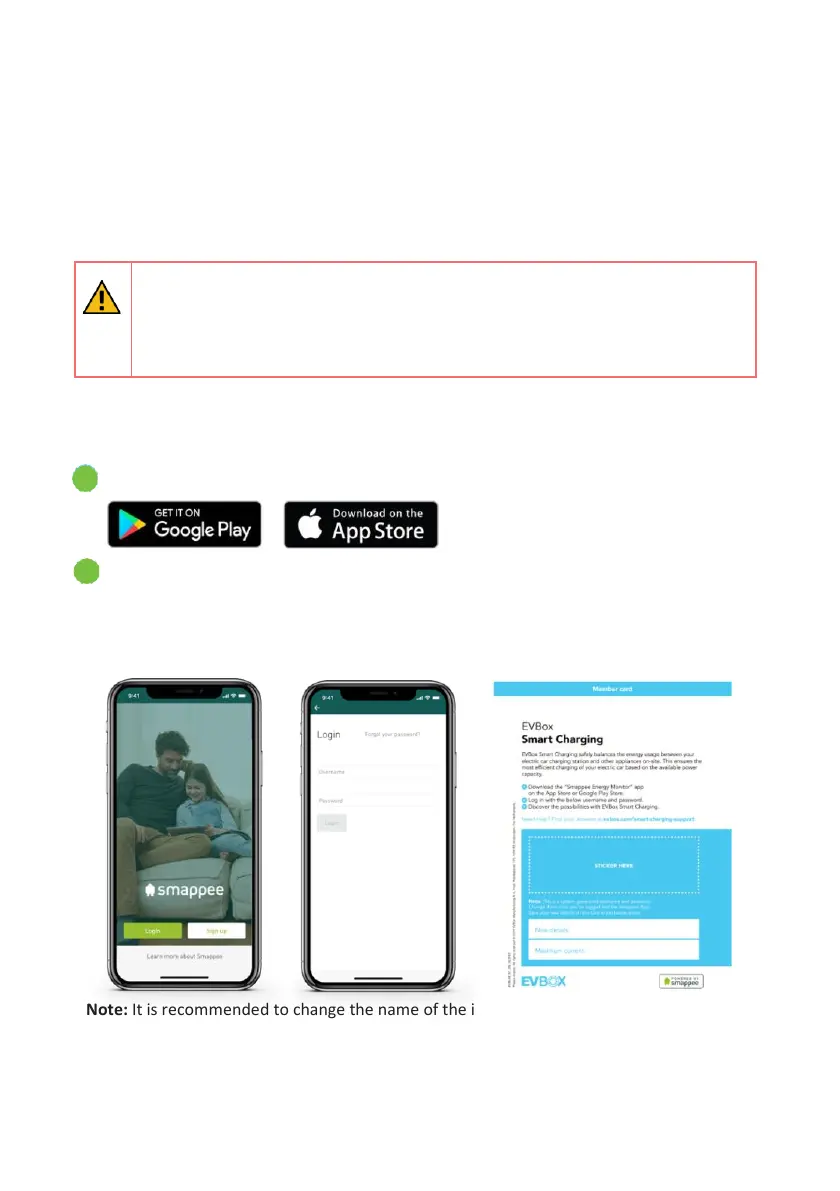
Download the Smappee Energy Monitor app onto your smartphone or tablet.
Log in to the app with your username and password on the member card provided
with the kit.
Note: The username and password are unique to the kit and cannot be used on a
different installation.
Note: It is recommended to change the name of the installation to the customer’s
preference (for example, ‘My EV station’)


 To Next Page