Quick Reference
© 2008 SMART Technologies Inc. SMART Board, Notebook, Bridgit and the SMART logo are trademarks of SMART Technologies Inc. All rights reserved. All other third-party product and company names
may be trademarks of their respective owners. 03/2008.
SMART Board™ Welcome Center for the Microsoft
®
Windows
®
Operating System
Welcome Center is a compact, movable toolbar that contains your most frequently used SMART Board features and
applications. You can also configure this toolbar to include any third-party software.
Opening the Welcome Center
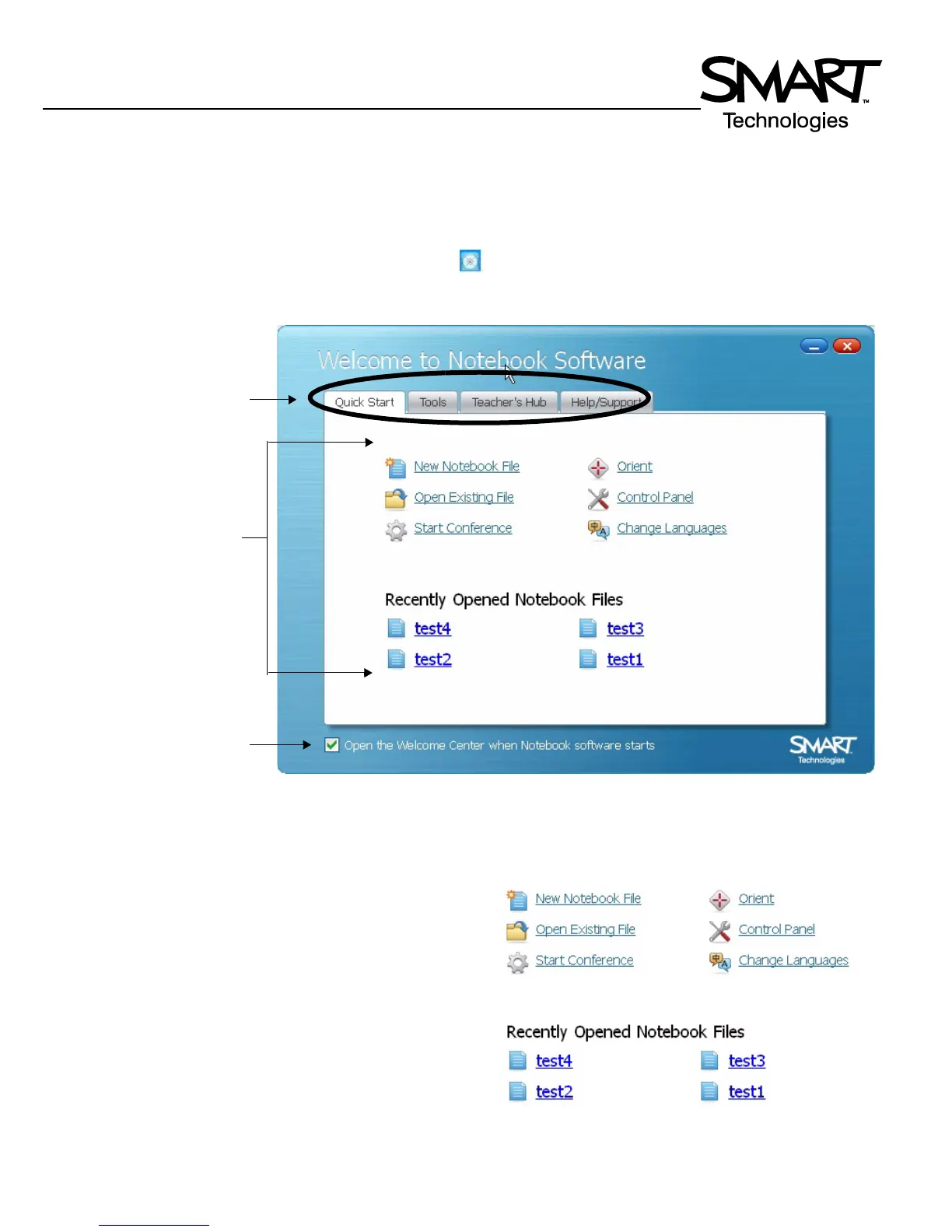
To open the Welcome Center, press the SMART Board icon in the Windows Notification Area at the bottom right of your
screen, and select Welcome to Notebook... from the menu. The Welcome Center provides several tabs, each with options
to launch commonly used applications and tools.
Quick Start
This tab provides options designed to get you up and running
quickly, with the most frequently used actions at your
fingertips.
You can create a new Notebook file, open a previously
created file, start a conference, change languages, orient
your SMART Board, and access the Control Panel to
configure a variety of software and hardware options.
Tabs
Select to have Welcome
Center launched
automatically when
Notebook is started
Action options



 To Next Page