Operating Instructions:
(1) If an Encoder shows “No Signal”, it means that the Encoder cannot
be dragged.
(2) If there is an image on an Encoder, it means that the Encoder can be
dragged. As shown in the figure above, if an Encoder is dragged to
the place where the red arrow points to, all Decoders will share the
same signal resource from this Encoder; if an Encoder is dragged to
the place where the blue arrow points to, only the indicated Decoder
can receive signals from this Encoder.
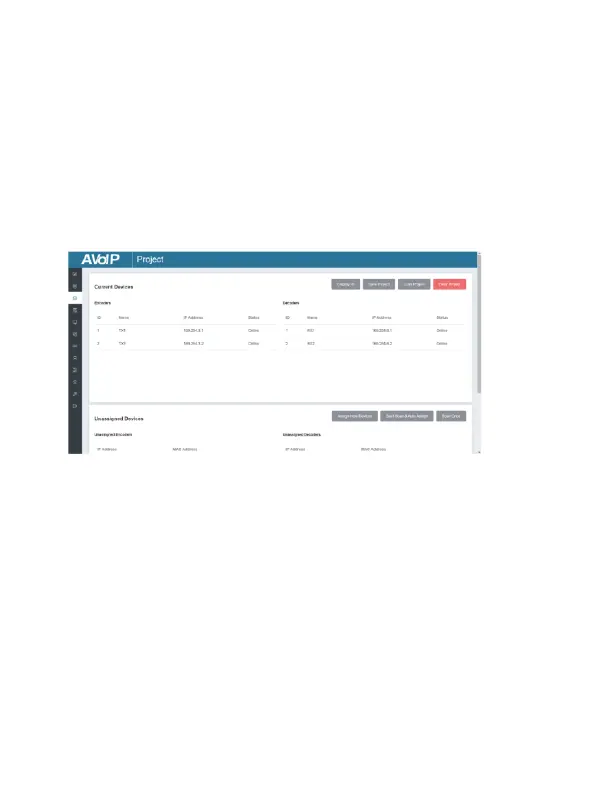
■ Project Page
① Current Devices: Devices that have been added to the current project.
② Unassigned Devices: Devices not added to the current project.
Operating Instructions:
(1) Click “Display ID” to display the ID number of the Decoders.
(2) Click “Save Project” to save the project file (config_file.json), so that
you can use the saved project next time without scanning devices
(3) Click “Load Project” to load the existing project in web page
directly.
(4) Click “Clear Project” to clear the current project, then you will need
to setup devices again.
(5) Click “Start Scan & Auto Assign” to search devices that do not appear
in the current project; Click again to stop searching.


 To Next Page