The Smart-e VHX-7000-H is an H.264/H.265 1080p@60Hz AVoIP Controller designed for controlling and managing IP products within a distributed system. It features dual 100M network ports, enabling dual-network isolation for the control network and multicast video distribution network. The device supports a built-in Web GUI, TCP, and RS-232 control, and offers Power over Ethernet (PoE) functionality for its VIDEO LAN port. It also supports wide-band 12V IR signal receiving and provides GPIO control ports. The VHX-7000-H is built with multiple circuit protections, including lightning and ESD design, ensuring reliable and stable operation for 24/7 use.
Function Description:
The primary function of the VHX-7000-H is to act as a central controller for H.264/H.265 IP-based video and audio distribution systems. It allows users to create, control, and manage projects through its intuitive Web GUI, which supports drag-and-drop operations for easy configuration. The controller facilitates video, audio, RS-232, IR, and KVM control and management of connected encoders and decoders. Its dual network ports enable the separation of control traffic from video multicast traffic, enhancing system performance and reliability. The device supports third-party central control via LAN/RS-232 ports and offers flexible I/O level outputs (5V/12V) through its GPIO ports.
Important Technical Specifications:
- Network Bandwidth: 100M
- Transmission Distance: 100m over CAT 5E/6/6A/7 cable
- Control Ports:
- 2 x 100M LAN (RJ45 connector), with VIDEO LAN supporting PoE.
- 1 x IR IN (3.5mm audio jack, 12V level).
- 1 x DIGITAL I/O (6-pin 3.81mm phoenix connector) for 4 channel I/O level outputs, 1 channel grounding, and 1 channel power supply.
- 1 x RS-232 (3-pin 3.81mm phoenix connector) for serial communication or MCU software upgrade.
- Dimensions: 204mm (W) × 98mm (D) × 21mm (H)
- Housing: Metal Enclosure, Black
- Weight: 509g
- Power Supply: 12V/1A (Note: Not required if PoE is enabled on the VIDEO LAN port)
- Power Consumption: 4.5W
- Operating Temperature: 0°C ~ 40°C / 32°F ~ 104°F
- Storage Temperature: -20°C ~ 60°C / -4°F ~ 140°F
- Relative Humidity: 20~90% RH (non-condensing)
Usage Features:
- Web GUI Control: Access the controller via a web browser using its default IP address (192.168.0.225) or URL (http://controller.local). The GUI provides a user-friendly interface for system setup and management.
- Project Management:
- Automatic Device Discovery: Automatically scans and adds discovered encoders and decoders to the project.
- Manual Device Assignment: Allows for manual assignment of unregistered encoders and decoders to the project.
- Save/Load Project: Save current project configurations to a file (config_file.json) and load existing projects.
- Clear Project: Clears the current project, requiring devices to be set up again.
- Matrix Control: Drag and drop encoders to decoders to route signals. Dragging an encoder to the red arrow applies the signal to all decoders, while dragging to the blue arrow applies it to a specific decoder.
- Encoder/Decoder Settings:
- Name and ID: Customize device names and IDs.
- EDID Management: Set EDID for encoders.
- Audio Selection: Configure audio output for encoders.
- Video Output/Mute/Pause/Auto On: Control video output settings for decoders.
- Scaler Resolution: Select resolution for decoders.
- Network Routing: Configure multicast settings.
- Rotation: Adjust video rotation for decoders.
- Front Panel Control: Enable/disable front panel buttons and IR for decoders.
- Power LED Flash: Configure front panel power LED behavior.
- Reboot/Replace/Remove/Factory Reset: Perform maintenance actions on individual devices.
- Locked Signal Routing: Independently route video/audio, IR, serial, and USB signals between encoder and decoder devices.
- Video Wall Management:
- Create Video Walls: Supports creation of up to 9 video walls with customizable ID, name, horizontal, and vertical panel numbers (1x2 up to 9x9 layouts).
- Assign Decoders: Assign specific decoders to video wall screens.
- Class Configuration: Configure regular or irregular video walls by assigning decoders to different classes.
- Video Wall Control: Preview video walls and change signal sources by dragging encoders.
- Delete Video Walls: Remove existing video walls.
- User Management: Create new user accounts with custom control privileges, limiting access to specific inputs and outputs.
- Controller Settings: Configure general settings (IR control, Telnet, SSH, RS232 Baud Rate), control network (DHCP, IP address, subnet mask, gateway), and video network (IP address, subnet mask, gateway).
- Firmware Update: Update firmware for individual encoders/decoders, all encoders/decoders simultaneously, or the controller itself.
- Password Update: Change the login password for the Web GUI.
Maintenance Features:
- Reset Button: A front panel button to reset the controller by pressing and holding for approximately 10 seconds until the Status LED flashes.
- Firmware Updates: The Web GUI provides a dedicated page for updating firmware for the controller, encoders, and decoders, ensuring the system stays current with the latest features and bug fixes.
- Factory Default Reset: Option to reset individual encoders and decoders, or the entire controller, to factory default settings.
- System Status Indicators: Front panel LEDs (POWER, STATUS) provide visual feedback on the device's operational status. The POWER LED indicates power, and the STATUS LED flashes during boot-up and becomes solid when the Control LAN is ready.
- Surge Protection: The manual strongly recommends using surge protection devices to protect sensitive electrical components from spikes, surges, electric shock, and lightning strikes, thereby extending the equipment's lifespan.
- Rack Mounting: Supports both 6U rack mounting (up to 10 units vertically) and 1U rack mounting (up to 4 units horizontally) with included mounting ears and screws, allowing for organized installation in server racks.

 Need help?
 General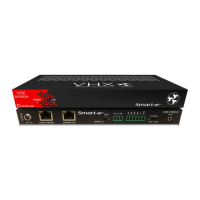

 To Next Page