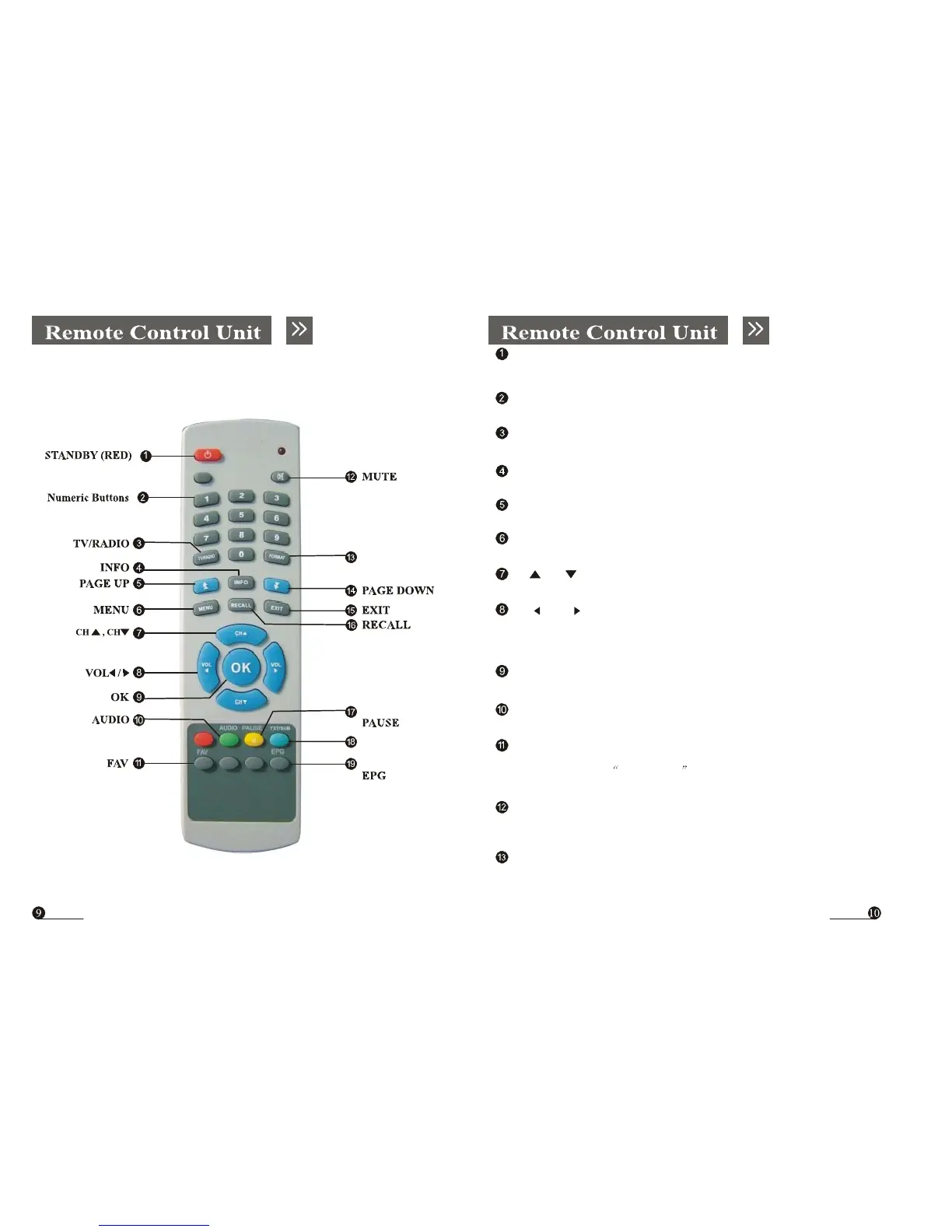
STANDBY (RED)
Switches between Operation and Standby modes.
Numeric Buttons
Changes channels or selects the menu options.
TV/RADIO
Switches between TV and Radio modes.
INFO
Displays the program information box on the screen.
PAGE UP
Press to jump one page up or change EPG program list up
FORMAT
MENU
Moves to main menu during TV viewing.
CH ,CH
Changes channels or items from top to bottom on the menu.
VOL ,
VOL
Turns up/down volume.
Changes the page of channel list.
OK
Displays the channel list and selects the item on the menu.
AUDIO
Changes audio mode to left right and stereo.
TXT/SUB
FAV
Selects favorite channel list or current channel list in the view mode In
Edit Channel mode’s Add favorite menu it changes the
right window’s channel list.
MUTE
Turns sound on or off.
FORMAT
To adjust TV
setting.



 To Next Page