Getting started
About your SMART Table 1
How your SMART Table works
2
What’s included with your SMART Table
3
Power cable
3
Installation instructions
3
Warranty information
3
Important information
3
Using your SMART Table with other SMART products
4
This guide is intended forteachers and application developers. It introduces you to SMART Table
software and explains how to use, maintain and troubleshoot your table.
N OTE
For information on setting up your SMART Table collaborative learning center or its accessories,
see the SMART Table 442i textless installation instructions (smarttech.com/kb/170315
) included
with your table.
About your SMART Table
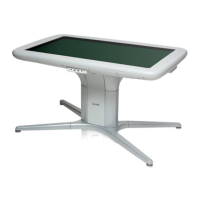
Your SMART Table collaborative learning center has a
touch-sensitive surface. By touching the surface, students can
create, select, move and resize digital objects. More than one
student can touch the surface at a time. This encourages
collaboration and cooperation as students learn and play together.
Using a Wi-Fi® network connection to a computer with
SMART Sync™ classroom management software, teachers can
observe students’ tabletopactivities from a distance, take control of the table, and capture and print
the tabletop image.
Chapter 1
1


 To Next Page