04
27
COMMISSIONING
4
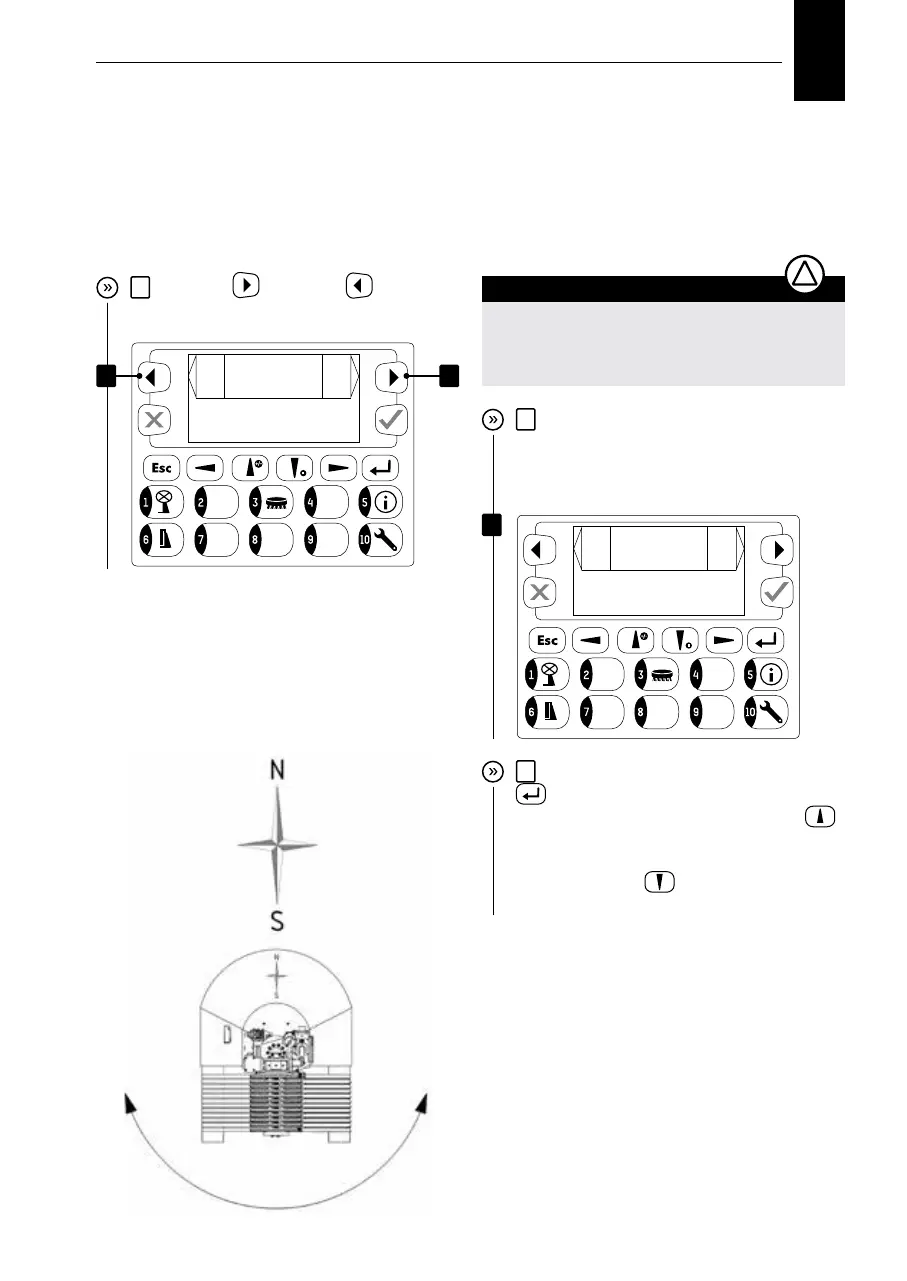
Use ”next”
and ”back” keys to
navigate through individual menu items.
Commissioning, settings
5
In the next screen, you must enter
the correct latitude for optimum sun
tracking. Example: Pinkafeld – latitude
47.374
ATTENTION
The correct input of longitude and latitude
is absolutely essential for the correct sun
tracking.
!
In the oset screen, you can enter a devia-
tion, which is maximum of +/- 30 degrees,
of smartflower from the south alignment.
These deviations must be taken into
account as shown in the figure.
6
Activate the selection using the “confirm”
key and then enter “0”, “4”, “7” using
corresponding keys. Use the “up arrow”
key to enter a decimal point “.”; Then use
corresponding keys to enter “3”, “7”, “4” (use
the “down arrow”
key to enter negative
coordinates)
Set Offset to
Southpol +- 30
ba
ck
Offset
+10
next
4
4
change latitude
ba
ck
degree
047.374
next
5


 To Next Page